19
Advanced Features
4. Channel tuning will commence. This operation may take up to few
minutes. The display will show the progress of the tuning and the
number of channels found.
5. If you want to skip the DTV tuning, press the
button to interrupt the
tuning half way. A pop-up screen will be displayed, press the
button
to select YES to confirm. You will then go straight to ATV tuning. You
may repeat the above step if you also want to skip the ATV tuning.
6. After tuning is complete, the channels are arranged in a preset order. If
you wish to skip channels, modify the preset order or rename channels,
select Channel Edit under the channel menu (refer to page 21 for
details).
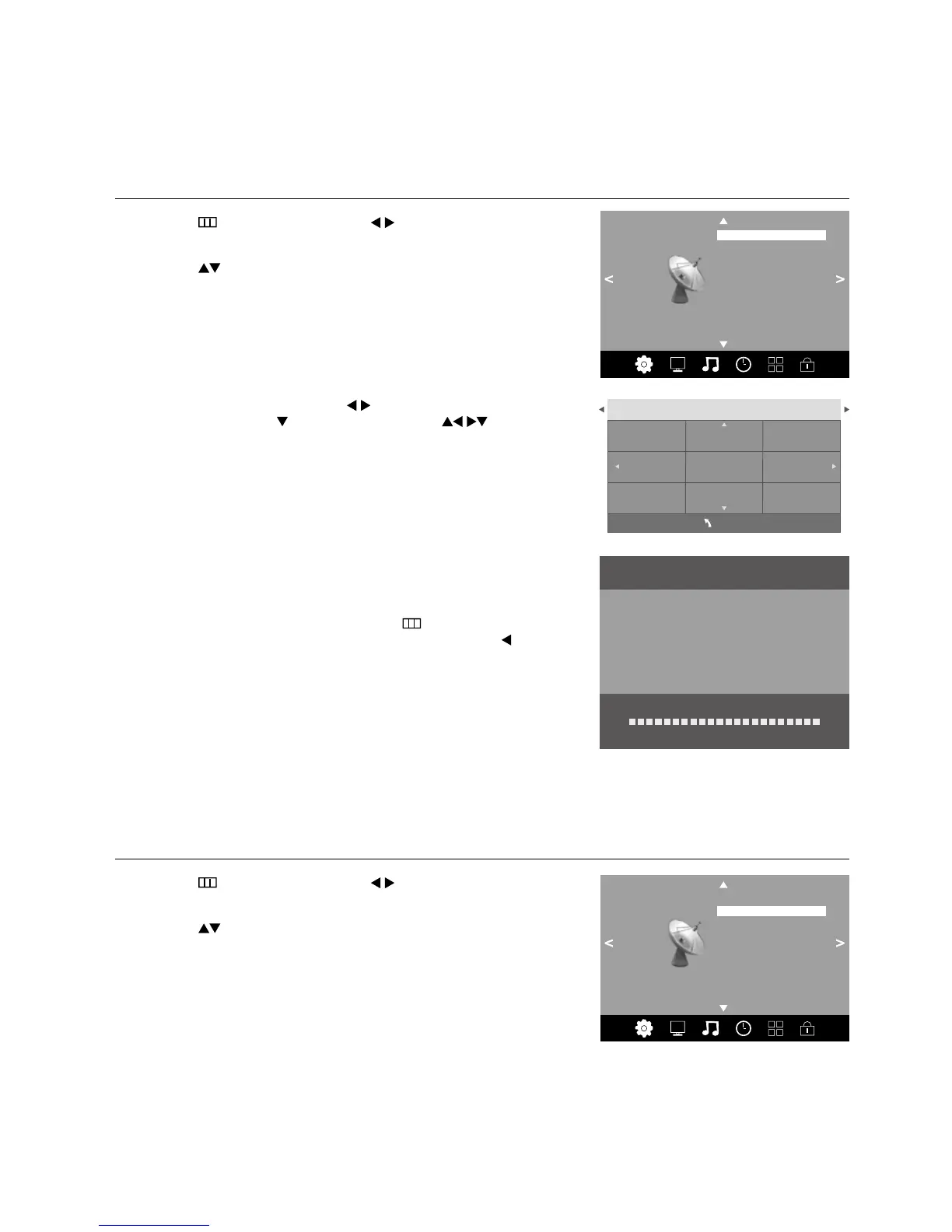
DTV Manual Tuning
Allows you to make manual fine tuning adjustments to the channel under DTV mode.
1. Press the
button and then press the buttons to select the
Channel menu.
2. Press the
buttons to select DTV Manual Tuning and then press
the OK button.
3. In the Tune Type menu, press the
buttons to select DTV+ATV /
DTV / ATV. Press the
button and then press the buttons to
select the country where you will operate the TV. Press the OK button to
confirm.
Channel Setting (TV, DTV or Radio Mode)
Auto Tuning
Use this to automatically find and store all available channels. This is normally recommended if some channels have been
added or removed by the broadcaster or if you have moved.
1. Press the
button and then press the buttons to select the Channel
menu.
2. Press the
buttons to select Auto Tuning and then press the OK
button.
Channel Tuning
DTV : 3 Channel(s)
Radio : 0 Channel(s)
TV : 0 Channel(s)
Data : 0 Channel(s)
36%... VHF CH 21 (DTV)
Channel
Auto Tuning
DTV Manual Tuning
ATV Manual Tuning
Signal Information
Software Update (OAD) Off
OAD Tuning
Software Update (USB)
Channel Edit
Australia
Austria
Belgium
Bulgaria
Croatia Finland
Czech France
Denmark
Tune Type DTV+ATV
MENU
Channel
Auto Tuning
DTV Manual Tuning
ATV Manual Tuning
Signal Information
Software Update (OAD) Off
OAD Tuning
Software Update (USB)
Channel Edit



 To Next Page