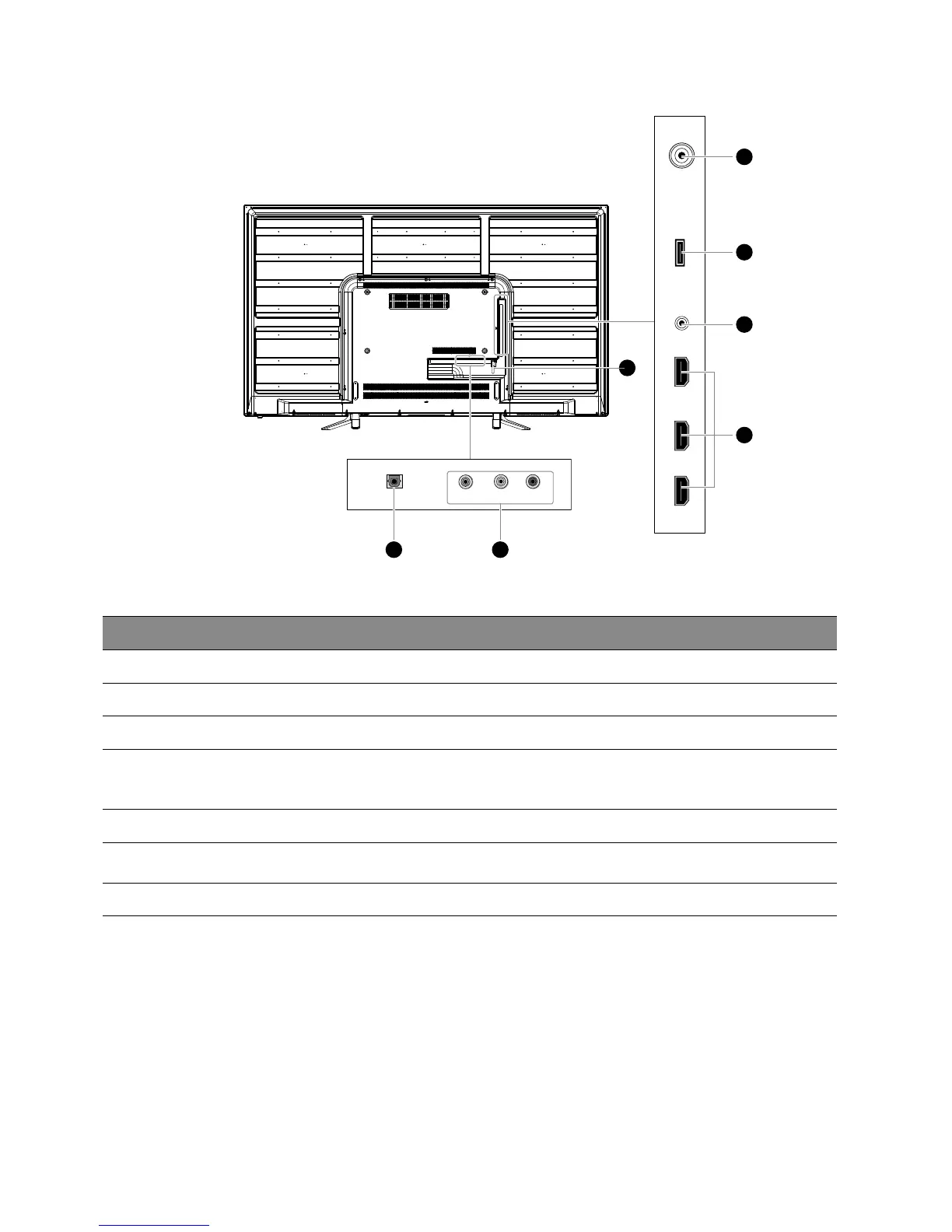
Rear View and Sockets
Item Description
1 OPTICAL Connects to the audio socket on the digital/standard 5.1 audio system.
2 AV IN Connects to the composite output sockets on external video devices.
3 RF Aerial Connects to the aerial socket on the wall with the RF coaxial cable.
4 USB
Allows the insertion of a USB storage device to play video, audio, photo and text files
(USB mode) and record DTV programmes on to a USB storage device.
(Note: This socket do not support 4K source.)
5 HEADPHONE Connects to the headphones.
6 HDMI1(ARC) / HDMI2 /
HDMI3
Connects to a High-Definition (HD) signal output device, such as a set-top box, blu-ray
disc player or AV receiver.
7 Cable Tie Bundle the connecting cables to prevent stepping on them before wall mounting.
HDMI1(ARC) HDMI2 HDMI3 RFHEADPHONE USB
3
4
5
6
RL
VIDEO
OPTICAL
1 2
7



 To Next Page