Connect ID 32-46 - 124 -
Operating instructions
Connecting audio amplifiers
The sound components wizard permits configuration of different
audio amplifiers (stereo amplifiers, surround amplifiers, analogue or
digital) with different digital audio formats (Dolby Digital, dts, MPEG,
and stereo/PCM). See the operating manual of the audio amplifier for
more information.
MENU: Call TV menu.
Select Connections,
go to the menu line below.
Select Sound components.
OK calls the sound components wizard
Select HiFi/AV amplifier or HiFi/AV amplifier or TV
speakers (switchable).
OK Proceed.
Select whether the sound is to be transmitted
digitally or analogue to the the amplifier. Continue,
depending on the amplifier, see right column.
Explanations of the setting possibilities:
➠
Settings for the sound projector: See operating
manual of the sound projector.
Select setting when an amplifier is connected and the
TV speakers are not used.
Select setting when an amplifier is connected and the
TV speakers are used. The sound can be switched
between the amplifier and the TV speakers in the listen
mode selection.
Specify sound formats which can be decoded with the
digital amplifier (see operating manual of the used amplifier).
Select either stereo or surround amplifier.
For every connected surround amplifier, select whether
the TV loudspeakers are to be used as centre speakers.
If yes, establish a connection from the Center port of
the amplifier to the CENTER IN socket on the AUDIO LINK
adapter cable using a cinch cable (see Accessories
page 143).
Attention: Do not use the centre speaker connection of
the amplifier, use the centre pre-amp output instead!
OK
OK
SOUND COMPONENTS
Sound playback via ...
TV speakers
Speaker system
HiFi/AV amplifier ۪
Sound projector
HiFi/AV amplifier or TV speakers (switchable)
Sound projector or TV speakers (switchable)
Proceed
HiFi/AV
amplifier
HiFi/AV
amplifier or TV
speakers
(switchable)
Sound
formats
Type of
amplifier
TV loudsp. as
centre speaker
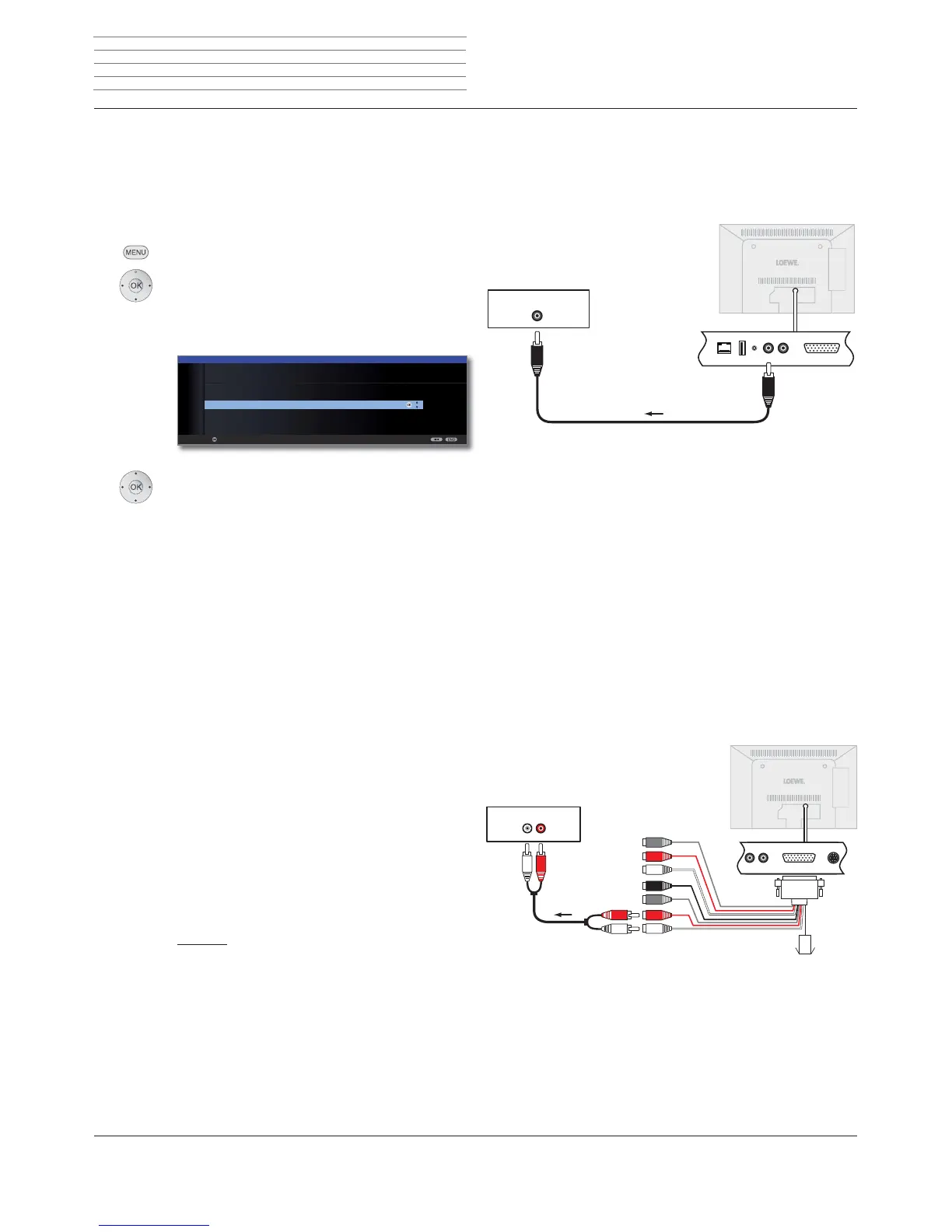
Connecting digital audio amplifiers
Continuation of the left column above ...
For digital audio transmission: Select yes.
Connect the digital audio output of the TV set AUDIO DIGITAL OUT with
the digital audio input of the amplifier via a cinch cable:
Connect digital audio (pre) amplifier via audio return channel (HDMI ARC)
Connect the HDMI1 socket of the TV using an HDMI cable with the
HDMI socket of the ARC-compatible audio (pre) amplifier (e.g.Loewe
MediaVision 3D). It is not necessary to log-in the amplifier separately
with the TV set.
Sound formats, amplifier type and other settings, see explanations of
the setting possibilities (left hand column).
Connecting analogue audio amplifiers
Continuation of the left column above ...
For digital audio transmission: Select no.
Connect the analogue audio output of the TV set to the analogue audio
input of the amplifier with a stereo cinch cable with the AUDIO LINK
adapter cable (see accessories on page 143):
For selecting the amplifier type and making other settings, see explana-
tions of the setting possibilities (left hand column).
External devices
DIGITAL IN
Digital amplifier
TV set
AUDIO
DIGITAL
OUT
AUX IN
R
L
SR
R
SUB
C
L
SL
CENTER
IN
Analogue amplifier
TV set
AUDIO
LINK












 To Next Page