Connect ID 32-46 - 9 -
Operating instructions
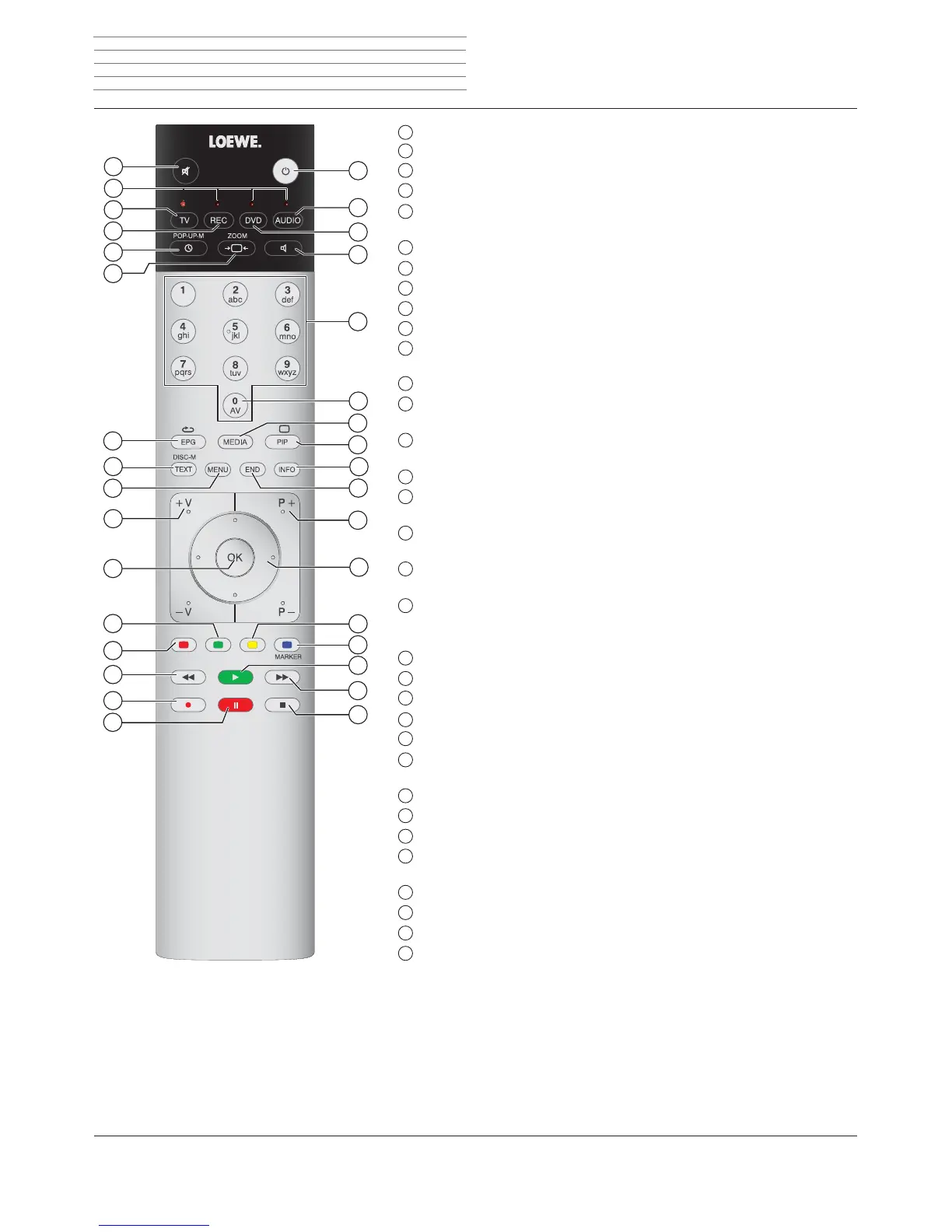
Remote control – TV functions
1
Sound off/on ...........................................................................................................(page 34)
2
LED display for current operating mode ................................................................(page 129)
3
Switch over to TV mode ..................................................................................(page 20; 129)
4
Switch over to operate recorder
(2
.........................................................................(page 129)
5
DR archive/Video archive
(1
on/off ............................................................................(page 99)
Timer list on/off .......................................................................................................(page 95)
6
Set picture format ....................................................................................................(page 37)
7
Electronic Programme Guide on/off ........................................................................(page 52)
8
Teletext/MediaText
(3
on/off................................................................................(page 54; 82)
9
Menu on/off ............................................................................................................(page 12)
10
V+/V– Increase/ reduce volume ...............................................................................(page 34)
11
Station list on ...........................................................................................................(page 32)
in the menu: Confirm/call ........................................................................................(page 12)
12
Green button: Teletext functions .............................................................................(page 40)
13
Red button: Freeze on/off
Start HbbTV or interactive data service
(3
.................................................................(page 82)
14
Select station down .................................................................................................(page 32)
Jump
(1
/ Rewind
(1
............................................................................................(page 91; 100)
15
Direct recording
(1
.....................................................................................................(page 93)
16
Still frame on/off
Interrupt timeshift television
(1
..................................................................................(page 91)
17
Still frame on
End timeshift
(1
.........................................................................................................(page 91)
18
Select station up ......................................................................................................(page 32)
Jump
(1
/ Fast forward
(1
....................................................................................(page 91; 100)
19
Still frame off
Continue timeshift television
(1
.................................................................................(page 91)
Highlights
(1
..............................................................................................................(page 92)
20
Blue button: Programme info on/off .......................................................................(page 40)
21
Yellow button: Switch to the last viewed channel ...................................................(page 40)
22
In the menu / in lists: Select/Set ...............................................................................(page 12)
23
P+/P– Select Station up/down .................................................................................(page 32)
24
Close all displays ......................................................................................................(page 12)
25
Status display on/off ................................................................................................(page 42)
in the menu: context-relevant Info on/off ...............................................................(page 15)
26
PIP on/off (picture in picture) ...................................................................................(page 50)
27
MediaPortal on/off ............................................................................................(page 14; 64)
28
AV selection .............................................................................................................(page 33)
29
Select station directly ...............................................................................................(page 32)
in the menu: Enter numbers or letters
30
Set sound mode ......................................................................................................(page 34)
31
Switch over to operate DVD player
(2
.....................................................................(page 129)
32
Switch over to radio mode
(2
..................................................................... (page 21; 56; 129)
33
Switch on/off to standby mode ...............................................................................(page 21)
The key assignment displayed here is valid for the main menu level of the TV set. The key assignment may vary in certain operating modes (see the corresponding
chapter in this operating manual).
(1
See the Digital Recorder chapter from page 86 onwards.
(2
The assignment of these buttons can be changed (see page 129). The description refers to the standard setting.
(3
Depending on the corresponding settings (see from page
82).
1
2
3
4
5
6
7
8
9
10
11
12
13
14
15
16
32
18
19
20
21
22
23
24
25
26
27
28
29
30
31
33
17












 To Next Page