Connect ID 32-46 - 99 -
Operating instructions
Archive playback
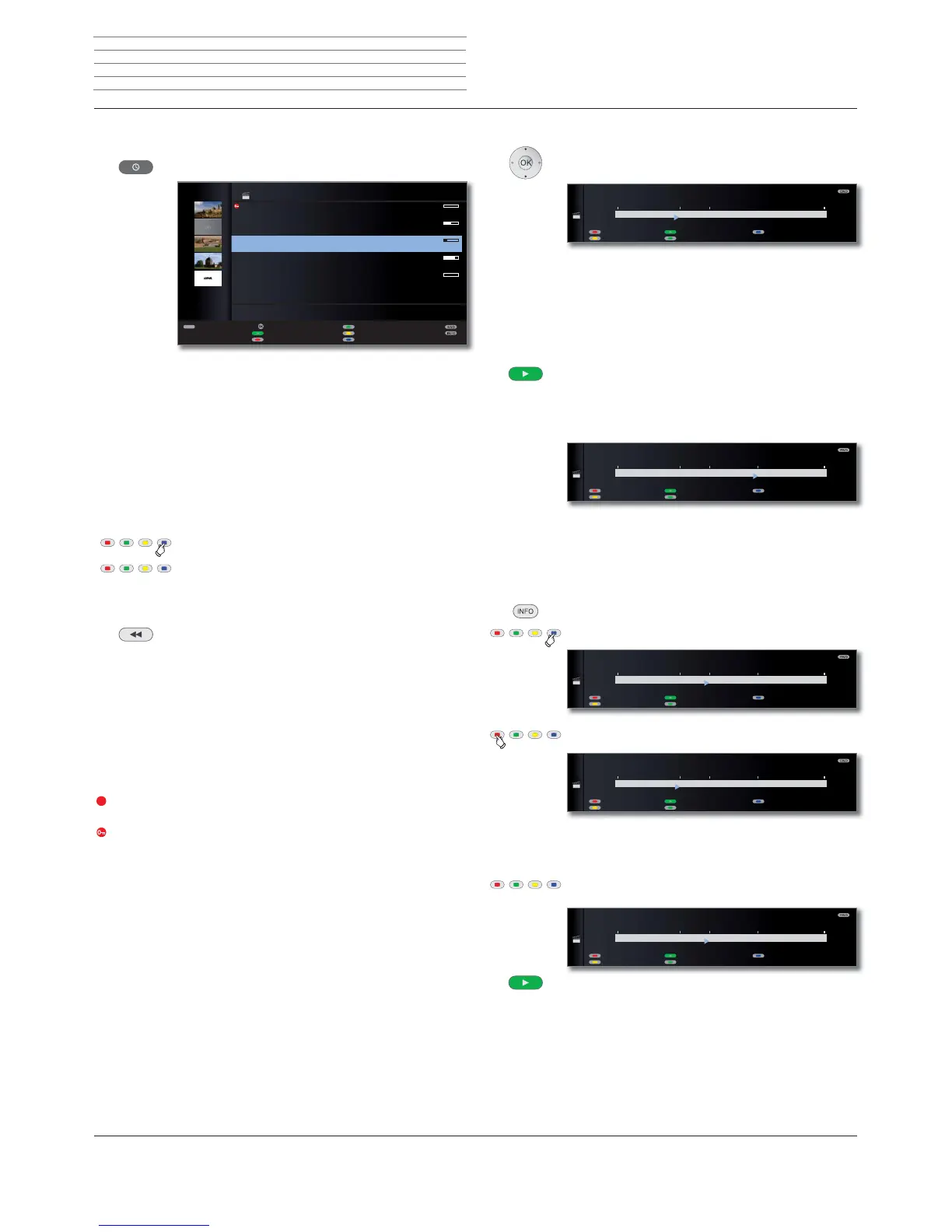
Call DR archive / Video archive.
The remaining free capacity on the storage device is shown at the top
right-hand corner.
➠ The specified free capacity is an estimated value. The exact remain-
ing capacity of the hard disc depends on the broadcasts recorded
in future.
The progress bar shows you how much of the recording has been
watched.
If other programme data is available from EPG or teletext these are
shown below the archive list for the entry just flagged. Other information
about the recording can be called with the TEXT button, if this is offered.
Blue button: Change sorting of the recordings.
Green button: Sort recordings by date.
Yellow button: Sort recordings alphabetically.
Blue button: Sort recordings by station.
Back to overview. The sorting last selected is retained.
Explanations of the symbols in the archive
s Archive entry with active replay (page 102).
ۮ Archive entry with set parental lock (page 105).
ۯ Archive entry with set delete protection (page 106).
ܑ Archive entry with manually set bookmarks (see right column).
۩ Coded archive entry.
v CI Plus coded archive entry.
Archive entry is entered for transferring/copying in the timer overview
(see page 102, Copying recordings to a connected recorder).
Archive entry is entered for descrambling in the timer overview (see
page 103, Descramble scrambled recording).
TEXT
OK
۩
=
{-
Top-Movie 1
15.09. Sky Cinema HD
Bon(n) jour Berlin
14.09. Phoenix
da capo
31.08. Das Erste
Tagesschau
29.07. 3sat
Individual
00.00. LOEWE.
09:45 - 10:00
DR ARCHIVE free capacity 68:42 hrs
Edit/protect
Delete/copy
Change sorting
Detail View
Highlights
Timer list
Playing from the archive
Select the recording.
OK Start playback.
➠ The CA module with Smart Card must be plugged in when playing
recordings which are still coded.
Setting bookmarks
While playing an archive recording, you can set bookmarks.
PLAY button (press for a little longer): Set bookmark.
You will see a screen message. The drive display is then faded in and
you will see the set bookmark above the bar for the playback. You can
set up to 15 bookmarks per recording.
➠ Automatically set bookmarks are white. Manually set
bookmarks are blue.
Jumping to bookmarks
INFO: Show status display.
Blue button: Skip to next bookmark.
Red button: Skip to previous bookmark.
Delete individual bookmarks
Red or blue button: Jump to the manually set bookmark
to be deleted.
Press PLAY button for a little longer: Delete bookmark.
00:00 01:0300:17
%RRNPDUNז
Repeat
Highlights
Language/sound
%RRNPDUNט
$UFKLYH 6WHUHR܃
da capo
00:00 01:0300:42
%RRNPDUNז
Repeat
Highlights
Language/sound
%RRNPDUNט
$UFKLYH 6WHUHR܃
da capo
00:00 01:0300:27
%RRNPDUNז
Repeat
Highlights
Language/sound
%RRNPDUNט
$UFKLYH 6WHUHR܃
da capo
00:00 01:0300:17
%RRNPDUNז
Repeat
Highlights
Language/sound
%RRNPDUNט
$UFKLYH 6WHUHR܃
da capo
00:00 01:0300:27
%RRNPDUNז
Repeat
Highlights
Language/sound
%RRNPDUNט
$UFKLYH 6WHUHR܃
da capo
Digital Recorder












 To Next Page