Connect ID 32-46 - 27 -
Operating instructions
Test reception
Settings
HD station
preferred
Encrypted
stations
Search
method
Symbol rates
Setting options for the satellite system
(other communal installation):
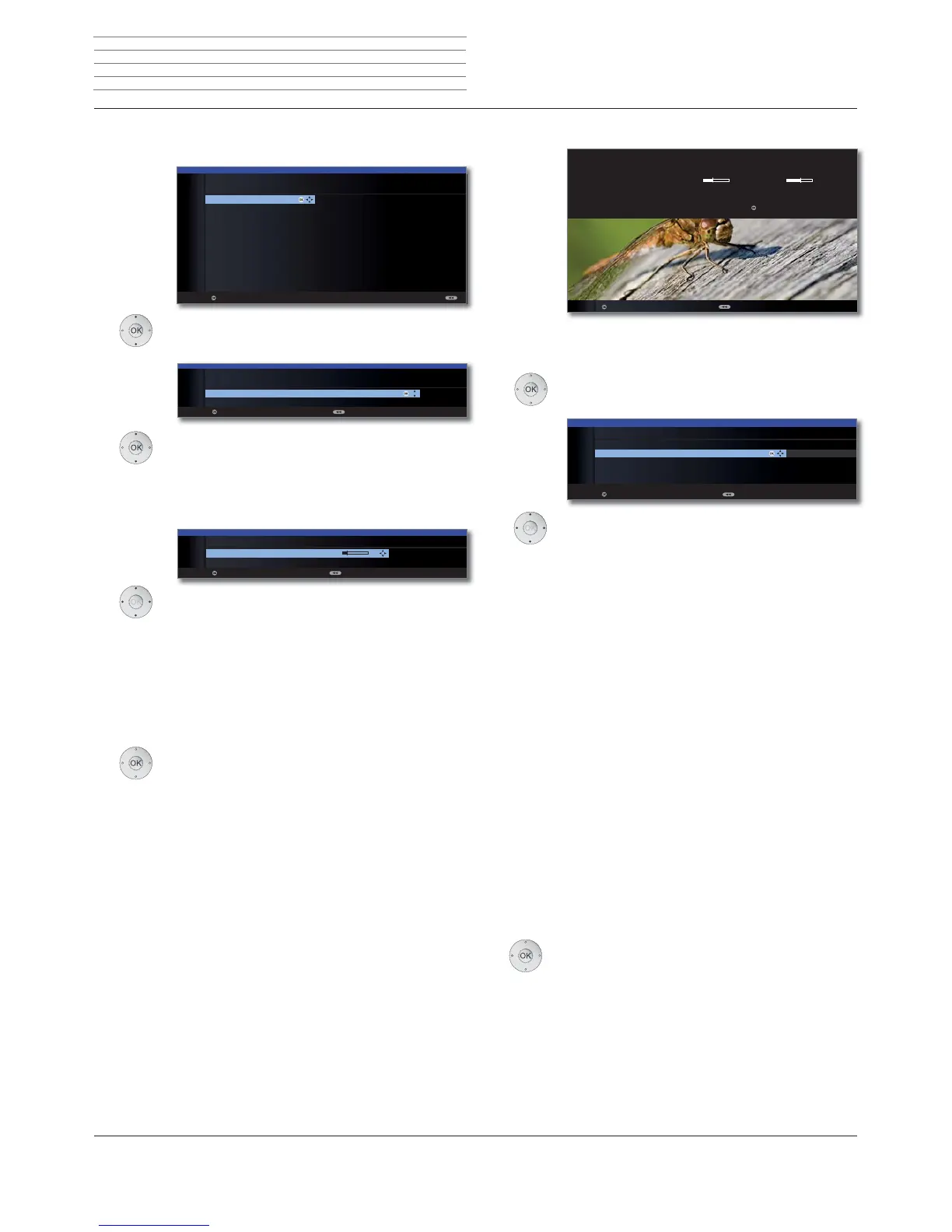
Select satellite,
OK Proceed.
Select network.
If several networks are available over DVB-S, you
can decide which network you want to receive
your channels from.
OK Proceed.
Select and adapt settings.
Normally, you do not need to change the values for high
and low band, unless the LNC (LNB) of your satellite
system uses a different oscillator frequency (important
for the frequency display).
If your set is connected to a single-cable system without
external voltage supply, you can connect the antenna
supply (13V or 18V / max. 500mA).
OK Proceed.
(with Setting options for all types of reception on
page 28).
OK
OK
INITIAL INSTALLATION (DVB-S)
Select single satellite
Astra1 19,2°E Hellas Sat2 39°E
Hot Bird 13°E Hispasat 30°W
Astra2 28,2°E Intelsat10 02 1°W
Astra3 23,5°E Intelsat901 18°W
Atlantic Bird1 12,5 °W Nilesat 7°W
Atlantic Bird2 8°W Pan Am Sat 43°W
Atlantic Bird3 5°W Sirius2/3 5°E
Eurobird1 28,5°E
Telekom2C 5°W
Eurobird 9A 9°E
Telekom2D 8°W
Eutelsat W2 16°E Telestar12 12,5°W
Eutelsat W3A 7°E Thor2/3 0,8°W
Eutelsat W4 36°E Türksat 42°E
Proceed
OK
Proceed Back
INITIAL INSTALLATION
Network selection
other network
CanalDigitaal
OK
OK
INITIAL INSTALLATION (DVB-S)
LNB frequency 9750 MHz
Supply voltage off
Proceed Back
Select single
satellite
Network
selection
LNB
settings
LNC
frequency
Supply voltage
Initial installation
Setting options for DVB-S reception (continued):
After you have made the previous settings, you should
receive picture and sound of the selected satellites (only
possible for Astra1 and HOTBIRD).
OK Proceed.
Select and adapt settings.
If several satellites are received, the following settings
must be made for every satellite. The type of settings
available may differ depending on the selected satellite
or network.
Here you can choose whether high resolution channels
should be prioritised in the channel overview.
➠ The menu item is only available for certain receiving
networks.
You can state whether coded stations are to be searched
for in the search/update.
Select yes to save all found
scrambled stations. However, these stations can only be
received in connection with a CA module and the
appropriate Smart Card.
Handling of the CA module is
described on page 63.
If a CA module with a SmartCard is already plugged in
for the station search, all the stations which this module
can descramble are also saved when no is preset.
If you want to run the station search independently of
the channel grid, select frequency search for the search
method.
The symbol rates are specified by the satellite provider
and do not normally need to be changed.
OK Proceed.
(with Setting options for all types of reception on
page 28).
OK
FIRST INSTALLATION WIZARD
You should now receive a picture and sound from the following satellite:
ASTRA1 19,2°E C/N Level
If not, please align your dish correctly. If however it is correctly aligned and
you have an older version you can proceed with .
Proceed Back
OK
OK
yes
INITIAL INSTALLATION (ASTRA1 19,2°E)
HD station preferred yes
Scrambled stations no
Search method Channel search
Symbol rate 1 (DVB-S) 27500
Symbol rate 2 (DVB-S) 22000
Proceed Back
OK







 To Next Page