Connect ID 32-46 - 96 -
Operating instructions
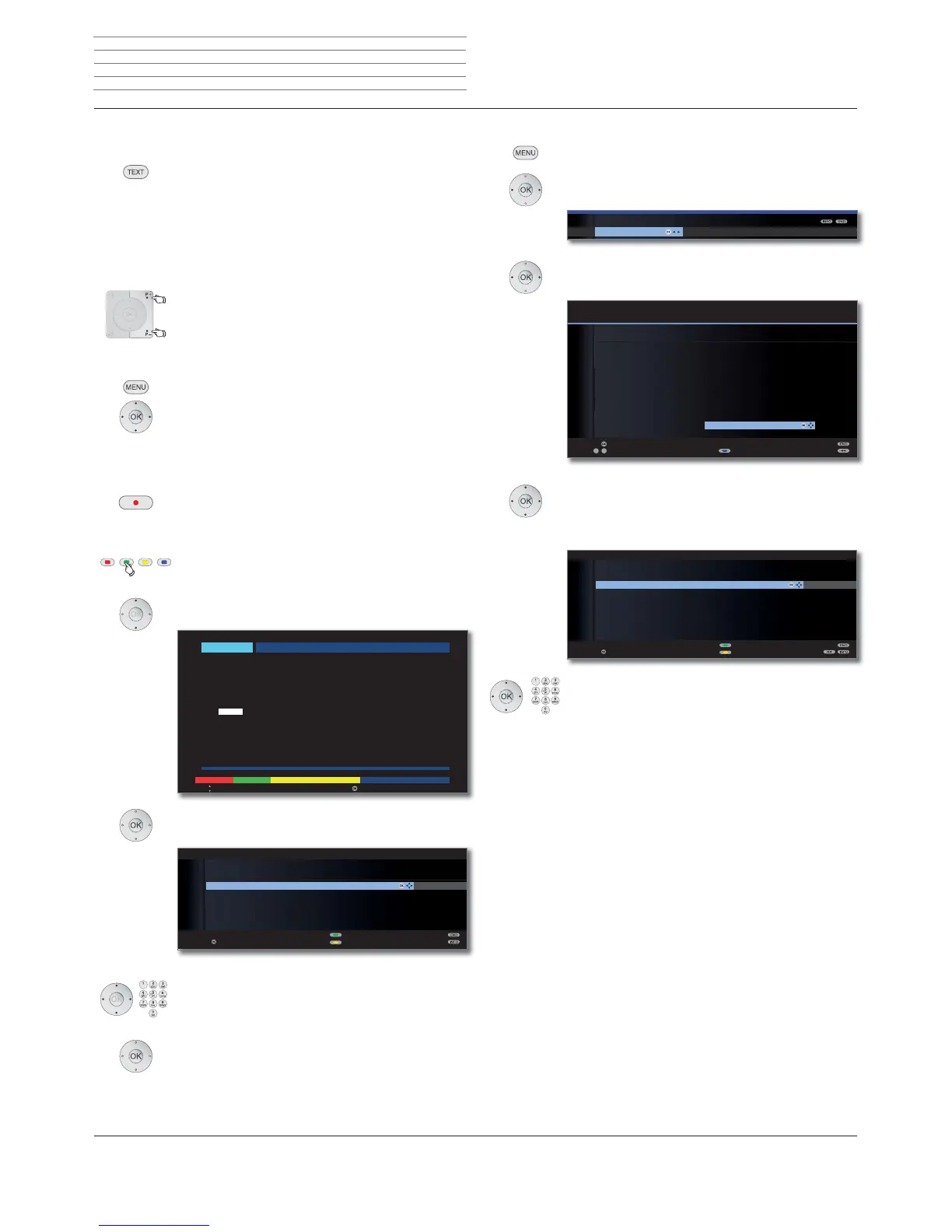
Programming a timer recording via teletext
Call the station on which you want to make a timer recording.
TEXT: Call teletext.
If HbbTV is offered by the channel, then the MediaText/
HbbTV text opens up (see page 82).
In this case, pressing the TEXT button again opens the
“standard” teletext/videotext.
If necessary, select the teletext channel:
P+/P– Select next/previous station.
The TV set switches through all the stations in
the Station list or the current Favourites list one
after another.
Or:
MENU: Call Teletext menu.
Select Station selection,
OK call station.
Select station as in the station list,
OK call station.
RECORD button: Call first programme preview page.
If not possible, define the preview page in the Teletext
menu ט Settings ט Preview pages.
Green button: If applicable, select the Programme Guide
Page, which contains the broadcast you
want to record.
Flag the time at which the broadcast starts.
OK Programme the recording of a broadcast.
Check the timer data and change it if necessary.
Check the recording time and date for broadcasts which
last past midnight or begin the following day. The data
from the teletext may not be complete.
OK Confirm timer data. The broadcast is entered into
the timer overview.
See page 97 for explanations of the setting options
in the Timer data menu.
OK
OK
TIMER DATA
17:15 Brisant
Parental lock
Set delete protection
confirm
AVRecorder DR
Station 21 Das Erste
Date 05.02.2010
Recording time 17:15 until 17:45
Recording type once only
Record subtitles no
OK
300 << Abend > 303
14.00 Tagesschau
14.10 In aller Freundschaft UT . . . . . . . . . . . 316
Zweite Begegnung (D, 2005)
15.00 Tagesschau
15.10 Sturm der Liebe (221) . . . . . . . . . . . . . 317
16.00 Tagesschau UT
16.10 Eisbär, Affe & Co. . . . . . . . . . . . . . . . 318
17.00 Tagesschau um fünf UT
17.15 Brisant . . . . . . . . . . . . . . . . . . . . . . . 319
17.47 Tagesschau
17.55 Verbotene Liebe . . . . . . . . . . . . . . . . 320
18.20 Marienhof . . . . . . . . . . . . . . . . . . . . . 321
18.50 Das Geheimnis meines . . . . . . . . . . . . 322
Vaters (19)
19.20 Das Quiz mit Jörg Pilawa . . . . . . . . . . 384
bis 19.50 Uhr
302 302 ARDtext Fr 05. 02. 10 09: 36 : 42
– +
Jetzt im TV ARD morgen
Fr 05. 02. 10 Das Erste
Select programme Record
Programming a timer recording manually
MENU: Call TV menu.
Select Recording.
OK Call Recording wizard.
Select Manual.
OK Start programming.
Select the station or connection socket to
be recorded.
OK Accept.
The Timer Data menu is displayed.
Check the timer data. Enter the date and recording
time in any case.
OK Confirm. The broadcast is entered into the timer
overview.
OK
RECORDING WIZARD
Manual
etext Via EPG Via Tele
OK
OK
09
-
P+
P–
OK
KUIHUQVHKHQ ۽
3KRHQL[۽
%5DOSKD ۽
VDW ۽
(LQV([WUD ۽
(LQV)HVWLYDO ۽
(LQV3OXV۽
=')GRNXNDQDO ۽
=')WKHDWHUN ۽
DUWH۽
6N\&LQHPD+'۽۩
0'57K¾ULQJ۽
HDMI3
HDMI2
HDMI1
PC IN
AVS
AV
0 VIDEO
'DV(UVWH ۽
=')۽
:'5.¸OQ ۽
%D\ULVFKHV)6۽
Station selection
MANUAL
3URFHHG3DJHܬ
Select station Sort alphabetically
RECORDING WIZARD
Please specify the station you want to record from.
OK
OK
TIMER DATA
**:** Sky Cinema HD
AVRecorder DR
Station 15 Sky Cinema HD
Date 05.02.2010
Recording time **:** until **:**
Descrambled recording yes
Programme provider PIN ****
Recording type once only
Record subtitles no
Parental lock
Set delete protection
confirm
Digital Recorder












 To Next Page