Operation control
Operation control 2-
14
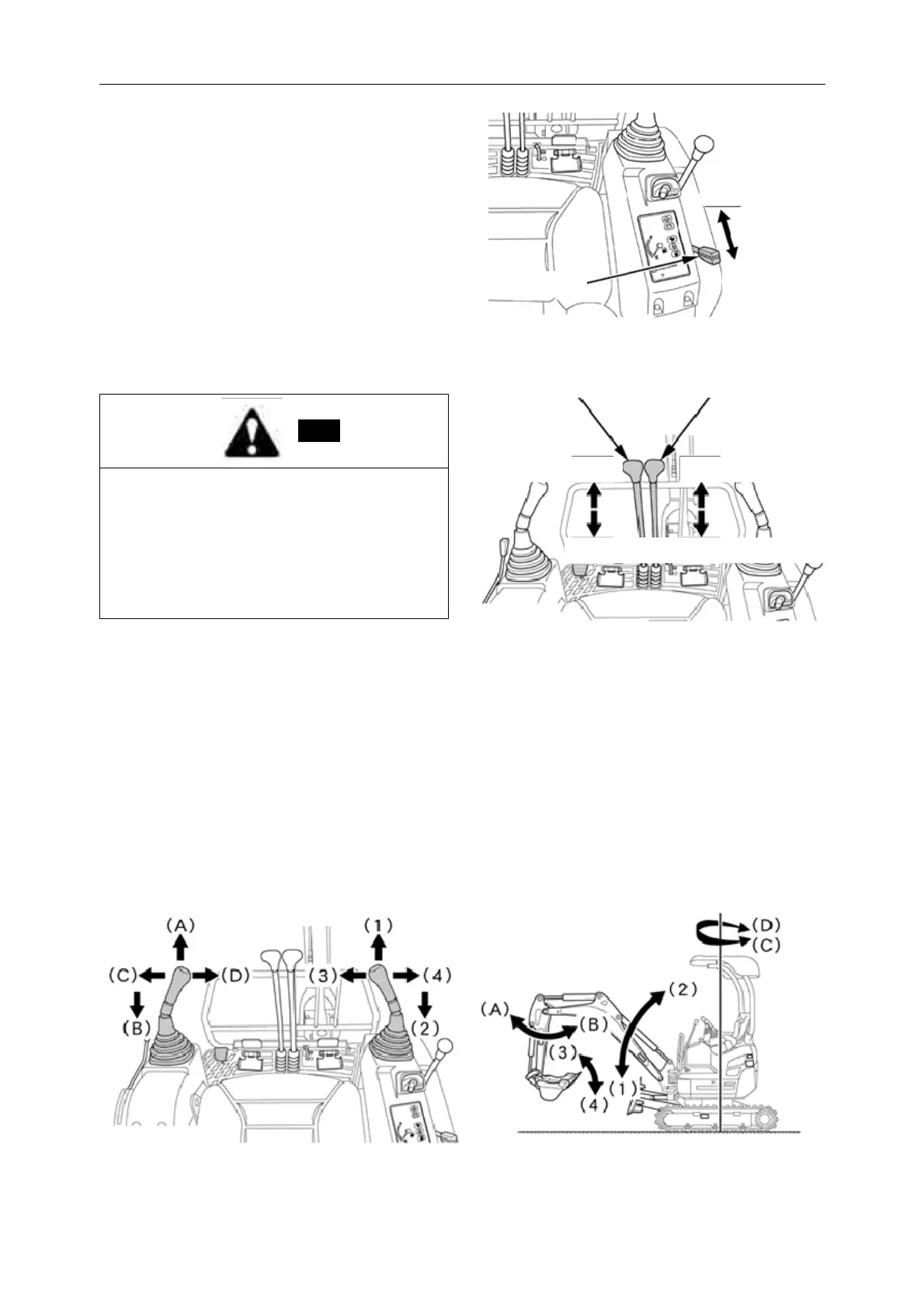
1. The throttle lever
In the driver's seat
Pulling the th rottle handle forward (on the high
speed side) increases engine speed.
When turning off the engine, push the throttle
handle to the bottom of the low speed a nd place
the starting key in the "STOP" position.
2. Driving handle (right, left)
Note:
* If the shovel and the front idler are placed
behind the handle, the body will drive in the
opposite direction to the handle. So please confirm
whether the shovel and f ront idler are facing
forward or backward. (The shovel is in front of the
abandoned comfort)
* If confi rmed, the body will move in th e opposite
direction, sometimes causing injury accidents.
In the driver's seat, when the shovel and the front id ler are in front, the driving handle is pushed forward
and the machine is pushed backward.
When the lock lever of the operating handle is in the "lo ck" position, it ca nnot run. When driving, put the
lock lever of the operating handle on the front of "release".
3. Operating handle of working device (right, left)
Used for rotating operation of moving arm, bucket bar and shovel. Handle position and operating device
are shown below.
The throttle lever
High speed
Low speed
Form ha ndle (left) driving handle (right)
Travel forward Travel forward
T ravel BackwardTravel Backward



 To Next Page