S80 Version 4.92 November 2014
Page 20 of 61
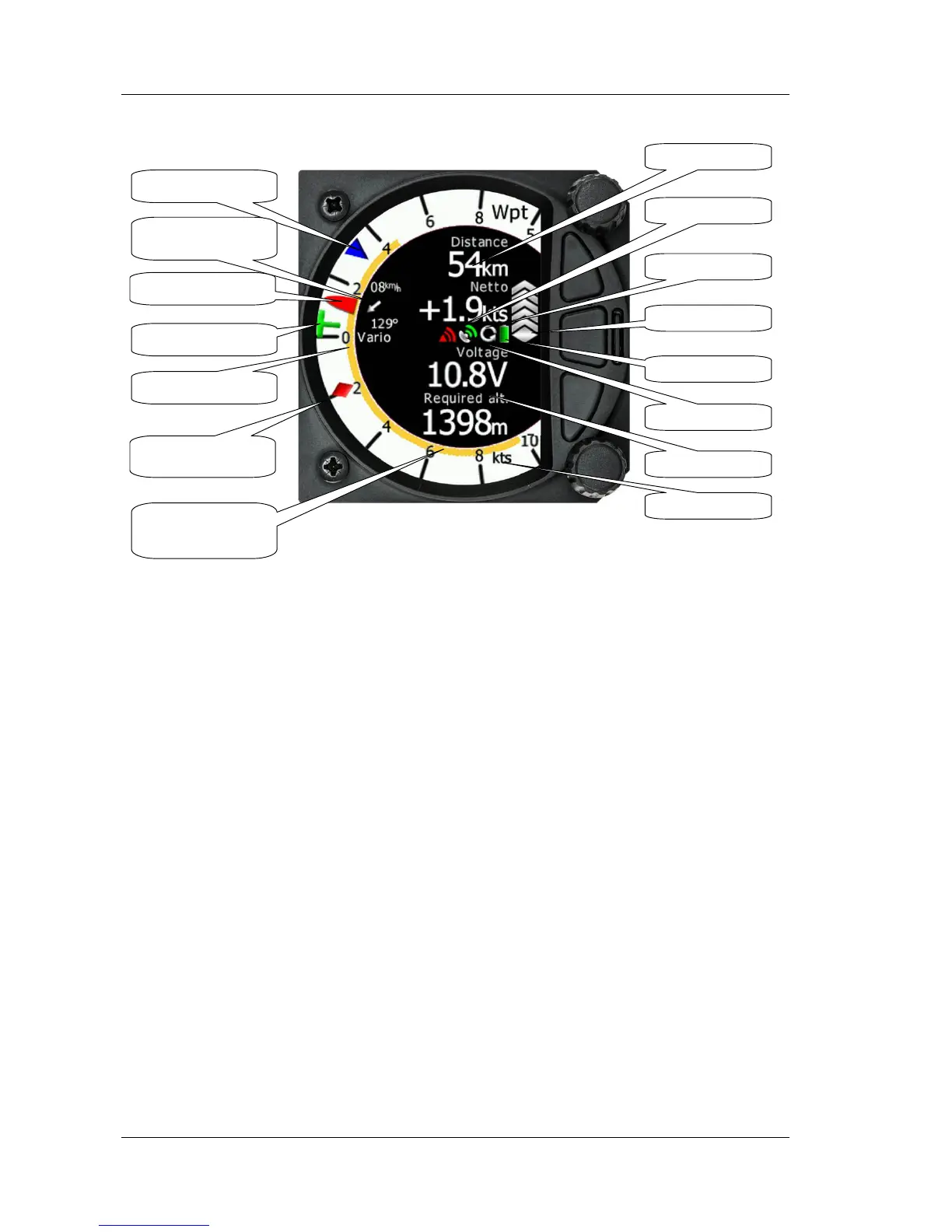
Vario Needle displays the vario, netto, relative or speed to fly value. The scale can be
chosen in the range of -+/-5 +/-10 or +/-20 (in setup, Vario Parameters). Within the
software the range can be set to m/s, kts, km/h, mph or fpm (in Setup, Units,
Vertical speed)
Upper numbers display Vario Netto, Average Vario
Lower number display True Airspeed and 60 minute task speed
Speed to fly bar symbol is indicating which speed you have to fly relative to the
current MacCready setting, sink rate and speed. One arrow means 10units of speed
faster or slower. Up red arrows mean fly slower and down blue arrows mean fly
faster.
Red diamond symbol can show netto or average vertical speed or g-force.
Blue arrow symbol shows current MacCready value.
Green T symbol represents last thermal average value.
Yellow Bar can show Max and Min values or G meter
The numerical Navboxes can be changed using the quick Access menu with a short
press of the bottom rotary knob followed by selecting Navbox from the menu and a
further short press of the bottom rotary knob. With the first Navbox highlighted with
a yellow boarder you can scroll through the four Navboxes using the bottom rotary
knob. Select the Navbox you wish to change with a short press of the bottom rotary
knob. This will open a list of available Navboxes.
Vario indicator needle
MacCredy setting
Last thermal average



 To Next Page