S80 Version 4.92 November 2014
Page 36 of 61
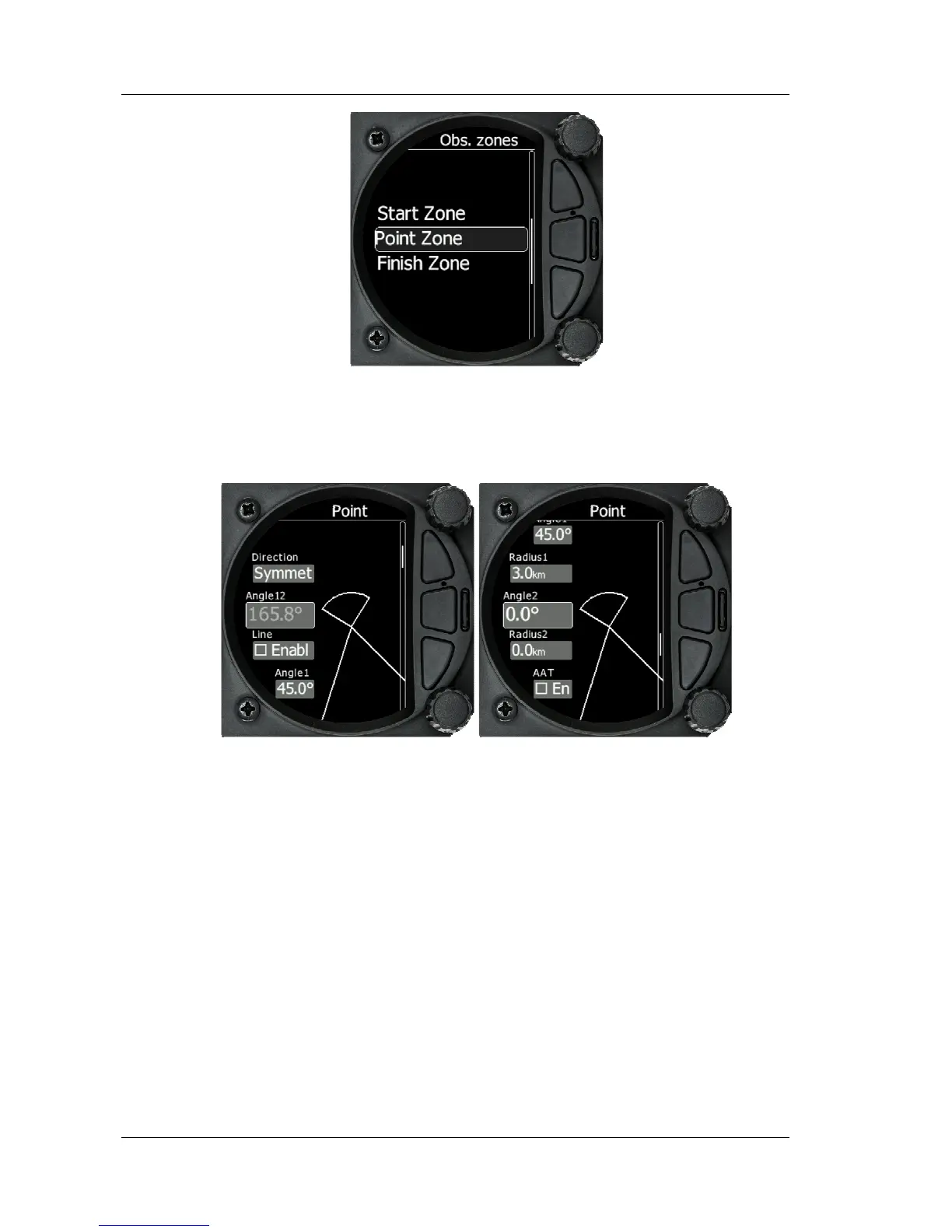
The start, turn point and Finish zone can be configured separately although the setup
is very similar.
The Start and Finish zone do not have the option of the AAT check box or Auto next.
Direction: Options include Start, Previous, Next, Symmetrical or Fixed angle
Angle 12: is greyed out unless fixed angle is specified in Direction
Line Check Box; typically used for start and Finish. If line is checked then Angel 1,
Angle 2 and Radius 2 are greyed out
Angle 1: Sets the angle of the Turn Point Zone
Radius 1: Sets the radius of the Turn Point Zone
Angle 2: Sets angle 2 for complex Turn Points and Assigned Area Tasks
Radius 2: Sets the radius for complex Turn Points and Assigned area Tasks
AAT Check Box: when checked, the S80 considers the area created within the zone
as an Assigned area
Auto Next: Typically used in racing tasks, will set the navigation of the S80 to the
next turn point when a single point is made within the Turn Point Zone.
5.5.8 Units
Use this menu to specify units, UTC time offset and type of ballast input.



 To Next Page