Data binding (Flash Professional only) 409
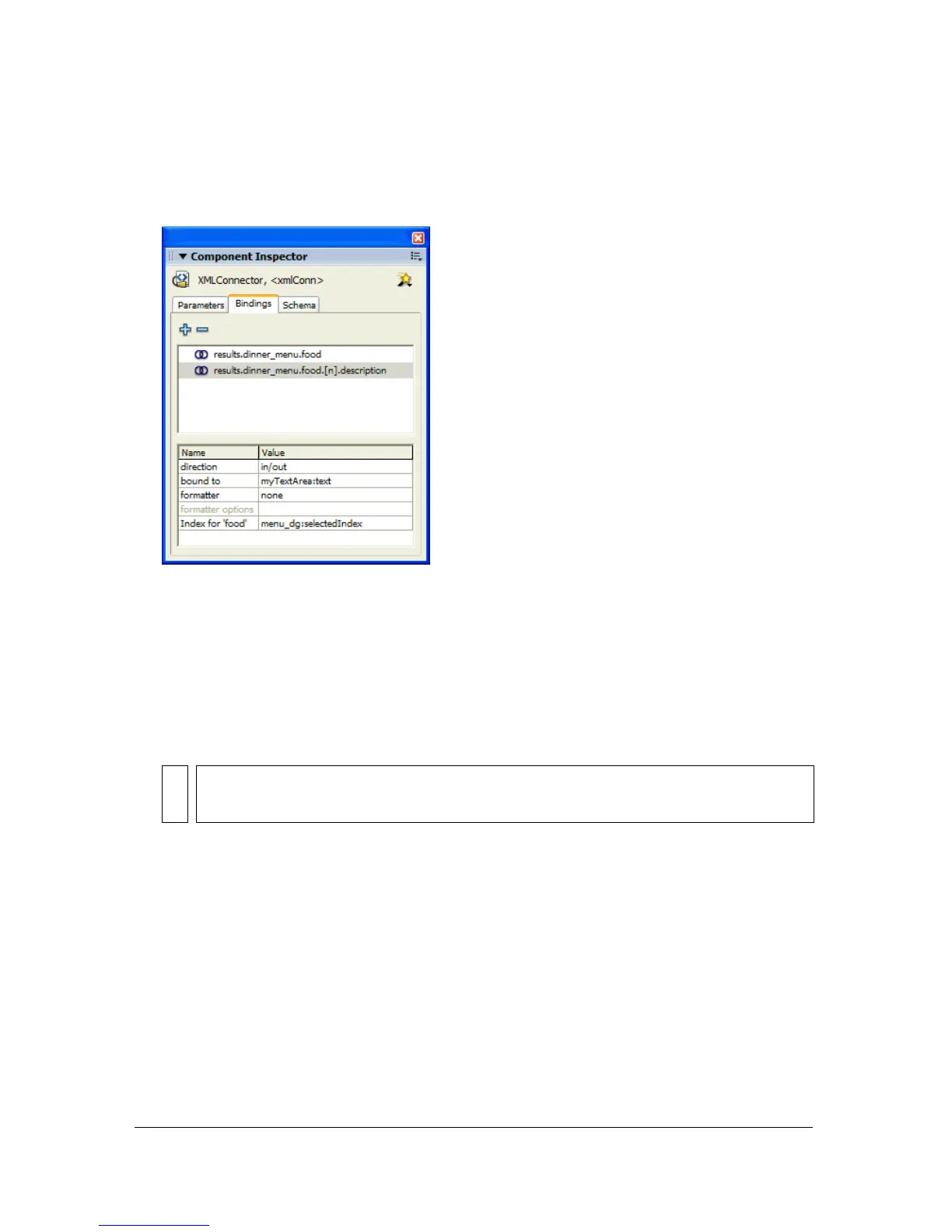
5. Click Index for ‘food’, click the magnifying glass icon, deselect Use Constant Value,
select the
menu_dg DataGrid instance, and select selectedIndex:Number. The settings for
the indexed binding appear in the Bindings tab, as shown in the following image:
6. Next, set the DataGrid index default value to 0 to make it available for data binding: select
the
menu_dg instance, click the Schema tab, select selectedIndex:number, and in the
Default Value field in the lower pane, type
0.
7. Save and test the application. Click Load Data, then click different items in the data grid.
The text area updates with the detailed description for each food item. Each time the user
selects a new item in the data grid, the index of the array is updated to show the data
associated with the new item.
Sometimes you might need to manually define a schema that identifies a schema item as a
field of an object contained within an array. In the following example, the id, billable, rate,
and duration schema fields are all considered attributes of an object contained within the row
array:
results : XML
datapacket : Object
row : Array
[n] : object
@id : Integer
@billable : Boolean
@rate : Number
@duration : Integer
NOTE
The index for property appears only in the Binding attributes pane for a schema
item that is the field of an object within an array.



 To Next Page