• DOK-DIAX02-DDS02.1*ANA-ANW1-EN-E1,44 • 12.96
41
ENA3A-Abb22/InbetrDDS
PROGRAM
START
MAIN MENU
Enter
ESC
1
2
3
DRIVE STATUS
ESC
LANGUAGE
SELECTION
ESC
PARAMETERS
ESC
3
4
5
6
POSITION
EVALUATION
1) 2)
ESC
?
ESC
ESC
ESC
ESC
ESC
ESC
HELP
TEXT
ESC
ESC
PROGRAM
END
1
8
27
OPERATION
MODES
SCALING
ESC
?
?
ERROR
REACTION
HELP
TEXT
HELP
TEXT
TORQUE
REDUCTION
ESC
?
HELP
TEXT
GAIN
PARAMETERS
AMPLIFIER
AND MOTOR
PARAMETERS
SAVE
PARAMETERS
ESC
LOAD
PARAMETERS
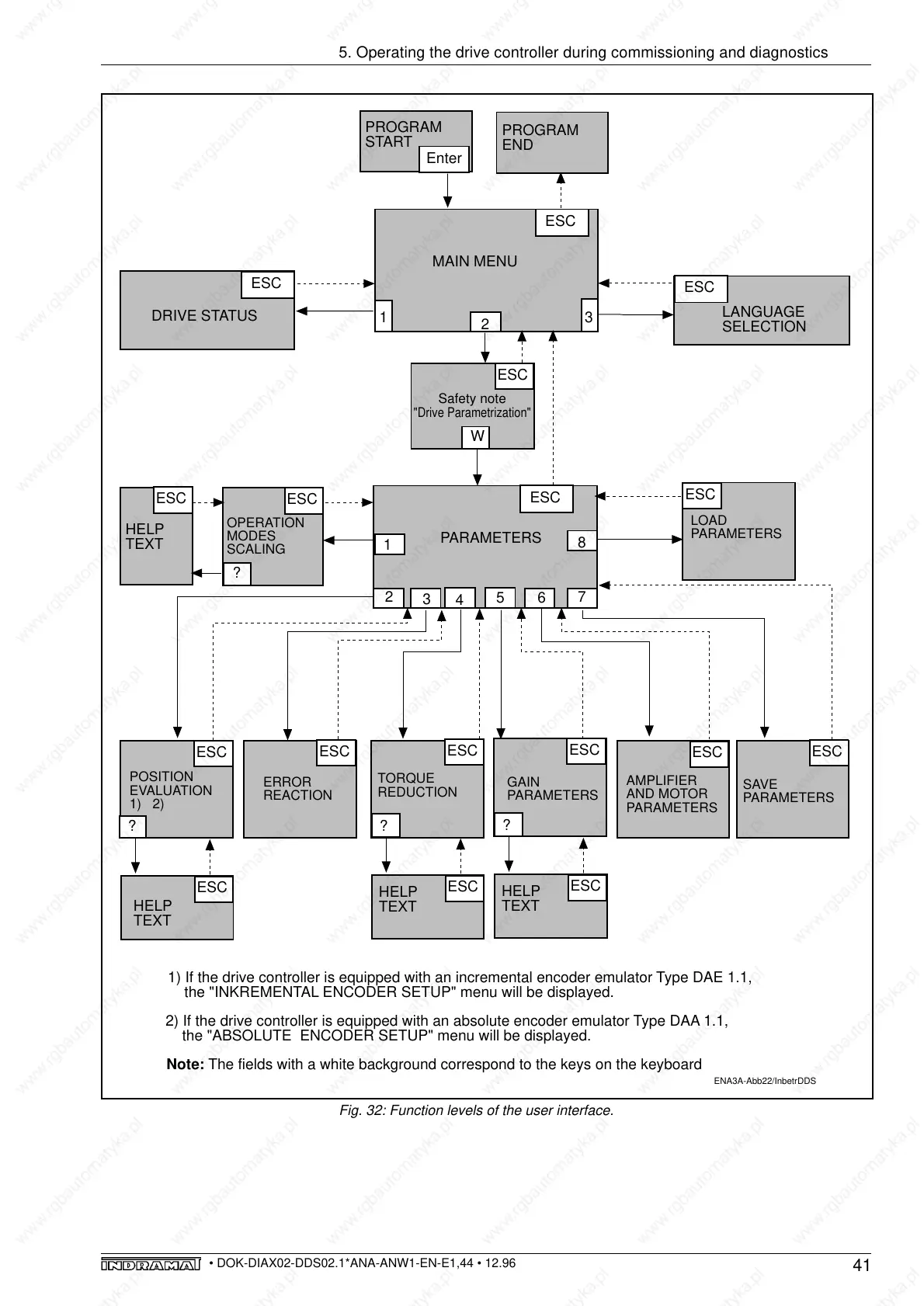
Note: The fields with a white background correspond to the keys on the keyboard
1) If the drive controller is equipped with an incremental encoder emulator Type DAE 1.1,
the "INKREMENTAL ENCODER SETUP" menu will be displayed.
2) If the drive controller is equipped with an absolute encoder emulator Type DAA 1.1,
the "ABSOLUTE ENCODER SETUP" menu will be displayed.
Safety note
"Drive Parametrization"
ESC
W
5. Operating the drive controller during commissioning and diagnostics
Fig. 32: Function levels of the user interface.



 To Next Page