• DOK-DIAX02-DDS02.1*ANA-ANW1-EN-E1,44 • 12.96
82
Depending on the type of machine and its design, certain operating
conditions may call for torque reduction of the drive.
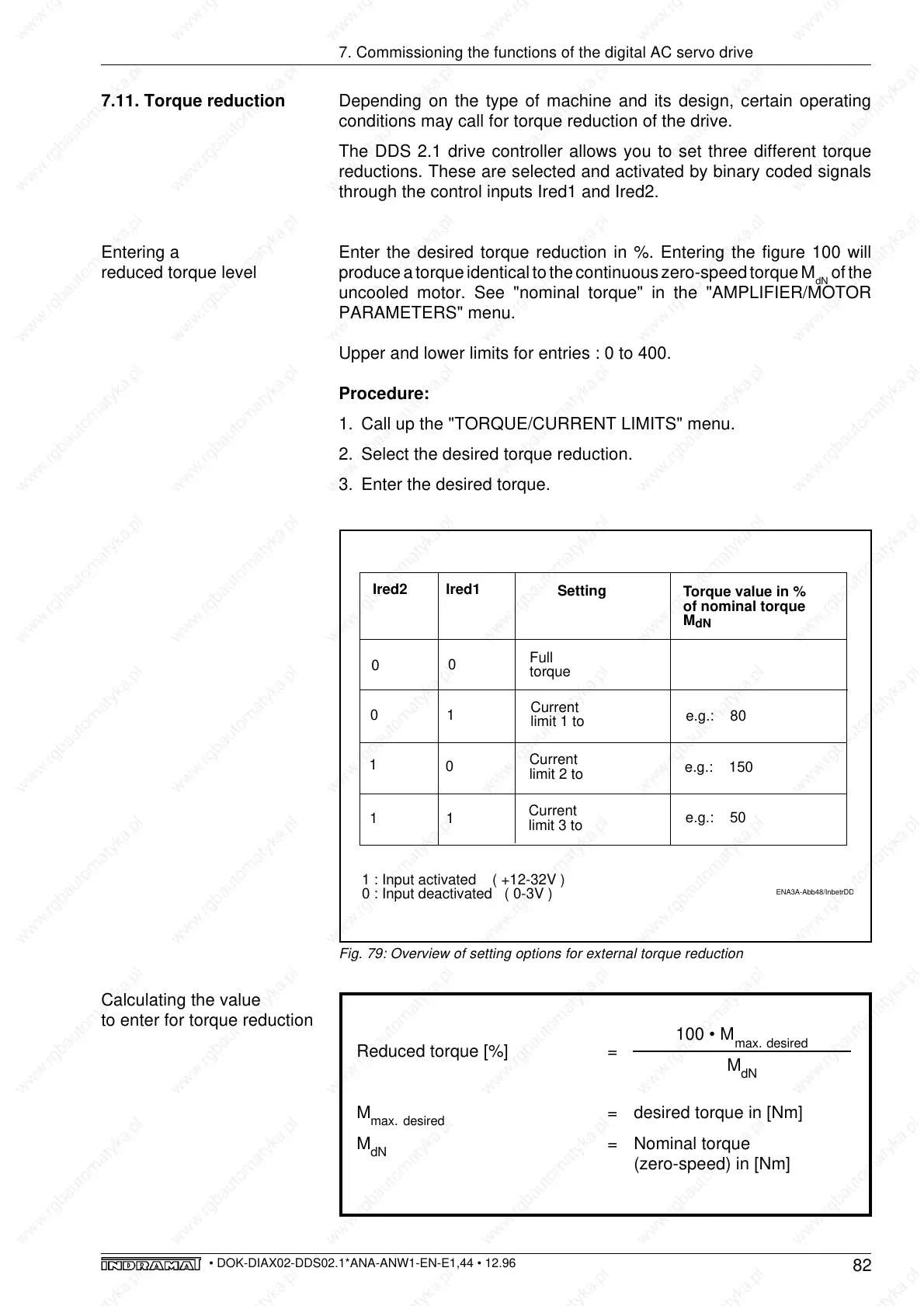
The DDS 2.1 drive controller allows you to set three different torque
reductions. These are selected and activated by binary coded signals
through the control inputs Ired1 and Ired2.
Enter the desired torque reduction in %. Entering the figure 100 will
produce a torque identical to the continuous zero-speed torque M
dN
of the
uncooled motor. See "nominal torque" in the "AMPLIFIER/MOTOR
PARAMETERS" menu.
Upper and lower limits for entries : 0 to 400.
Procedure:
1. Call up the "TORQUE/CURRENT LIMITS" menu.
2. Select the desired torque reduction.
3. Enter the desired torque.
7. Commissioning the functions of the digital AC servo drive
7.11. Torque reduction
Entering a
reduced torque level
Fig. 79: Overview of setting options for external torque reduction
Calculating the value
to enter for torque reduction
Reduced torque [%] =
M
max.
desired
= desired torque in [Nm]
M
dN
= Nominal torque
(zero-speed) in [Nm]
100 • M
max.
desired
M
dN
ENA3A-Abb48/InbetrDDS
Ired2
Ired1
Setting
Torque value in %
of nominal torque
M
dN
e.g.: 80
e.g.: 150
e.g.: 50
0
0
1
1
1
1
0
0
Full
torque
Current
limit 1 to
Current
limit 2 to
Current
limit 3 to
1 : Input activated ( +12-32V )
0 : Input deactivated ( 0-3V )



 To Next Page