15
Preparation Playback Settings Tips Appendix
ENGLISH
Connections
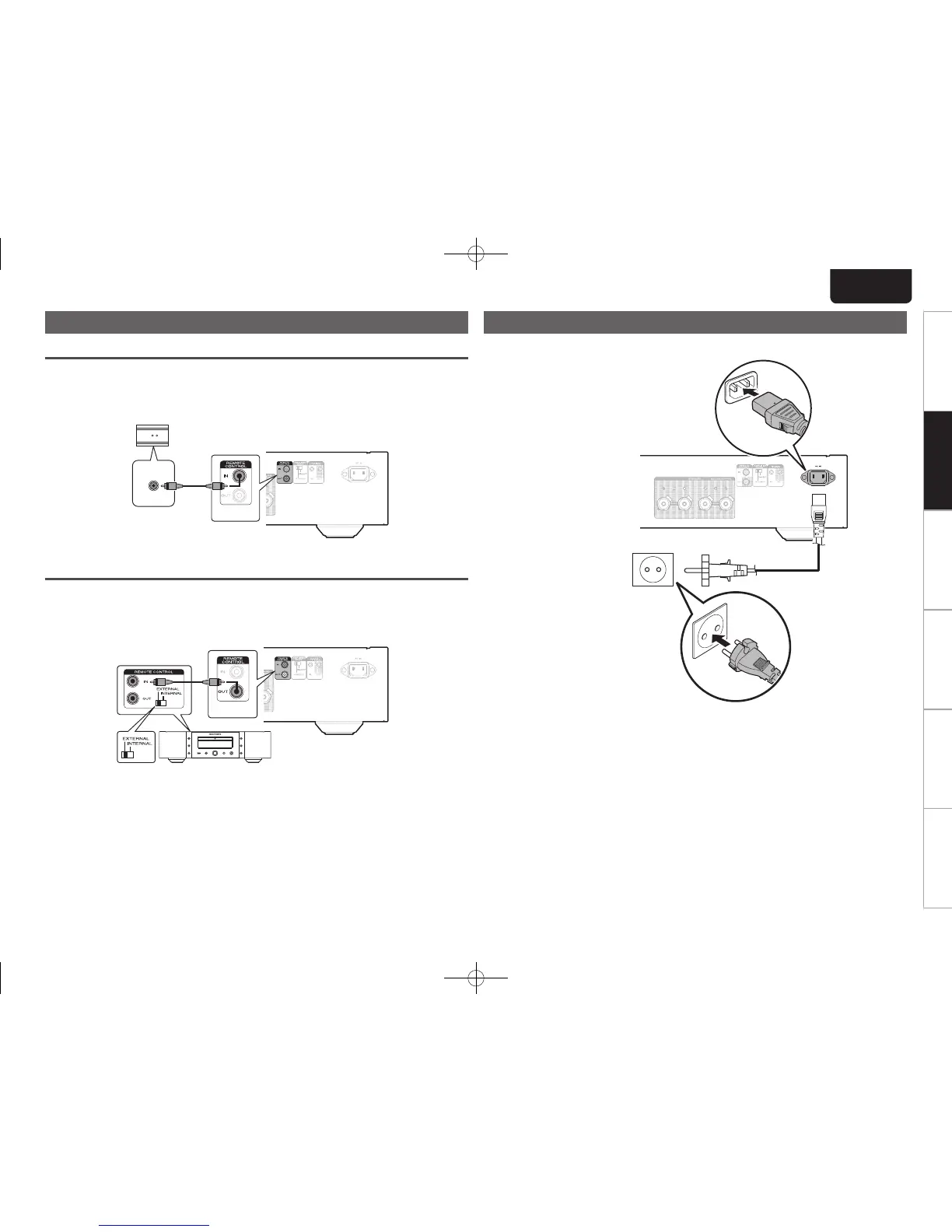
Connecting devices with remote control connectors
Performing operations by RC on this unit without visual contact
Youcanconnectan externalIRreceiver totheREMOTE CONTROLconnectorsto perform
operationsonthisunitwiththesuppliedremotecontrolunitwithoutvisualcontact.Thismight
benecessaryiftheunitishiddeninacupboardorcorner,soyoucan’tdirectlypointwiththe
remotecontrolunittothedevice.
RC OUT
IRreceiver
Remotely connecting Marantz devices
YoucantransmitremotecontrolsignalssimplybyconnectingaMarantzaudiodevicetothe
REMOTECONTROLIN/OUTconnectorsusingtheremoteconnectioncableprovidedwiththe
device.
Settheremotecontrolswitchlocatedontherearpaneloftheconnectedaudiocomponentto
“EXTERNAL”tousethisfeature.
Connecting the power cord
Waituntilallconnectionshavebeencompletedbeforeconnectingthepowercord.
Tohouseholdpower
outlet
(AC230V,50/60Hz)
Powercord
(supplied)
1.PM14S1N_ENG_Final_0708.indd 15 2013/07/11 19:14:16


 To Next Page