39
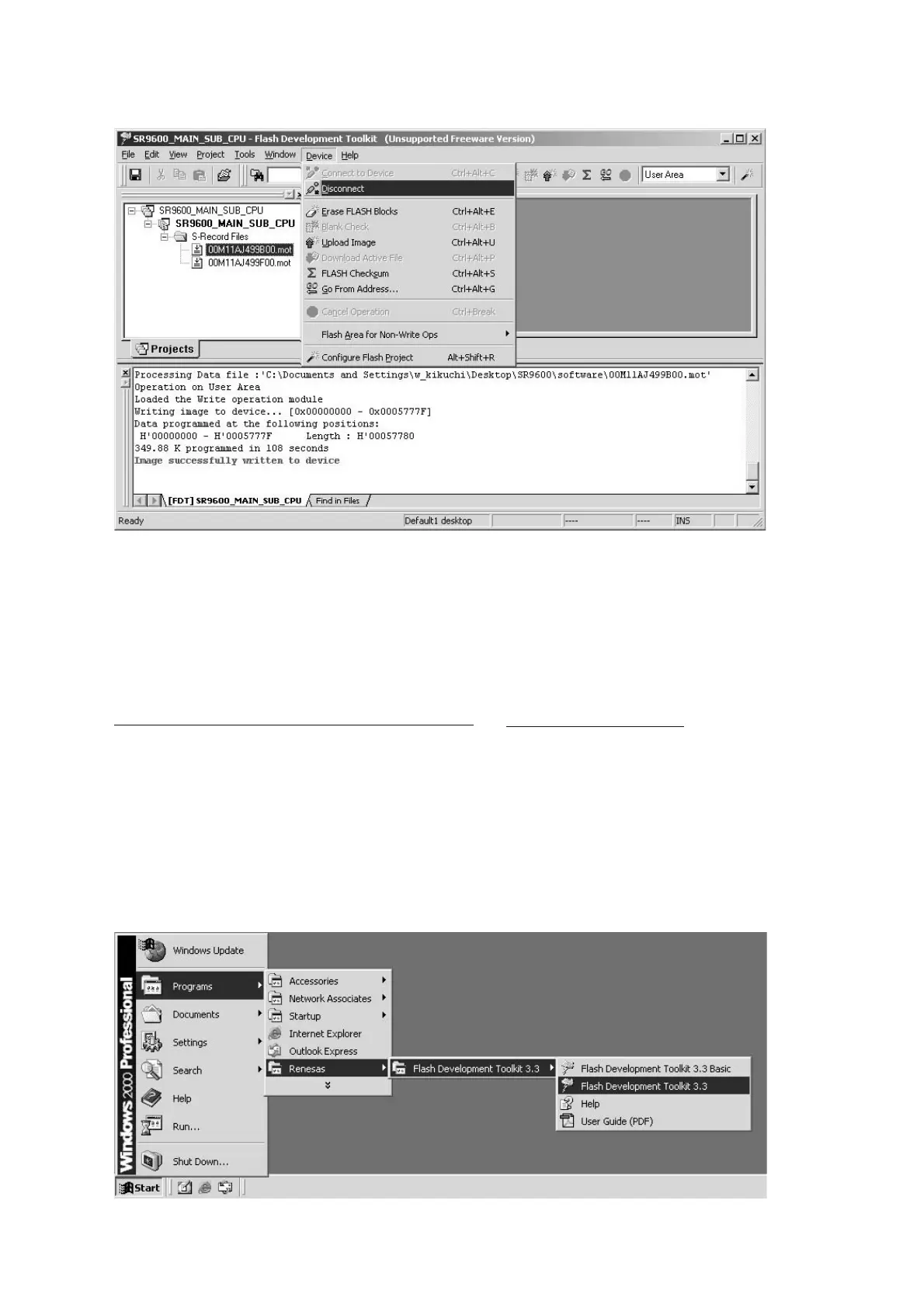
Click Device in the menu bar and select Disconnect.
Click File and choose Exit in menu, when ending writing
software.
Disconnect the mains cable from the Unit.
Insert a thin rod to the hole near the MULTI RC terminal and
push the switch inside to turn off the switch.(Refer to 30 pege)
WRITING PROCEDURE FOR SUB MICROPROCESSOR
Disconnect the mains cable from the Unit.
Connect RS-232C on the rear panel of the Unit and Serial
Port of windows PC with RS-232C cable.
Connect the mains cable into the Unit.
Launch up the writing software.
Click Start, Programs, Renesas, Flash Development
Toolkit 3.3 and Flash Development Toolkit 3.3.
Device ǛǯȪȃǯƠŴȡȋȥȸƔǒ Disconnect ǛǯȪȃǯ
ƠLJƢŵ
ǽȕȈǦǧǢǛኳʕƢǔƱƖƸ
File ǛǯȪȃǯƠŴȡȋȥȸƔ
ǒ
Exit ǛǯȪȃǯƠLJƢŵ
ᩓเdzȸȉǛஜೞƔǒٳƠLJƢŵ
ኬƍొǛƍஜೞƷ MULTI RC ᇢ܇ƷӫƱƳǓƴƋǔᆭƔǒǹ
ǤȃȁǛƠƯƖᡂLjȢȸȉǛᚐᨊƠLJƢŵ
30 ȚȸǸӋༀ )
SUB
ȞǤdzȳƷƖᡂLj૾ඥ
ᩓเDZȸȖȫǛஜೞƔǒٳƠLJƢŵ
Windows PC Ʒ Serial Port ƱஜೞƷ RS-232C Port Ǜ
RS-232C DZȸȖȫưዓƠLJƢŵ
ஜೞƴᩓเDZȸȖȫǛዓƠLJƢŵ
FDT ǛឪѣƠLJƢŵ
Start ă Programs ă Renesas ă Flash Development
Toolkit 3.3 ă Flash Development Toolkit 3.3. ǛǯȪȃǯƠ
LJƢŵ



 To Next Page