EasyManua.ls Logo

Masimo LiDCO - Page 39

Masimo LiDCO
68 pages
Print Icon
To Next Page IconTo Next Page
To Previous Page IconTo Previous Page
Loading...
Masimo LiDCO Chapter 4: Operation
www.masimo.com 37 Masimo
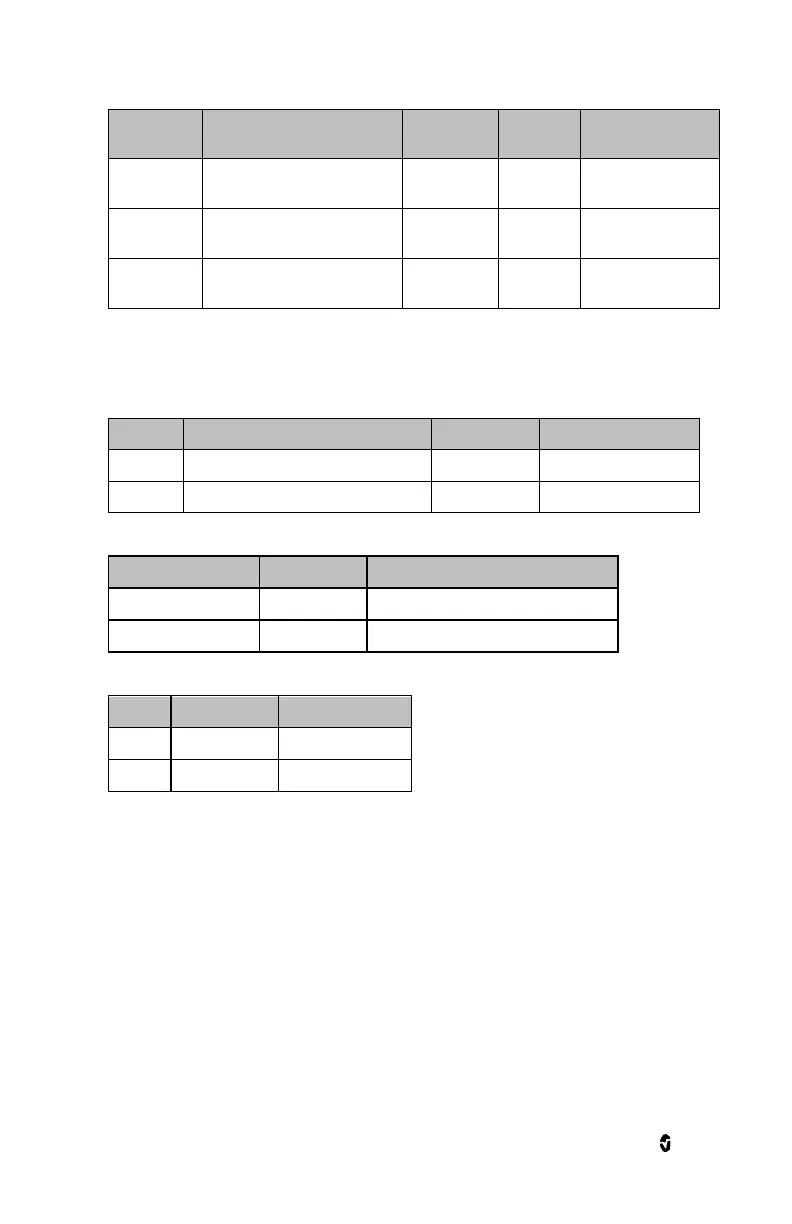
Options
Description
Alarm
Priority
Factory
Default
Selectable Settings
Low Caution
Range
Value above Low Limit to
trigger caution light
NA
100
Off, or 50 to 300 in
steps of 50.
Silence
Duration
Length of time that the audible
alarm remains silenced
NA
2 min
30s, 1m, 2m, 5m.
Audible
Alarms*
Disables audible alarm
NA
Off
On or Off
* Masimo LiDCO has the ability to control alarm priority based on the clinical use case. When Audible
Alarms are set to Off, the alarm priority is Low. When Audible Alarms are set to On, the alarm priority is
Medium.
Trends
Options
Description
Factory Default
Selectable Settings
Trend Max
Highest DO
2
value that can be displayed
1500
100-3000 in steps of 100.
Trend Min
Lowest DO
2
value that can be displayed
500
0-2900 in steps of 100
Additional Settings
Options
Factory Default
Selectable Settings
Display parameter
Absolute
Absolute or Index
Manual Entry Reminder
30 seconds
Off, 1sec,30 sec, 1 min 2 min, and 5 min.
DO
2
Manual Entry
Options
Factory Default
Selectable Settings
Hb
Pulse Ox
Manual or Pulse Ox
SpO
2
Pulse Ox
Manual or Pulse Ox
Note: If Manual setting is selected, parameter will display as "DO
2
". If Pulse Ox is selected, parameter
will display as "cDO
2
".

Related product manuals