3-1 Masterflex SS B/T Washdown Digital Pump Drive with Advanced Connectivity
Section 3: Operation
Masterflex
SECTION 3: OPERATION
!
WARNING: Tube breakage may result in uid being sprayed from the pump. Use appropriate
measures to protect operator and equipment.
CAUTION: Keep ngers away from the rotor while the pump is in operation. Stop the pump
before loading or unloading tubing.
CAUTION: Hot Surface. Do not touch.
CAUTION: To avoid electrical shock, the power cord protective grounding conductor must be
connected to ground. Not for operation in wet locations as de ned by EN61010-1.
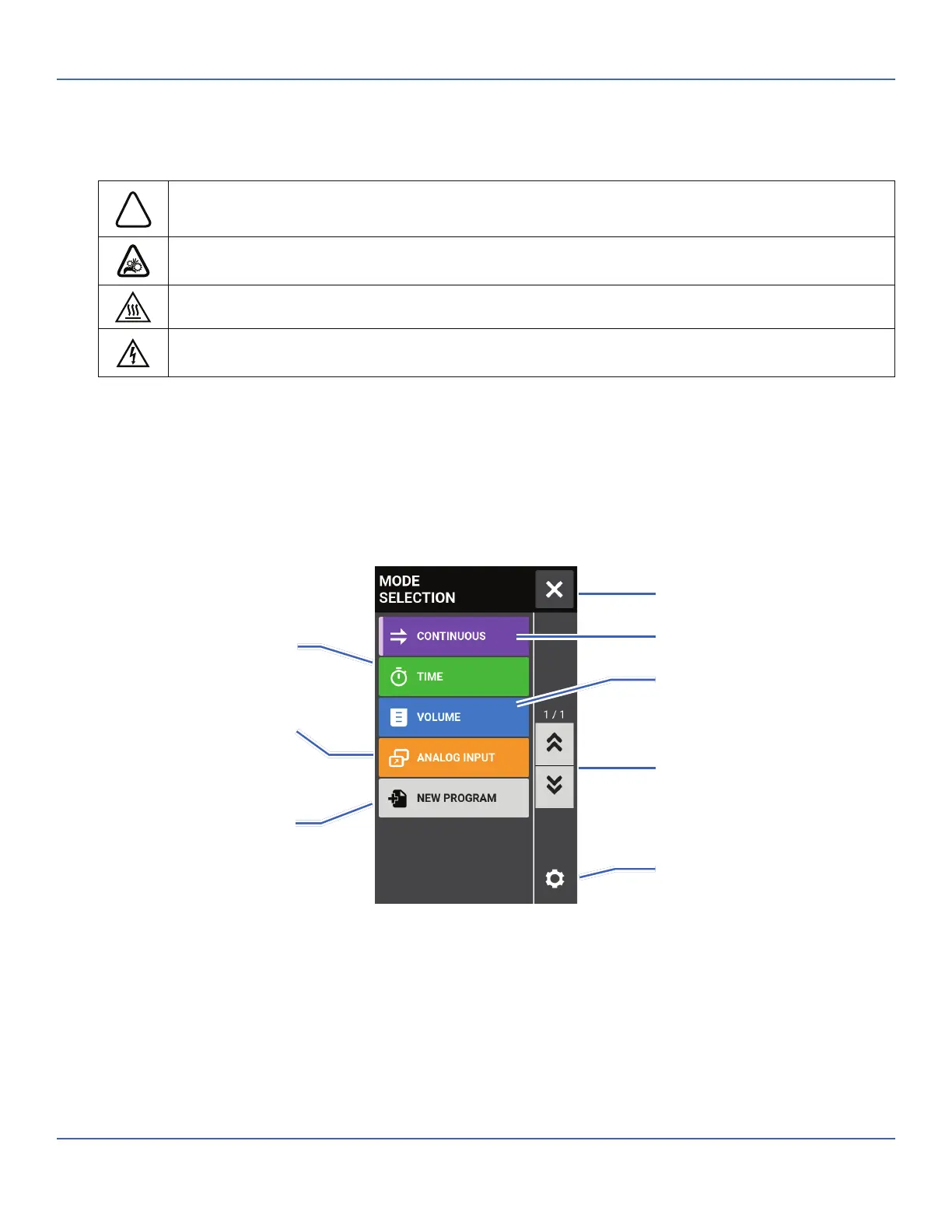
MODE SELECTION SCREEN
e Mode Selection Screen allows access to the drive’s four basic operation modes (CONTINUOUS, TIME,
VOLUME, and ANALOG INPUT) as well as the New Program Screen and user de ned programs. e Mode
Selection Screen can be accessed from any of the mode screens by tapping the MODE NAME BANNER.
Tap the desired mode or program to access individual mode or program screens.
Continuous Mode
Return to Previous Screen
Time Mode
Volume Mode
Analog Input Mode
Add New Program
Settings
Page Scroll



 To Next Page