3-2 Masterflex SS B/T Washdown Digital Pump Drive with Advanced Connectivity
Section 3: Operation
Masterflex
CONTINUOUS MODE
In Continuous Mode the pump will operate at a selected rpm and/or ow rate until stopped by the user.
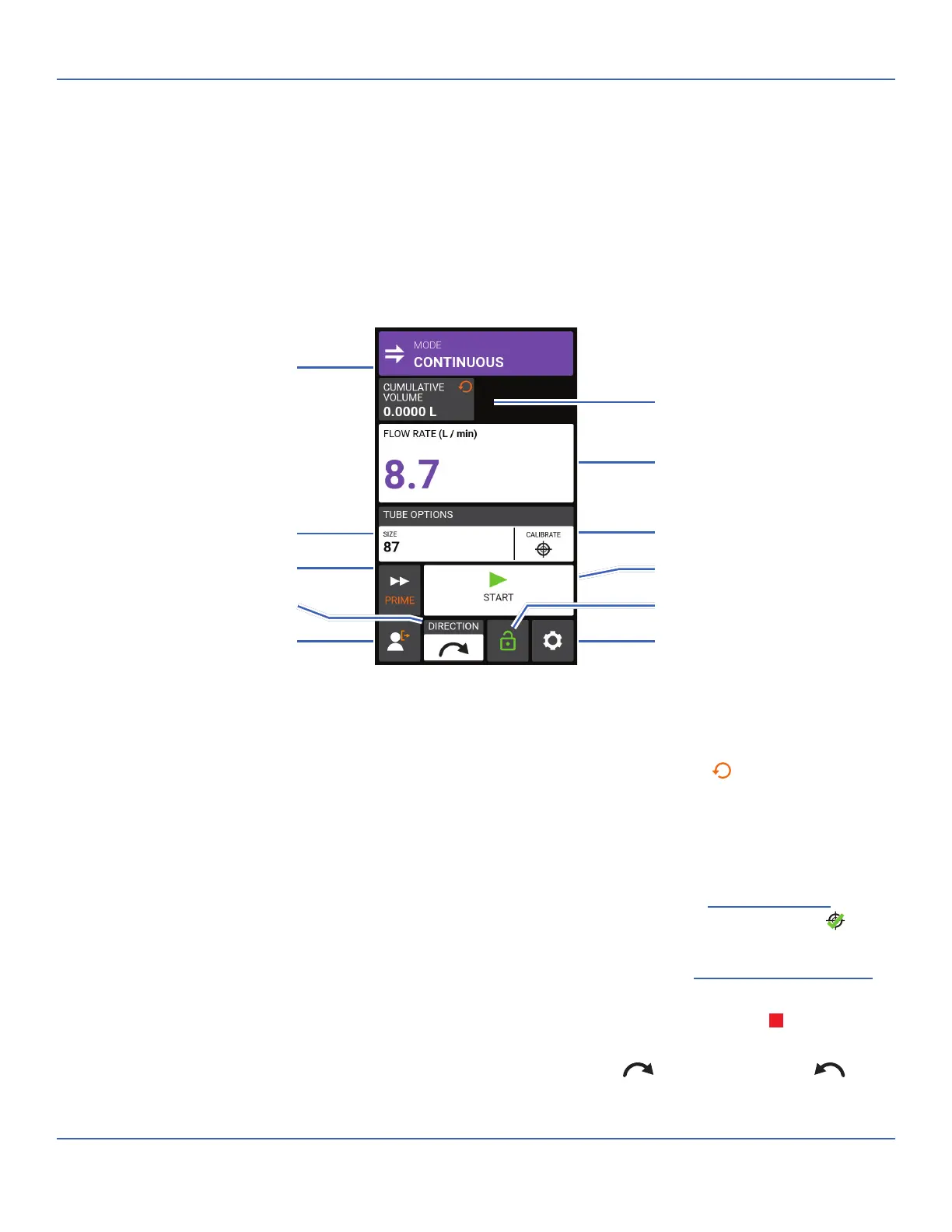
Continuous Mode Run Screen
e Continuous Mode Run Screen is accessed by selecting CONTINUOUS from the Mode Selection
Screen.
A. MODE NAME BANNER: Tap the Mode Name Banner to return to the Mode Selection Screen.
B. CUMULATIVE VOLUME: Displays the current cumulative volume of uid that has been pumped. To
reset the cumulative volume: Press and hold CUMULATIVE VOLUME RESET
until the display
changes to zero.
C. FLOW RATE: Displays the current ow rate in the unit of measurement selected by the user. Tap to
access the Flow Rate Screen.
D. SIZE: Tap to access the Tube Size Screen.
E. CALIBRATE: Tap to access the Calibration Screen (for further information see "
Tube Calibration" on
page 2-13). Once calibration has been completed for the current tube size Calibration Complete
will
be displayed.
F. PRIME: Press and hold to prime the pump drive (for further information see "
Priming the Pump Drive"
on page 2-12).
G. START/STOP: Tap START to begin operation. Once operation has commenced STOP
will be
displayed.
H. FLOW DIRECTION: Tap DIRECTION to select either clockwise
or counterclockwise .
I. SCREEN LOCK: Locking the screen disables all touchscreen functions. To lock the screen: Press and
H. Flow Direction
B. Cumulative Volume
G. Start/Stop
D. Tube Size
E. Calibrate
K. Settings
I. Screen Lock
C. Flow Rate
J. Logout
A. Mode Name Banner
F. Prime



 To Next Page