3-9 Masterflex SS B/T Washdown Digital Pump Drive with Advanced Connectivity
Section 3: Operation
Masterflex
VOLUME MODE
In Volume Mode the pump will operate at a selected rpm and/or ow rate until a selected volume of uid has
been pumped. When the selected volume has been pumped the drive will automatically stop.
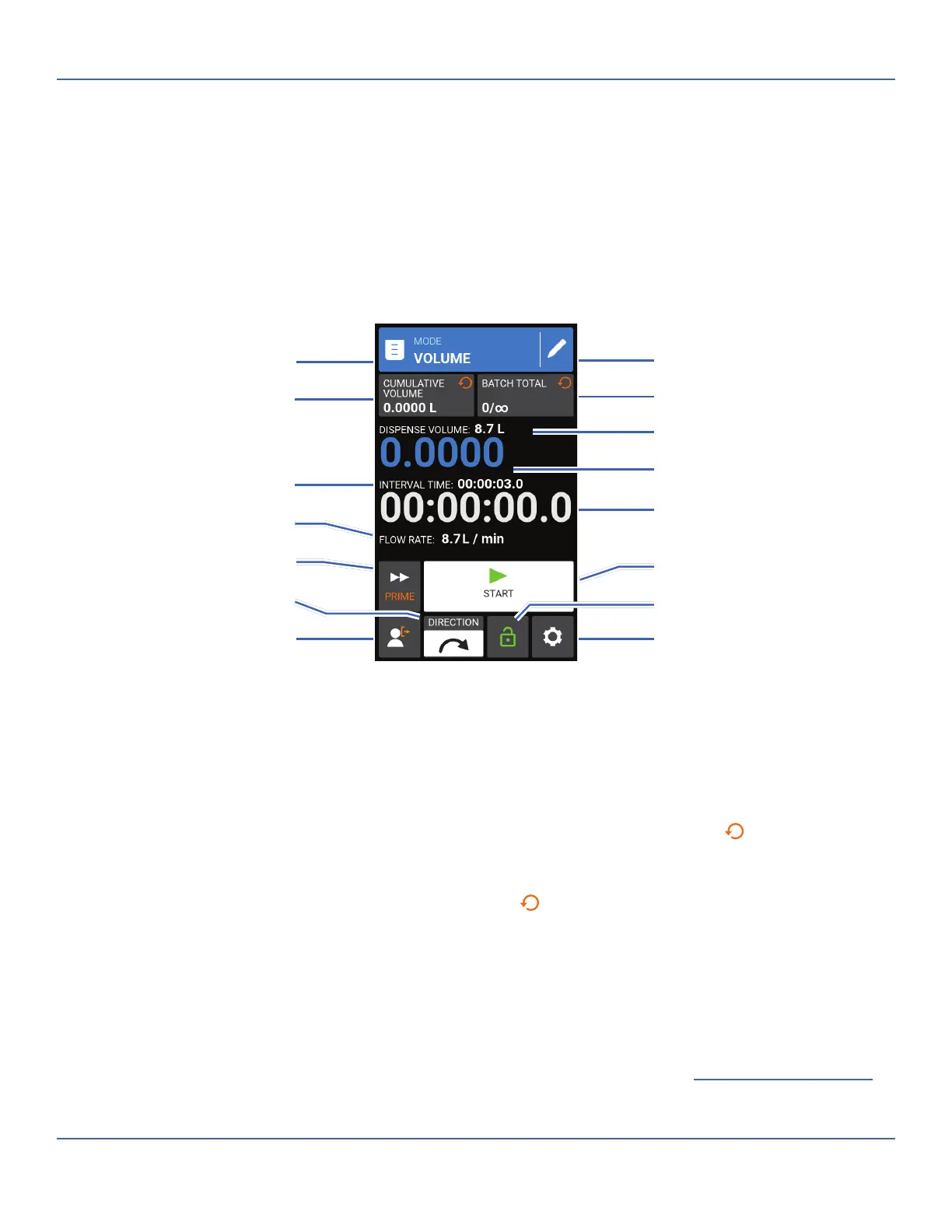
Volume Mode Run Screen
e Volume Mode Run Screen is accessed by selecting VOLUME from the Mode Selection Screen.
A. MODE NAME BANNER: Tap the Mode Name Banner to return to the Mode Selection Screen.
B. EDIT: Tap to access the Volume Mode Edit Screen. From the Volume Mode Edit Screen adjustments can
be made to dispense volume, interval time, ow rate, tube options, calibration and batch total. NOTE:
Edit is inactive during operation.
C. CUMULATIVE VOLUME: Displays the current Cumulative Volume of uid that has been pumped. To
reset the cumulative volume: Press and hold CUMULATIVE VOLUME RESET
until the display
changes to zero.
D. BATCH TOTAL: Displays the number of dispenses that have been completed in the current batch. To
reset the batch total: Press and hold BATCH RESET
until the display changes to zero.
E. SET DISPENSE VOLUME: Displays the selected volume of uid for dispensing.
F. DISPENSE VOLUME COUNTER: Displays a countdown of the uid volume during operation.
G. SET INTERVAL TIME: Displays the set time the pump pauses between dispenses.
H. INTERVAL TIME COUNTER: Displays a countdown of the set interval time during operation.
I. FLOW RATE: Displays the current ow rate in the unit of measurement selected by the user.
J. PRIME: Press and hold to prime the pump drive (for further information see "
Priming the Pump Drive"
on page 2-12).
D. Batch Total
B. Edit
K. Start/Stop/Pause
J. Prime
F. Dispense Volume Counter
H. Interval Time Counter
E. Set Dispense Volume
O. Settings
M. Screen Lock
N. Logout
A. Mode Name Banner
C. Cumulative Volume
G. Set Interval Time
I. Flow Rate
L. Flow Direction



 To Next Page