Page 92 P/N 03521015 Rev Q
Do the Hood, Helmet, Battery and Belt
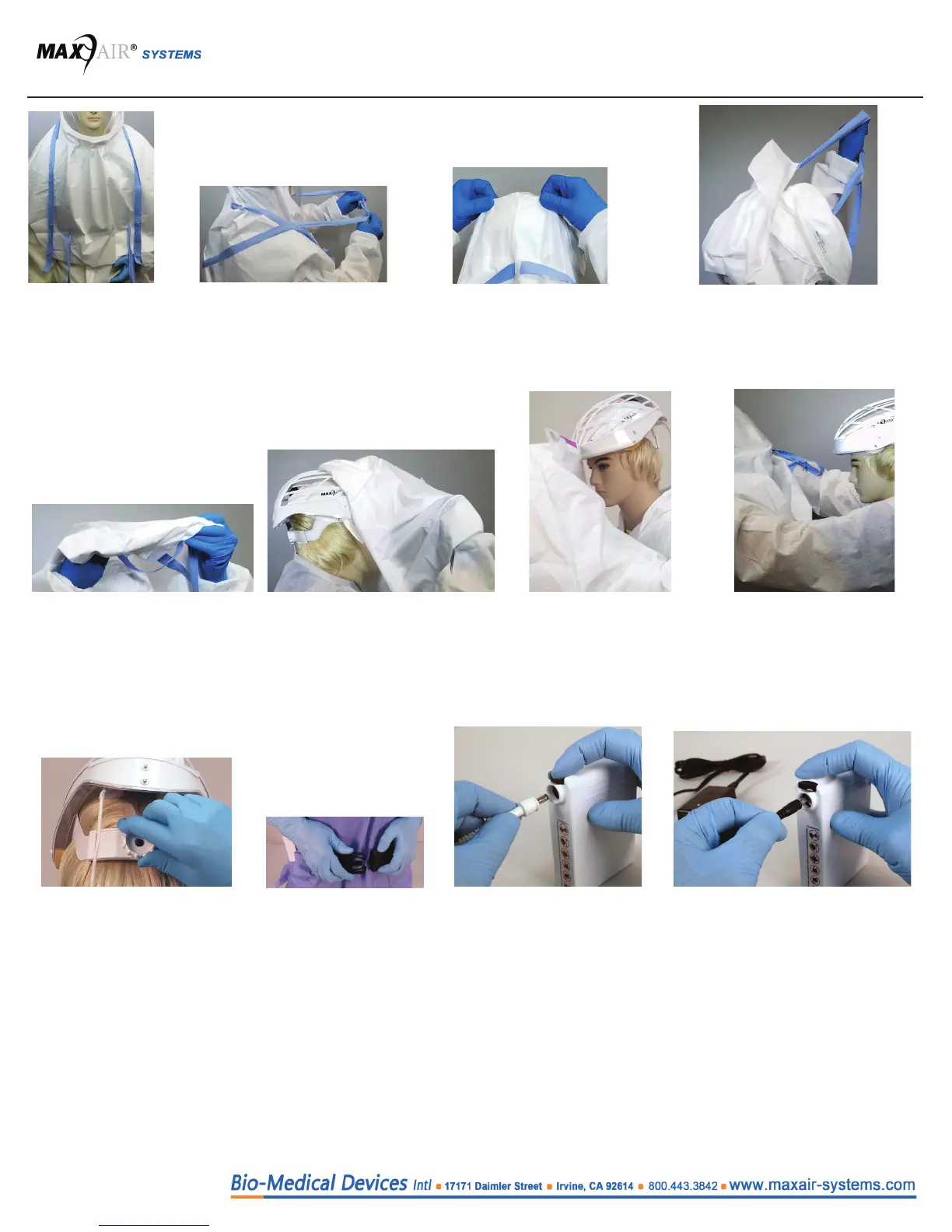
1. Untie both neck
and body Ties.
12. Connect a powered on Battery
Charger connector to the Battery.
Push connector into Battery recep-
tacle fully - Do NOT push down on
the Battery Secure Lock (Black)
button.
2. Re-tie both neck and body
Ties in front, out at their
most distant extremities.
3. Pull the Hood body, just below the
Filter, back and up to lift the back
of the Filter up over the back of
the Helmet.
4. Use the body ties to pull the back
Hood body up and over the top of
the Helmet. The HLF, if left on, will
come o the Helmet in this and next
steps.
6. Continue the rolling process while
moving the entire Hood (and
HLF) over, o, and forward from
the Helmet.
5. As the back Hood body bottom
comes up over the Helmet, roll
the Hood (and HLF) and ties over
themselves to compact them and
minimize self contamination.
7. Continue the rolling pro-
cess until the Hood is at the
front of the Helmet, then lift
upwards slightly to lift the
front Hood Lens mounting
hole up and o the front
Helmet mounting post.
8. When the Hood (and HLF) is
completely o the Helmet and
out in front of you, discard it
appropriately as with other dis-
posables per your institutional
hazardous waste protocol.
9. Turn Helmet Ratchet Knob
counterclockwise to loosen
Headband and lift Helmet up,
over, and o the Head, and
prep the Helmet for next use.
11. Disconnect the Helmet
Power Cord from the Bat-
tery - Press down on the
Secure Lock (Black) Button
to release, then pull the cord
connector out from the Bat-
tery connection receptacle.
10. Unbuckle Belt and
remove Battery and Belt
from around the waste.


 To Next Page