© 2023 Maxeon Solar Technologies, Ltd. All rights reserved. | 549549 Revision A - October 2023
Specications included in this document are subject to change without notice
25
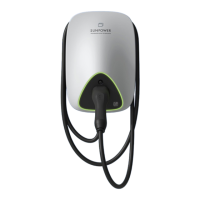
6.3. Download and Install the SunPower One App
1. Download the SunPower One app by scanning the QR code on the Mounting template with
Quick Install Guide you received with your Drive EV Charger.
• Alternatively, Android device users can download the SunPower One app from Google
Play
• iOS device users can download the SunPower One app from the Appstore
6.4. Activate SunPower Drive in the SunPower One app
Before commencing, ensure that Drive is correctly installed and has a functional
data connection.
Please follow the steps below to successfully activate the SunPower Drive:
1. Launch the SunPower One app and log in using your SunPower One username (email) and
password.
2. On the home screen, tap “start” to initiate the commissioning process for a new system.
3. On the subsequent screen, enter the email address of the customer for whom you are ins-
talling the system. This email will be utilized to pre-congure the customer SunPower One
account required for logging into the ev.energy app. It is crucial to verify the accuracy of
the email with the customer and ensure that they can access it on their mobile device.
4. Select the appropriate system conguration by tapping on SunPower Drive, and follow the
app’s provided steps to complete the activation and conguration of your installation.
5. Once the Drive setup is complete, a conrmation email will be sent to the customer. This
email will contain a link enabling the customer to activate their SunPower One account and
enjoy the comprehensive SunPower One experience.
TIP
Commissioning tools including login details are only available to installers


 To Next Page
 Loading...