McHale Orbital Round Bale Wrapper
49
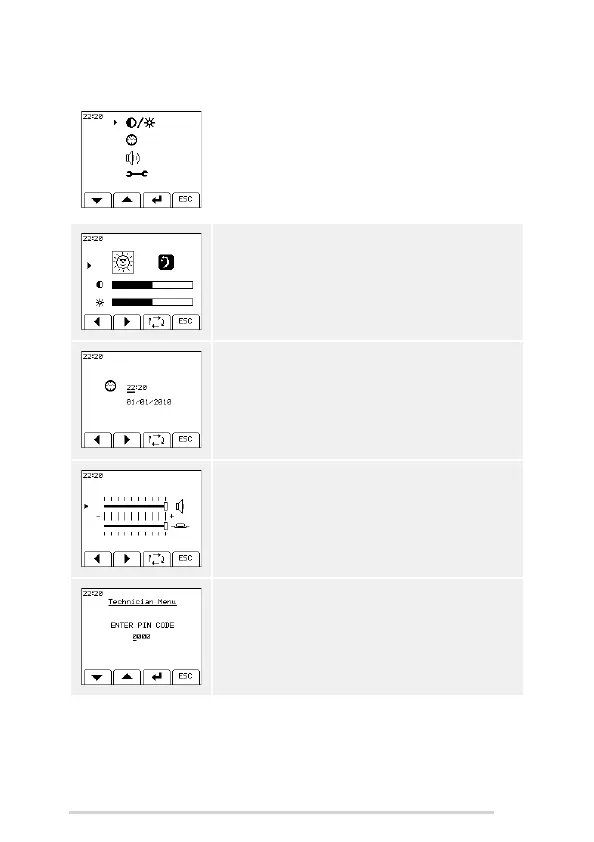
7.4.5 Operator menu
Use the toggle key to move the arrow to each of the
parameters and the + and - keys to change the value of
the selected parameter. ‘ESC’ (soft key D) will return to
the machine menu.
Contrast
Extremes of temperature may affect the contrast of the
display, which is adjustable from the contrast menu.
Select day or night, then the contrast and brightness
settings can be adjusted for that option.
Clock adjust
This is used to set the time on the clock which is always
displayed on the top left of the screen. A date setting is
also available.
Volume
The volume of the beeper and the button tone can be
adjusted. Use the toggle key to select the beeper/button
tone setting. Use the left arrow head (soft key A) to
decrease the volume and the right arrow head (soft key
B) to increase the volume.
Technician menu
The Technician menu is reserved for McHale engineers
only. A pin code needs to be entered to access this menu.



 To Next Page