McHale Orbital Round Bale Wrapper
53
7.6 Warning messages
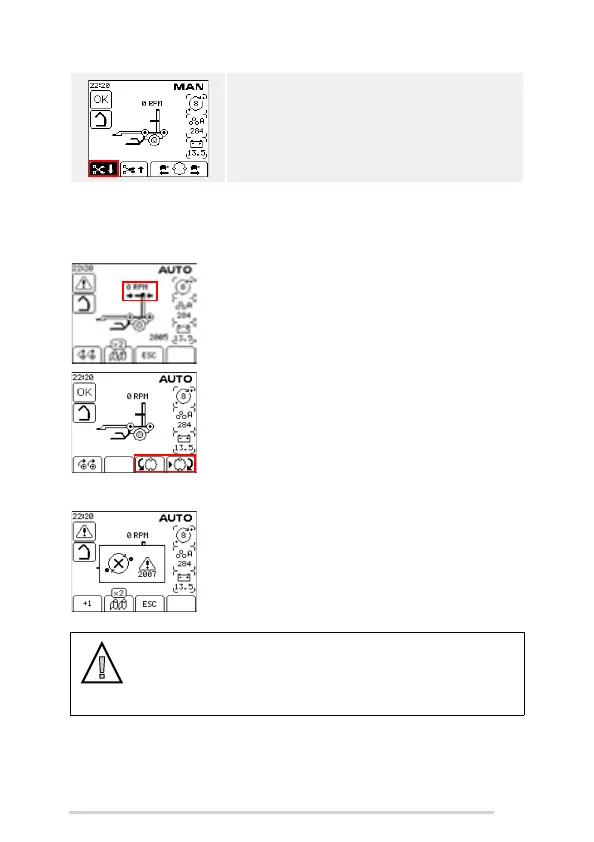
Ring position warning
If you attempt to load, wrap or tip a bale when the wrapping
ring is not in the home position then the ring position
warning with two flashing arrows will be shown. Press ESC
to clear the warning and then move the ring to the home
position using the index buttons on soft keys C and D. Press
soft key D once to rotate the ring forward to the home
position or alternatively press and hold soft key C to reverse
the ring to the home position.
(2005)
No rotation warning
If you attempt to wrap a bale or rotate the ring when the film
loading door is open or if the hydraulics are switched off
then a no ring rotation warning will be displayed. For safety,
the ring will not rotate if the loading door is open.
(2007)
If you press and hold soft key A for 8 or more seconds
then the ‘Cut and Hold’ will stay open when you
release the button. The external beeper will sound on/
off and the soft key icon will change. Press the soft key
again to close the ‘Cut and Hold’
WARNING: Never work on the ‘Cut and Hold’ by
holding out the rails against hydraulic pressure.
CAUTION: Ensure that the rear door switch is operating correctly
A warning should always appear on the control box if an attempt is made
to rotate the dispenser ring while the rear door is open. If this is not the
case or if the warning appears with the rear door fully closed, contact
your McHale dealer.



 To Next Page