McHale Orbital Round Bale Wrapper
52
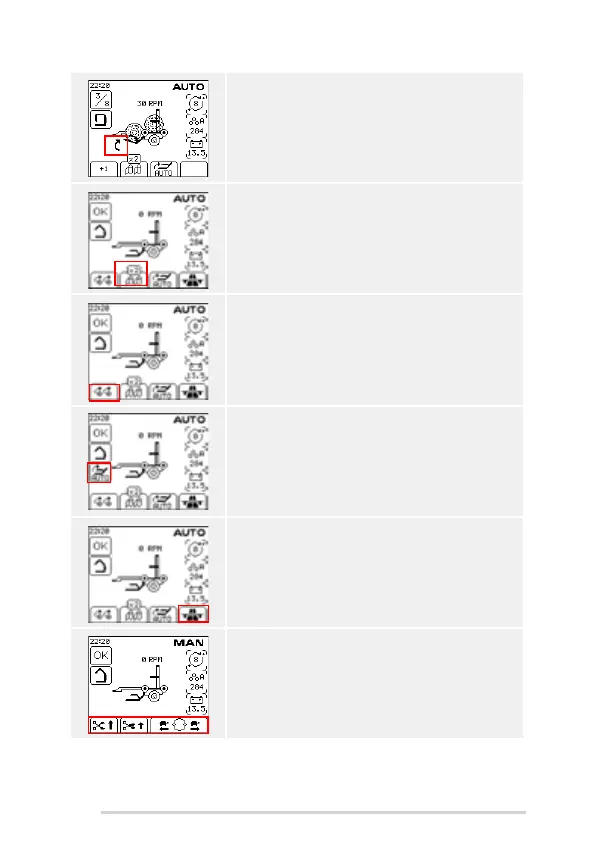
A second bale can be preloaded onto the wrapper by
pressing the AUTO LOAD button a second time after
first bale is loaded. The up arrow shows that the
second bale will load automatically after the first bale
is tipped off.
The operator can change the number of rolls of film by
pressing and holding soft key B. The number of
wrapping ring revolutions automatically doubles when
you switch from 2 rolls to 1 roll.
The bale can be rotated manually on the rollers by
pressing the first soft key A. This is useful for loading
badly shaped bales which do not sit correctly on the
wrapper after loading.
If ‘Bale Sensor’ is set to ‘on’ then an icon is shown on
the main wrapping screen to notify the operator that
the sensor is now live. ‘Bale Sensor’ defaults back to
off every time the control box is rebooted.
If the wrapper is empty and the wrapping ring is in the
home position, then the transport position soft key can
be pressed to close the clamp arm and raise the load
arm into the transport position automatically. Once the
load arm is in the transport position the control unit
switches to manual mode.
In manual mode there are four soft keys:
Open ‘Cut and Hold’
Release film
Reverse the ring
Rotate ring forward slow/fast



 To Next Page