McHale Orbital Round Bale Wrapper
58
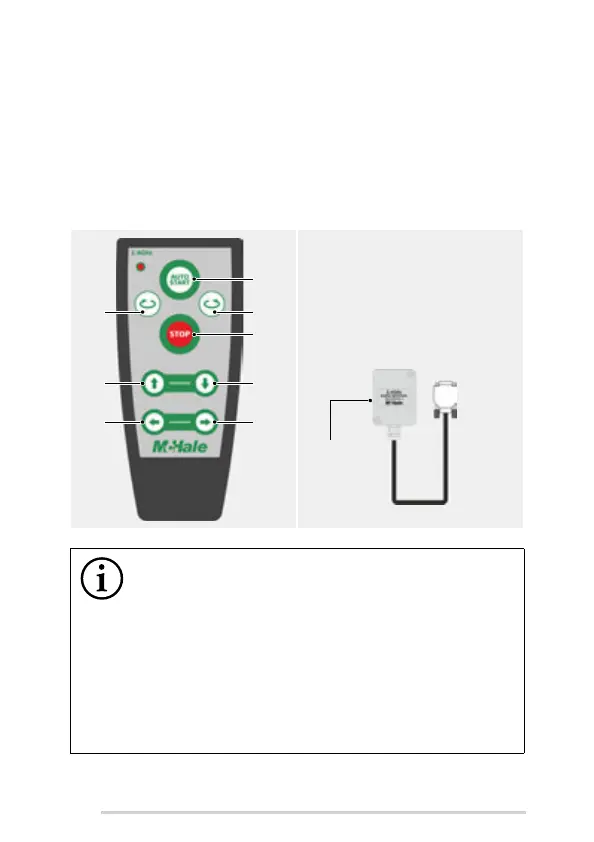
Press the stop button on the remote. A code will be shown when the remote
has been paired with the control unit.
The radio remote only works machine functions when the control unit is in
Auto mode. Press the red button on the rear of the remote when pressing any
button, except the stop button. The red LED will flash every time a machine
function is operated.
The external beeper will sound for 3 seconds before an automatic sequence
starts.
Pressing the stop button will cancel all machine functions and switch the
control unit to Manual mode.
A. Wrap/Pause/Resume/Rewrap
B. Auto load
C. Auto tip
D. Load arm up
E. Load arm down
F. Close clamp arm
G. Open clamp arm
H. Stop
NOTE: This equipment has been tested and found to comply with
the limits for a Class A digital device, pursuant to part 15 of the
FCC Rules
These limits are designed to provide reasonable protection against
harmful interference when the equipment is operated in a commercial
environment.
This equipment generates, uses, and can radiate radio frequency energy
and, if not installed and used in accordance with the instruction manual
may cause harmful interference to radio communications.
Operation of this equipment in a residential area is likely to cause
harmful interference in which case the user will be required to correct the
interference at his own expense.



 To Next Page