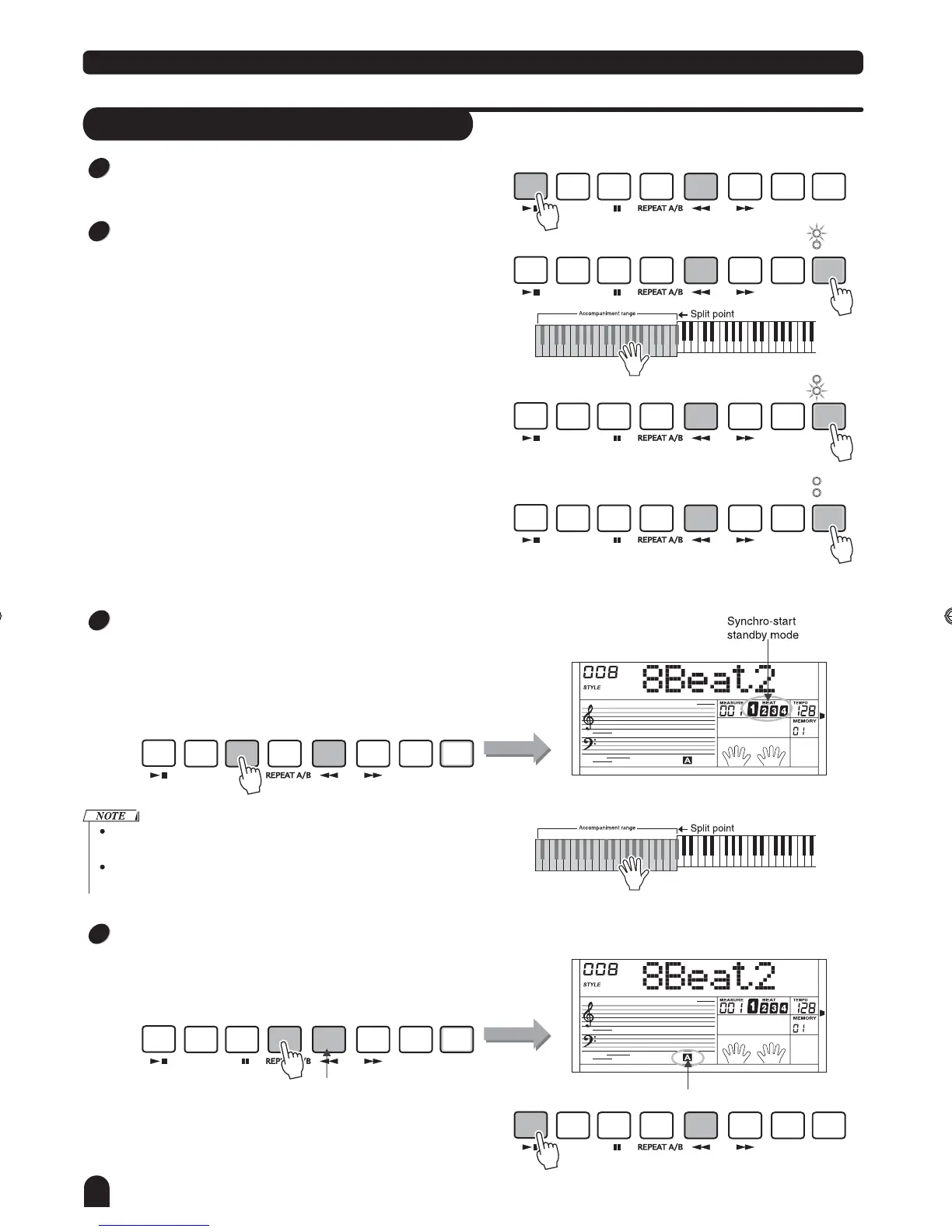
Style Control
Start a Style
Start immediately:
Use [START/STOP] button to start the style.
Chord. Mode:
Press the [CHORD MODE] button for the first time to enter
the FINGERED mode, the relevant LED is lightened.
The left area of keyboard are known as the chord area,
when playing the chord, both the bass and the chord voice
phonate.
Press the [CHORD MODE] button for the second time to
enter the FULL RANGE mode, the relevant LED is lightened.
The whole keyboard are known as the chord area, but only
to detect the chord and make the current voice of keyboard
while style playing.
Press the [CHORD MODE] button for the third time to close
the chord mode.
There are 2 ways to detect the chord: single finger detect
and fingers detect. If the chord playing accord with fingers
detect, it is recognized as the fingers chord. If not, single
finger chord will be recognized.
14
START/
STOP
START/
STOP
START/
STOP
START/
STOP
START/
STOP
START/
STOP
START/
STOP
SYNC
STOP
SYNC
STOP
SYNC
STOP
SYNC
STOP
SYNC
STOP
SYNC
STOP
SYNC
STOP
SYNC
START
SYNC
START
SYNC
START
SYNC
START
SYNC
START
SYNC
START
SYNC
START
A
A
A
A
A
A
A
FADE
FADE
FADE
FADE
FADE
FADE
FADE
B
B
B
B
B
B
B
CHORD
MODE
CHORD
MODE
CHORD
MODE
CHORD
MODE
CHORD
MODE
CHORD
MODE
CHORD
MODE
INTRO/
ENDING
INTRO/
ENDING
INTRO/
ENDING
INTRO/
ENDING
INTRO/
ENDING
INTRO/
ENDING
INTRO/
ENDING
FINGERED
FINGERED
FINGERED
FULL RANGE
FULL RANGE
FULL RANGE
1
2
3
4
Sync Start:
Press the [SYNC START] button, The SYNC START LED
lightens, LCD flashes 4 beats with current tempo. Press the
[INTRO/ENDING] button to insert INTRO. In this mode,
playing the keyboard will start the style automatically.
Intro Start:
When style is not playing, press the [INTRO/ENDING] button,
"A" or "B" flashes on LCD, indicates the intro section is ready
to play. Length of intro varies in different style.
Press [START/STOP] button, then the style starts with an
intro section , followed by the main section.
If chord mode is off, play any key on keyboard to start the style.
If chord mode is on, only play the chord area key to start the style
with the Auto Bass Chord accompaniment.
Flashing
Flashing
TOUCH
TOUCH
DZB63B0DQXDOB*BSGIDZB63B0DQXDOB*BSGI



 To Next Page