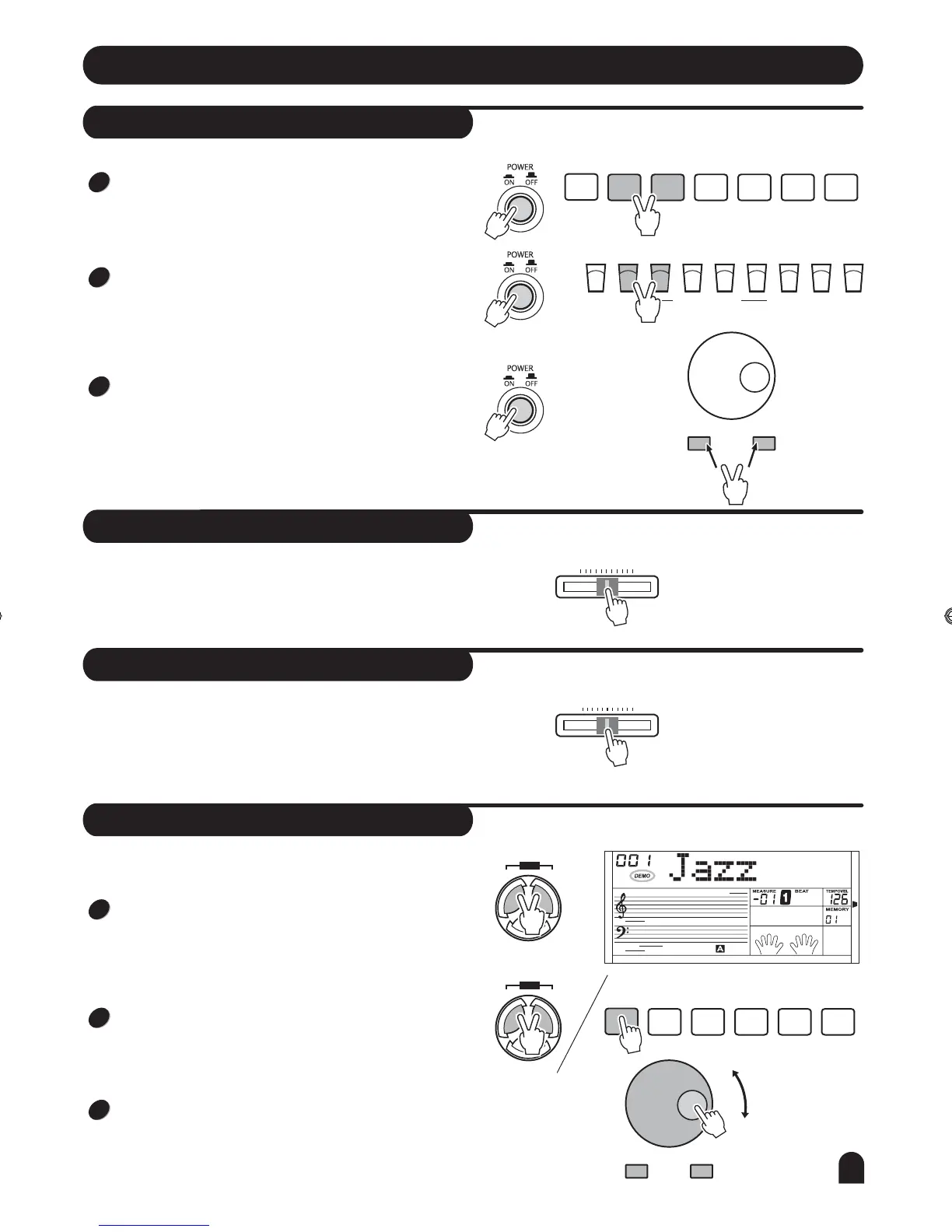
Press the [RECORD] & the [PLAY/STOP] button synchro-
nously when it is power on,It can clear the record data.
Press the [STORE] & the [M1] button synchronously when
it is power on,It can set all the memory data to default
value.
Press the [+/YES] & the [-/NO] button synchronously when
it is power on, it can reset all the setting to the default value
(Including Memory data, Record data, Style Record data.)
Preparation
Power on key combination
Master volume control
Brilliance
Demo
- / NO
- / NO
+ / YES
+ / YES
STYLE
RECORD
START/
STOP
RECORD
SYNC
STOP
PLAY/
STOP
SYNC
START
MELODY
1
A
MELODY
2
B
ACCOMP
INTRO/
ENDING
MELODY
3
STORE O.T.S.
BANK M2
M3
M4
M5 M6
M1
ONE TOUCH SETTING
Push the [VOLUME] handspike rightwards, the volume
increases.
Push it leftwards, the volume decreases.
To create brighter sound, push [BRILLIANCE] handspike to
the right.
To create gloomy sound, push [BRILLIANCE] handspike to
the left.
You can change the piano brilliance as your wish.
VOLUME
MAX MIN
MELLOW BRIGHT
BRILLIANCE
There are total of 2 Demos.
Press the [STYLE] & the [VOICE] button synchronously to
enter the demo mode, the DEMO flag on LCD is lightened.
It displays the first demo and plays all demos circularly.
Press the [STYLE] & the [VOICE] button again or press the
[START/STOP] button to stop playing and quit current mode.
When playing, press the [+/YES] & the [-/NO] button or rot-
ate the DIAL to select the song you want.
SONG
STYLE VOICE
DEMO
SONG
STYLE VOICE
DEMO
1
1
2
2
3
3
9
DZB63B0DQXDOB*BSGIDZB63B0DQXDOB*BSGI



 To Next Page