Load
SD Function
- / NO + / YES
1
2
3
39
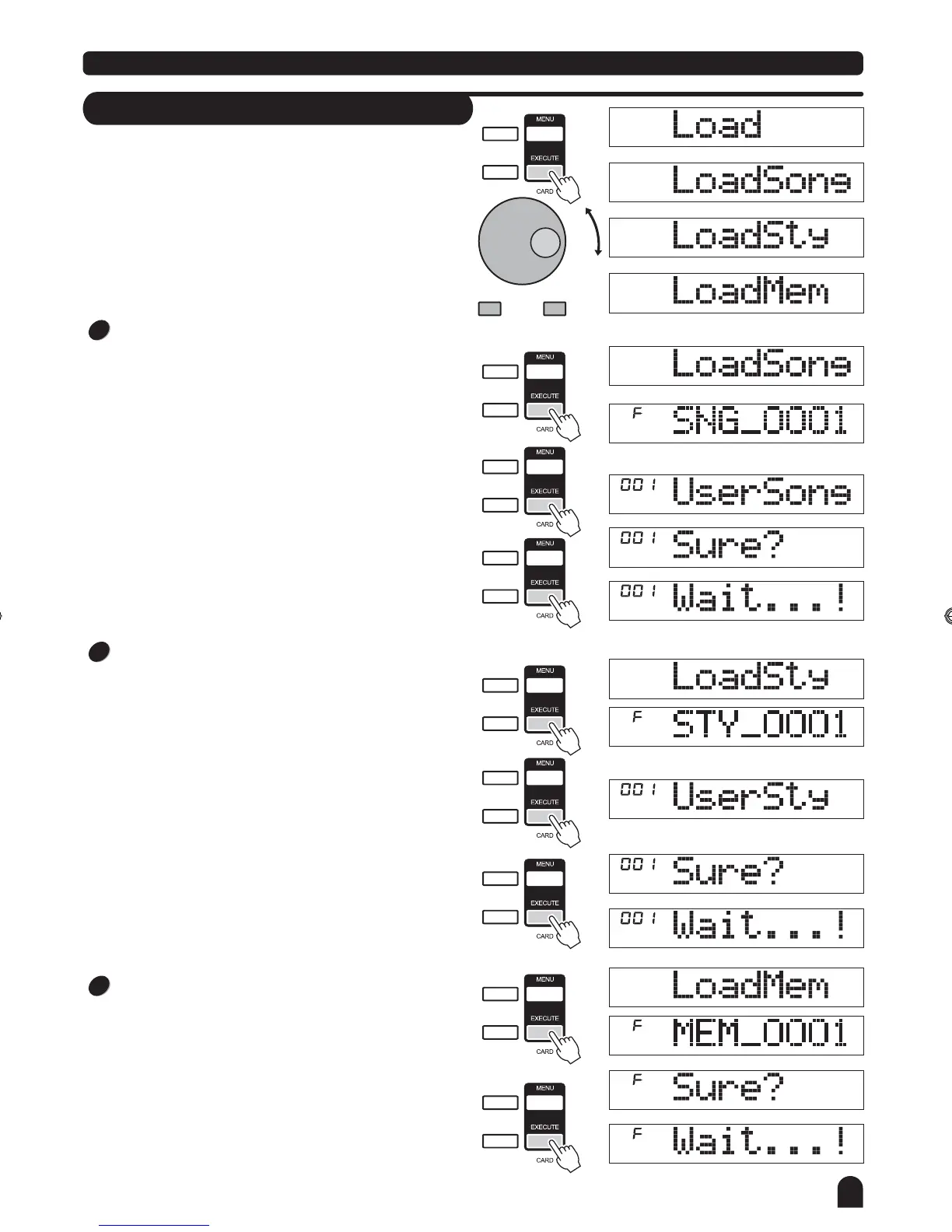
Select the menu Load and press the [EXECUTE] button,
the Load menu are displayed on the LCD, it includes "Load
Song", "LoadSty" and "LoadMem". Use the [+/YES],[-/NO]
buttonand DIAL to select one.
""
SPLIT
TOUCH
SD
SPLIT
TOUCH
SD
SPLIT
TOUCH
SD
SPLIT
TOUCH
SD
SPLIT
TOUCH
SD
SPLIT
TOUCH
SD
SPLIT
TOUCH
SD
SPLIT
TOUCH
SD
SPLIT
TOUCH
SD
Load Memory
Select the menu "LoadMem" and press the [EXECUTE]
button, the memory files you saved or directory in the root
of SD are displayed on the LCD, the main name of the file
includes 8 characters, the postfix name is MEM.
Press the [EXECUTE] button, "Sure?"
will be displayed
on the LCD.
You
just need to press the [EXECUTE] button to load the file.
Load Song
Select the menu "LoadSong" and press the [EXECUTE]
button, the user songs you saved or directory in the root of
SD are displayed on the LCD, the main name of the file
includes 8 characters, the postfix name is MID. You can
select songs with DIAL or the [+/YES] & the [-/NO] button.
Press the [EXECUTE] button to confirm the desired file,
the empty user song slot will be displayed on the LCD,
you can select them with dial or the [+/YES] and the [-/NO]
button.
Press the [EXECUTE] button, "Sure? "
will be displayed
on the LCD.
You just need to press the [EXECUTE] button to load the file.
Load Style
Select the menu "LoadSty" and press the [EXECUTE]
button, the user styles you saved or directory in the root of
SD are displayed on the LCD, the main name of the file
includes 8 characters, the postfix name is STY. You can
select
styles with dial or the [+/YES] & the [-/NO] button.
Press the [EXECUTE] button to confirm the desired file, the
The empty user style slot will be displayed onthe LCD,
you can select them with dial or the [+/YES] & the [-/NO]
button.
Press the [EXECUTE] button, "Sure?"
will be displayed
on the LCD.
You just need to press the [EXECUTE] button to load the
file.
DZB63B0DQXDOB*BSGIDZB63B0DQXDOB*BSGI



 To Next Page