WARNING
To avoid damages, please be sure to turn off the power
switches before you disconnect the related devices from
the piano.
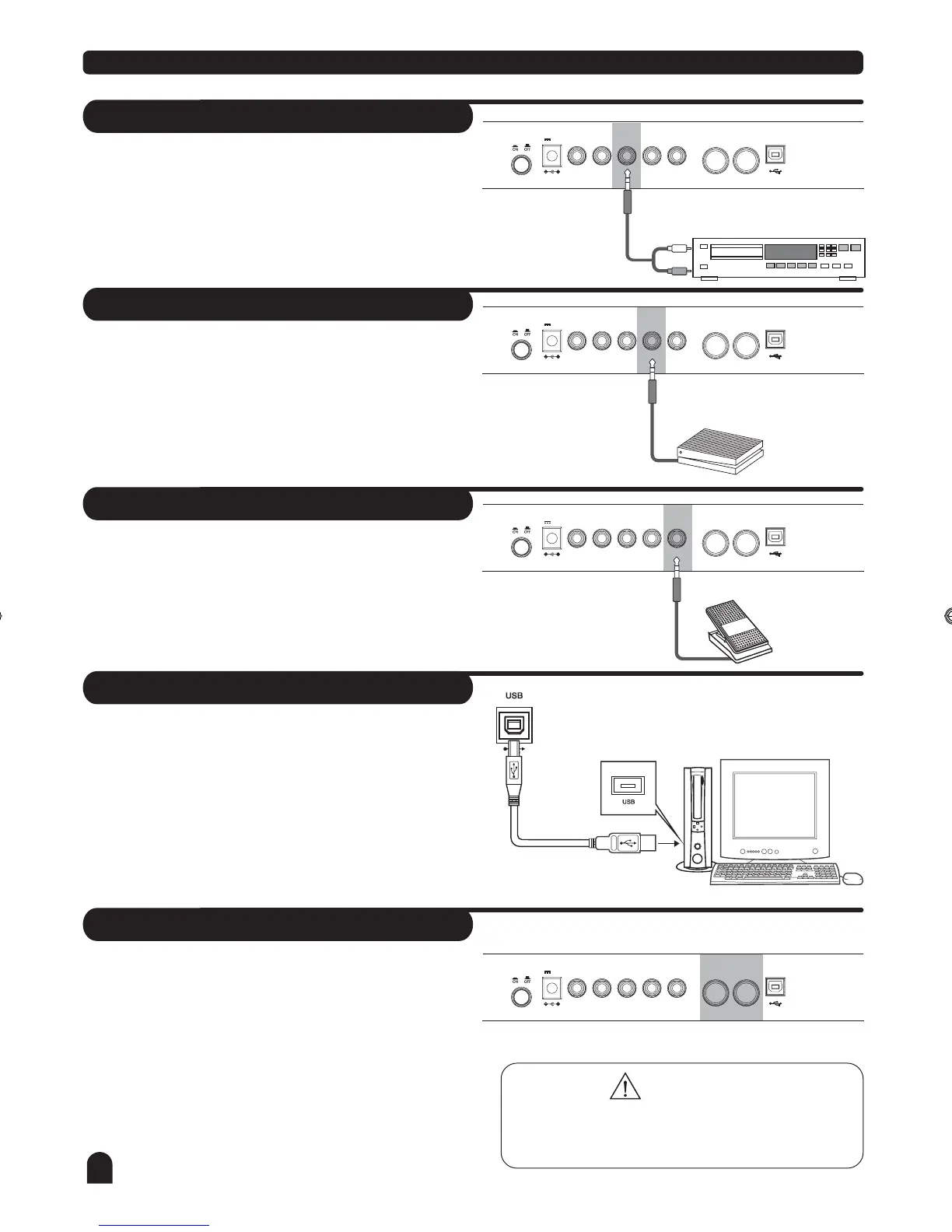
The audio output from a CD player connected to the AUX
IN jack on the left panel can be mixed with the sound of the
piano module. This function is convenient when you want
to play along with a favourite song.
The volume of the external signal is adjusted with the
VOLUME button.
An optional footswitch can be plugged into the ASSIGN jack
for
control.
soft pedal,sostenuto pedal,memory select,style start/stop
Connection
AUX IN Jack
Sustain Jack
Assign Jack
L/MONO
L/MONO
L/MONO
R
R
R
ASSIGN
ASSIGN
ASSIGN
SUSTAIN
SUSTAIN
SUSTAIN
USB
USB
USB
AUX OUT
AUX OUT
AUX OUT
AUX IN
AUX IN
AUX IN
PEDAL
PEDAL
PEDAL
MIDI IN
MIDI IN
MIDI IN
MIDI OUT
MIDI OUT
MIDI OUT
POWER
POWER
POWER
12V
12V
12V
MIDI stand for Musical Instrument Digital Interface.
MIDI is a world wide standard that makes it possible for
various electronic musical instruments and other devices.
MIDI IN:
received by this terminal.
MIDI OUT:
Data produced by the Digital Piano is transmitted to other
MIDI instruments via MIDI from this terminal.
Data transmitted from other MIDI instrument via MIDI is
MIDI IN/OUT Jack
L/MONO
R
ASSIGNSUSTAIN
USBAUX OUT
AUX IN PEDAL MIDI IN
MIDI OUTPOWER
12V
Step on the footswitch, all notes played on the keyboard
have a longer sustain effect.
USB Jack
Connect PC or other USB host devices that support USB
Audio.
You can simply connect the MIDI/USB converter to your
USB play on your computer and plug the MIDI in and
out cables into the piano, after the driver is installed and
initialization is finished, you can choose USB Audio
Device in the device menu of the software to transfer
midi data.
8
DZB63B0DQXDOB*BSGIDZB63B0DQXDOB*BSGI



 To Next Page