Style Record
29
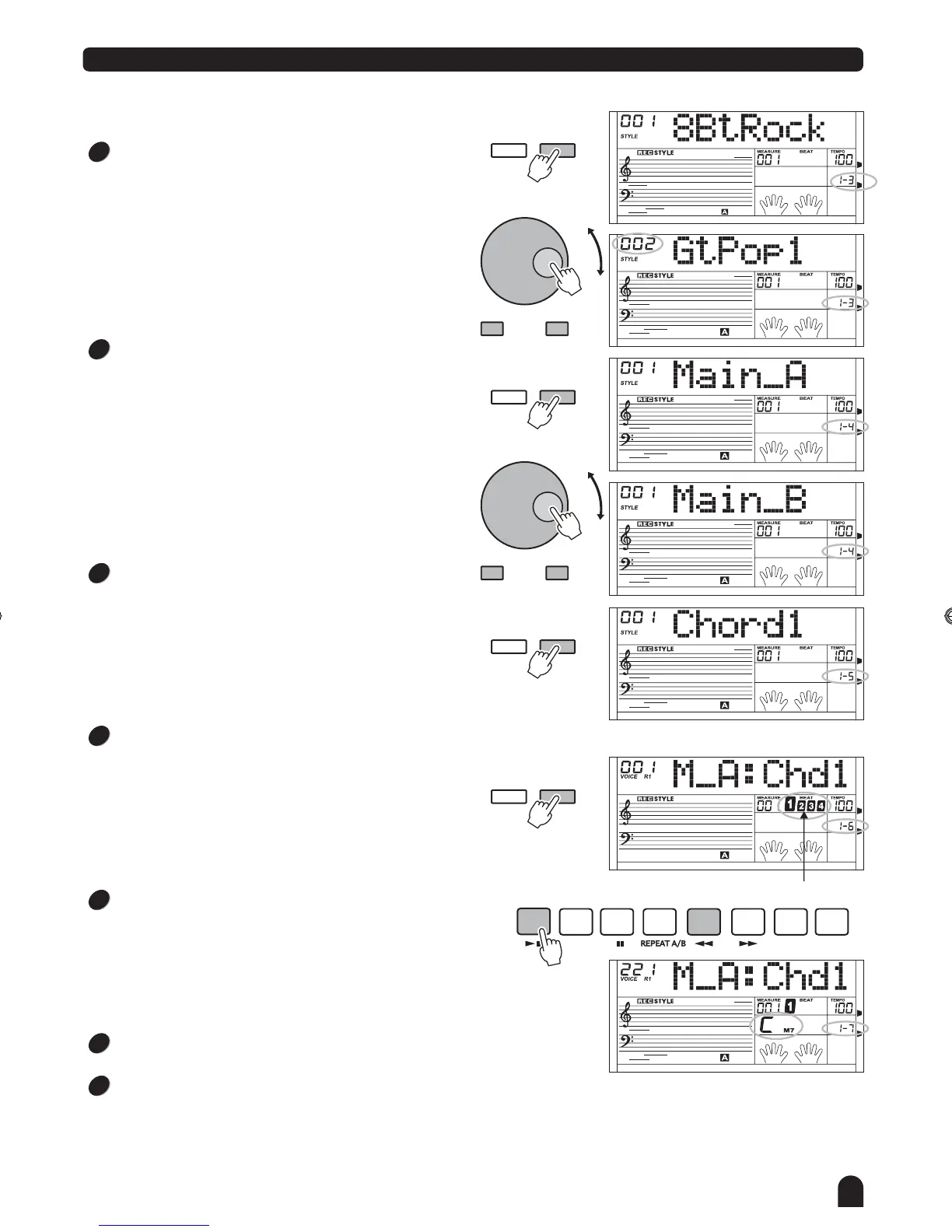
Press the [FUNCTION / NEXT] button to enter the record
ready menu.
The style record is on the synchronized start mode, and
the beat display will flash at the current tempo.
At that time you can use the [+/YES], [-/NO] button or DIAL
or direct select buttons to change the voice for the current
track. If you've picked the drum track, you would only have
drum kits for selection.
Press the [FUNCTION / BACK] button to return previous
menu.
Press the [START/STOP] button to start recording.
The style will play with CM7 chord, the selected paragraph
of the original rhythm begins to play in a loop way.
Play the keyboard to record, the recorded data in current
loop would be replayed in next loop. Also you can delete the
note being recorded in last loop by pressing the same note
at same time in next loop within 1/8-quarter note around it
played.
Press the [START/STOP] button again to stop recording
and return to the synchronized start state.
Press the [] button to exit the current
mode. You can also repeat the operation by pressing the
[FUNCTION / BACK] button to return previous menu and
select other options.
STYLE RECORD
FUNCTION
Flash together
NEXTBACK
START/
STOP
SYNC
STOP
SYNC
START
A
FADE
B
CHORD
MODE
INTRO/
ENDING
6
7
8
9
Press [FUNCTION / NEXT] to enter rhythm selection menu.
Press [+/YES], [-/NO] button or rotate the DIAL to select a
original rhythm.
Press [FUNCTION / BACK] to return previous menu.
FUNCTION
NEXTBACK
FUNCTION
NEXTBACK
FUNCTION
NEXTBACK
- / NO + / YES
- / NO + / YES
Press [FUNCTION/NEXT] button to enter the paragraph
menu.
Press [FUNCTION/NEXT] button to enter the paragraph
menu.
Press button or rotate
the paragraph of rhythm. There are 8 paragraphs to be
selected includes: Main _ A, Main _ B, Intro _ M, Intro _ m,
Fill _ A, Fill _ B, Ending _ M, Ending _ m.
[+/YES], [-/NO] the DIAL to select
Press [+/YES], [-/NO] button or rotate the DIAL to select
the track: Rhythm sub, Rhythm main, bass, chord 1, chord 2,
chord 3, phrase 1, phrase 2.
3
4
5
DZB63B0DQXDOB*BSGIDZB63B0DQXDOB*BSGI



 To Next Page