SD Function
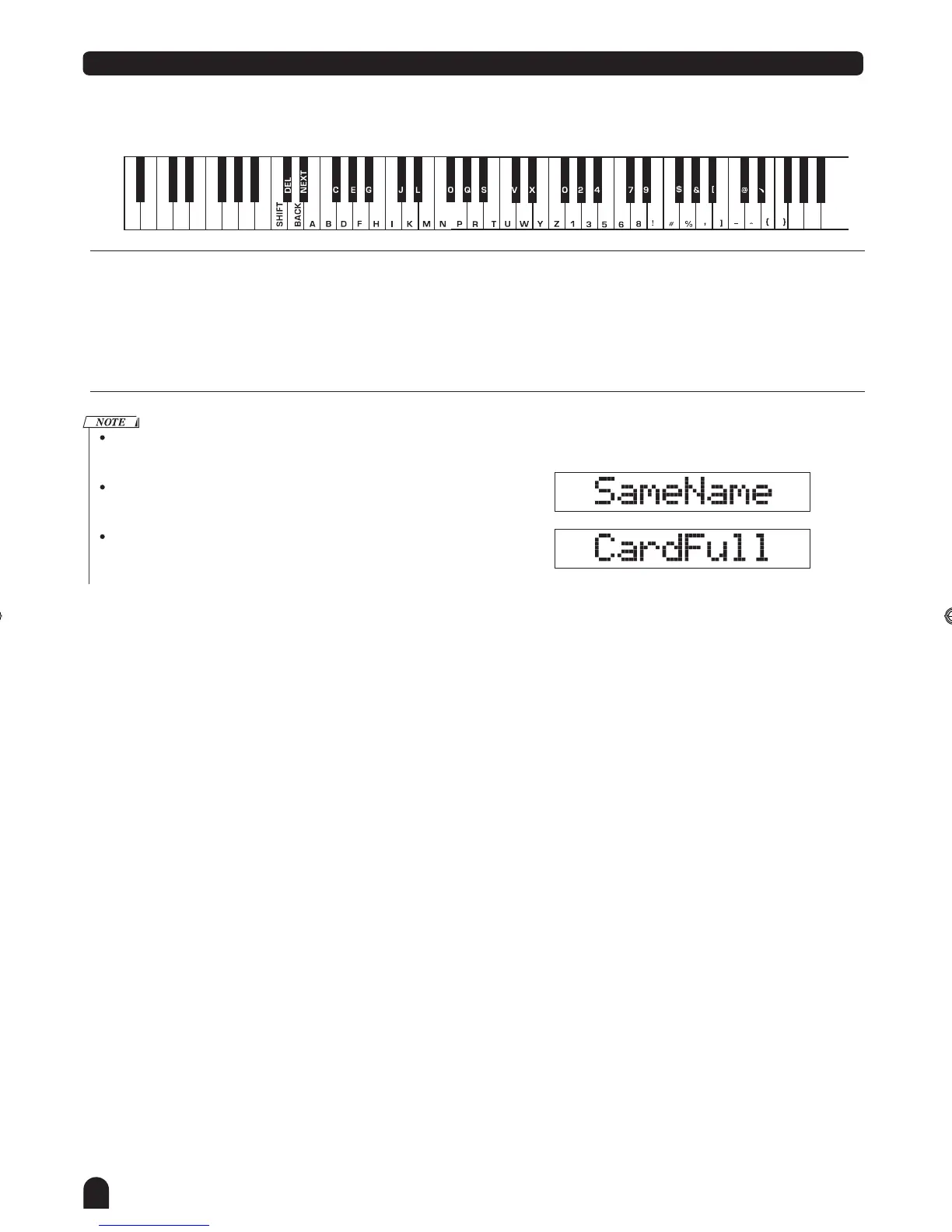
The file name includes 1-8 characters which can be inputted with the keyboard.
Keyboard & ASCII Character Relative Table is as follows:
[DELETE]:
To erase the character which
cursor flashes.
[BACK]:
move the current cursor to the left.
[NEXT]:
move the current cursor to the right.
[SHIFT]:
26 letters will be displayed with
capital letter by pressing the key-
board in letter area directly.
Explanation:
While in the SD mode, press the [SHIFT] key hold on, it won't
respond to it.
If the name input has already existed, LCD will display "SameName"
temporarily, then exit the SD mode to return the previous state.
If there's no enough space in the card after name input, LCD will
display "CardFull" temporarily, then exit the SD mode to return the
previous state.
42
DZB63B0DQXDOB*BSGIDZB63B0DQXDOB*BSGI



 To Next Page