39 Version 1.0
The default setting for Firewall Protection Level security is Low, which attacks Blocking
Policy, allow all Inbound and Outbound IP Filter Policy, and allow all router service access
policy from WAN. Please change it as your demand, and click on Next button to next step
(see also 3.4.2.1 Firewall Configuration).
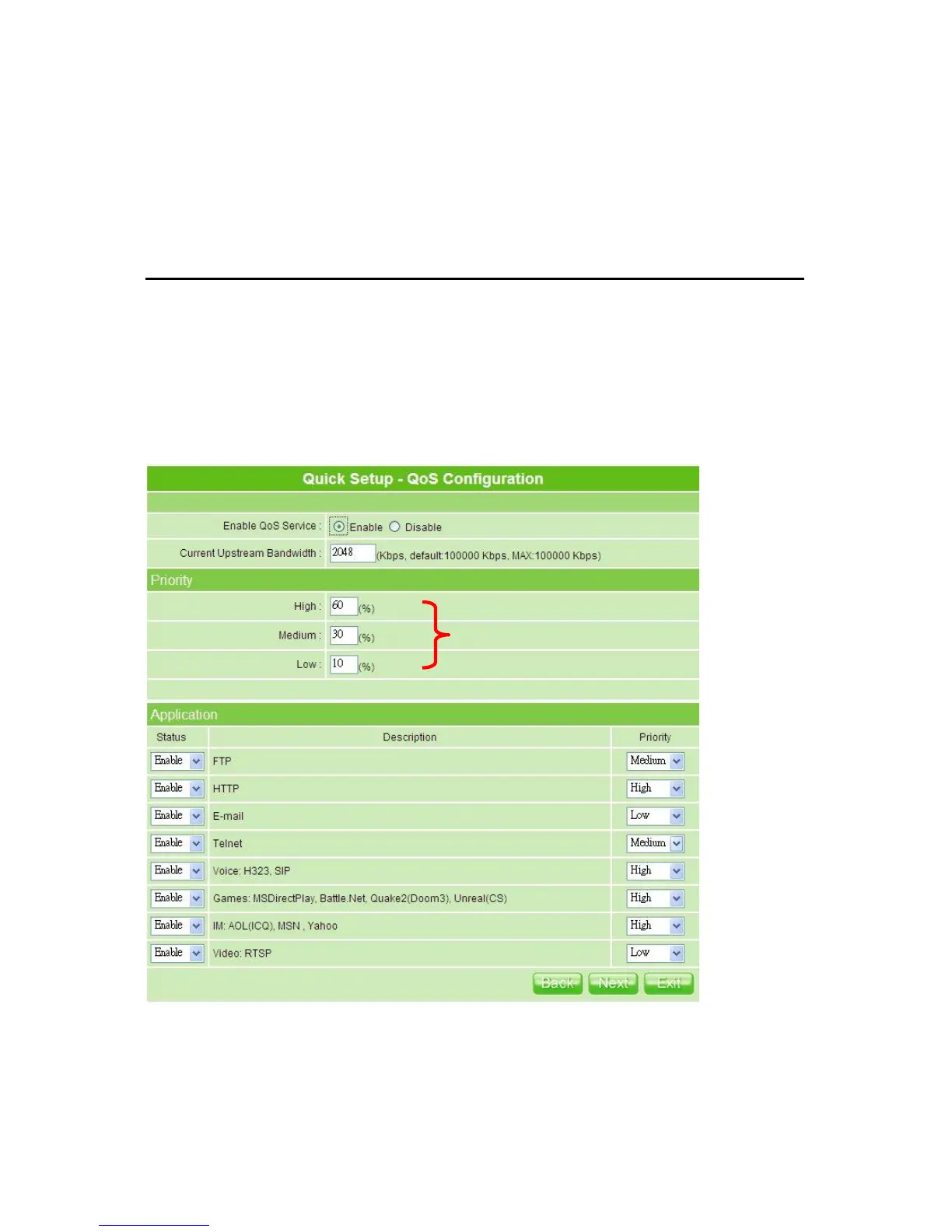
3.2.9 QoS Configuration Setup
QoS management helps to set and evaluate QoS policies and goals. It is the particular
concern for the continuous transmission of high-bandwidth video and multimedia
information. Transmitting this kind of content dependably is difficult in public networks
using ordinary best effort protocols.
Make sure your connecting bandwidth with ISP and set the priority percentage. Once setting
the QoS service, the transmitting performance will be affected, so please ensure your
connection setting before doing this setup. Click on Next button to next step after finishing
the above.



 To Next Page