P3V Veterinary Digital Ultrasonic Diagnostic Imaging System User Manual
- 82 -
When saving a file, the saving information is automatically displayed in the middle of image
area.
6.8.2. File Manager
You can use the file manager to perform the file management or browse the images.
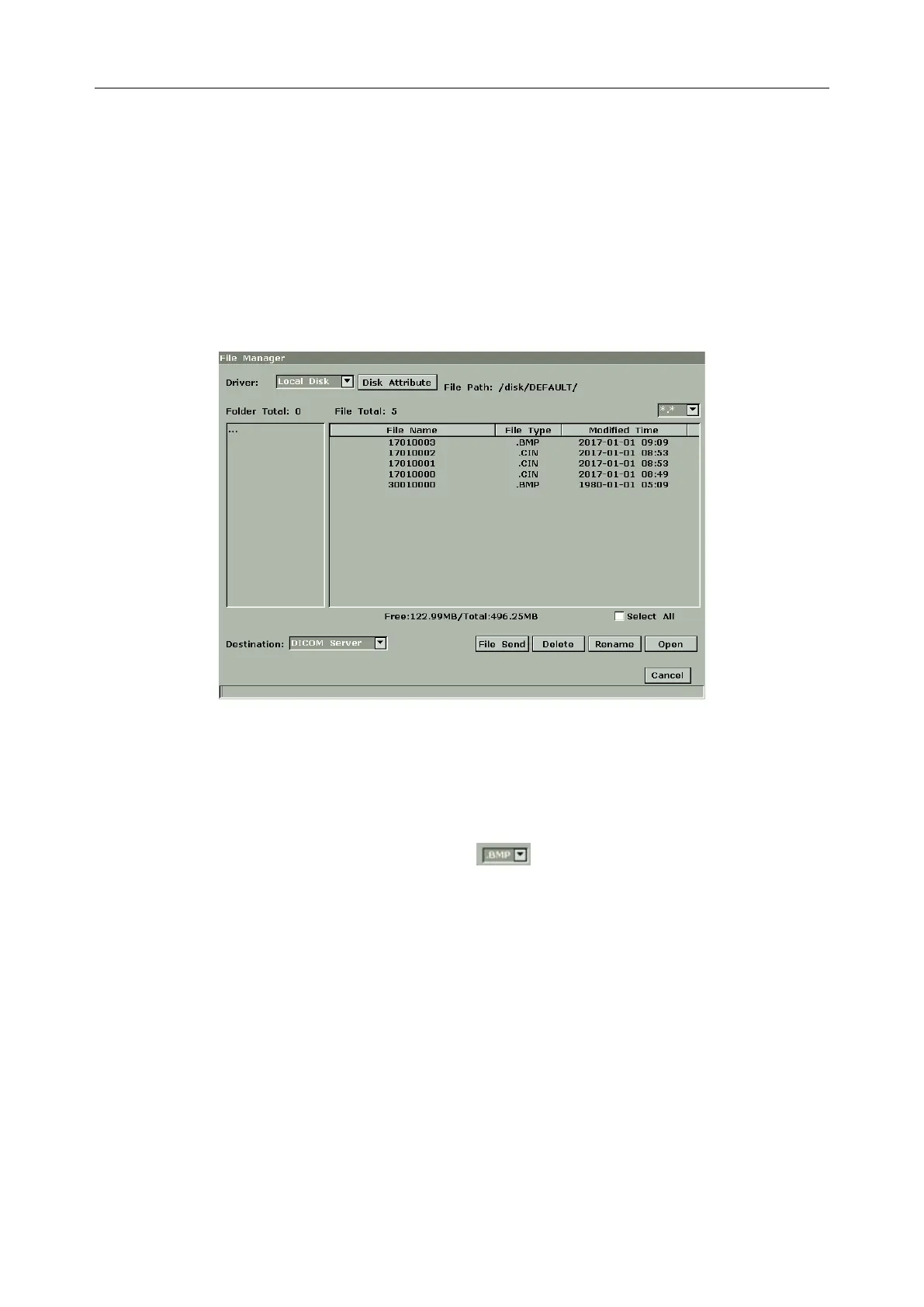
In real-time or frozen status, press File to display file menu, and select File Manager, the File
Manager dialog box pops up, as shown below.
Figure 6-25 File Manager Dialog Box
Basic operations:
Press Disk Attribute to check capacity information of current driver.
Select a file format from the pull-down menu , such as BMP/ JPG/ DCM/ FRM/ CIN/
AVI/ DAT/ PDF to display files in one type, or select *.* to display all files.
Point to a file, press Set to select it, and press Set again to deselect it; the system supports
multi-choice by default; check the Select All checkbox to select all files, and then you can
perform following operations: File Send, Delete and Open.
Click on the headings of the file list: File Name, File Type or Modified Time to rearrange
the file sequence according to the file name, file type or modified time (in
ascending/descending order).
NOTE:
1. When you are sending, deleting or renaming a file, do not connect or disconnect the
USB disk or portable hard disk.



 To Next Page