Mega 105WR Router - Manual
Page 13 of 82
3.2.2 Back Panel
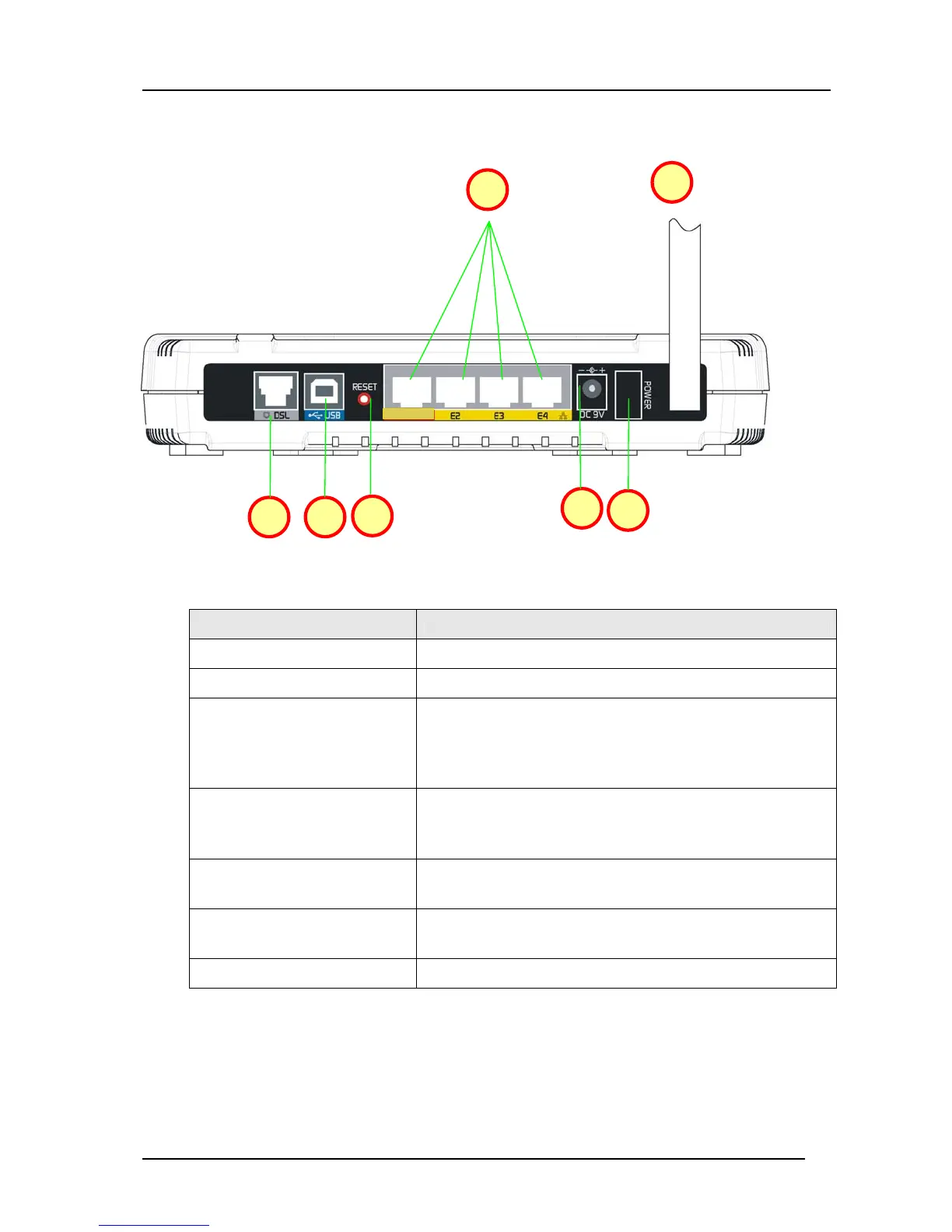
Figure 3-2 shows the back panel indicators of the Mega 105WR router.
Figure 3-2: Back Panel Indicators
Label Description
1. DSL
Connects to your ADSL enabled telephone line.
2. USB
Connects to your PC’s USB port, if required.
3. RESET
To reset the ADSL Router, simply press and hold the
reset button for at least 10 seconds (all customised
settings that you have saved will be lost and the router
will be returned to factory default settings ).
4. E1-E4
(ETHERNET)
The 10/100 Base-T Auto-MDI/MDIX Ethernet jacks
(RJ-45) connect to your PC’s Ethernet (Network) card or
an Ethernet Hub / Switch.
5. DC 9V
To connect to the Power Adapter (LPU) that comes with
your package.
6. POWER SWITCH
Push downwards to switch ON and press upwards to
switch OFF.
7. RF Antenna
2.4Ghz Wireless Antenna.
E1
1 2
3
5
6
4
7



 To Next Page