13 Malfunctions
74
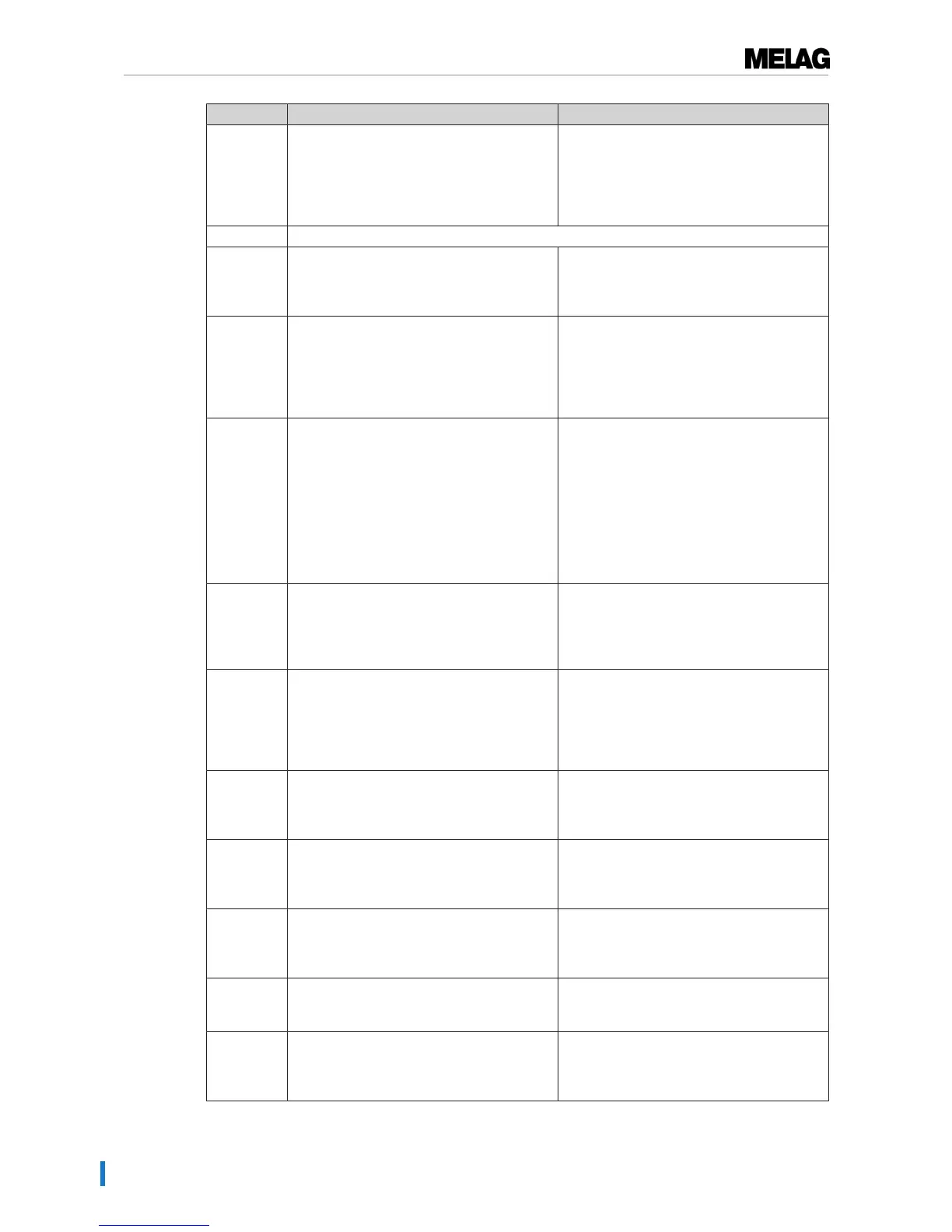
Incident Possible causes What you can do
231 The CF card cannot be located / has not
been inserted.
Check whether the CF card has been
inserted correctly or insert it in the slot again.
Upon repeated incidence, transfer the
present log files from the CF card to a
computer and format the CF card in the
steam sterilizer and then try again.
232 see event 229
236 File malfunction on the CF card Upon repeated incidence, transfer the
present log files from the CF card to a
computer and format the CF card in the
steam sterilizer and then try again.
237 The CF card has not been recognized. Check whether the CF card is write-
protected and remove the write protection.
Upon repeated incidence, transfer the
present log files from the CF card to a
computer and format the CF card in the
steam sterilizer and then try again.
238 a) It is not possible to format the CF card
because it is larger than 4 GB.
b) The CF card is defective or incompatible.
a) Only use CF cards with max. 4 GB
memory.
b) Attempt to format the CF card on the
computer.
The CF card is defective or incompatible. It is
possible that a non-MELAG CF card has
been used.
Please note: We recommend using only
original MELAG CF cards.
239 The CF card or a sub-directory on the CF
card is full.
1. Transfer the present log files from the CF
card to a computer
2. Re-format the CF card in the steam
sterilizer.
3. Try again.
240 The CF card has not been recognized. Make sure that the CF card has been
inserted in the slot correctly.
Upon repeated incidence, transfer the
present log files from the CF card to a
computer and format the CF card in the
steam sterilizer and then try again.
249 The door does not close. The door seal and/
or the seal face is soiled.
Check and clean the door seal and seal face
on the sterilization chamber for soiling,
foreign bodies or damage (see Cleaning
[}page 59]).
305 The connection cable behind the display is
loose or has a loose contact.
Remove the display from the bracket and
check whether the connection cable has
been connected to the display correctly and
has not suffered damage.
351 The maximum operating interval or the
number of batches since initial
commissioning or the last maintenance have
been reached. Maintenance is necessary
Arrange for maintenance with an authorized
customer services/stockist technician. You
can continue to operate the steam sterilizer
until the maintenance.
353 The steam sterilizer was switched off too
early after alteration of the settings.
Always wait until the alterations in the steam
sterilizer have been fully accepted before
switching off the steam sterilizer.
367 The internal malfunction log memory is full. Ensure that the selected output media are
suitable for your instruments and are ready.
Working in the “Log output” menu, output the
non-outputted logs.












 To Next Page