MM-IM User Guide
73
Dialback troubleshooting
Get address and
try to connect
Alarm is raised
Is there an IP dial
out address?
Did it connect?
Yes
Are there any more IP
dial out addresses?
No
Yes
Increment
consecutive IP dial
in failures
Are there 10 or
more consecutive IP
failures?
Raise “High Dial in
Failure” flag
Yes
No
Get next available
PSTN number
No
No
Zero consecutive
IP dial in failures
Yes
Did it connect?
Blacklist number
for 10 minutes &
increment
consecutive PSTN
dial in failures
Are there any more
PSTN numbers?
No
No
Next PSTN
number will be
available in 1
minute
Zero consecutive
PSTN dial in
failures
Yes
Yes
Is the number
available now?
Dial number
Yes
First number will
be available in 2
minutes or when
its blacklist timer
expires, whichever
is longer
No
Wait for number to
become available
Is the number
available now?
No
Yes
No
Finish
Are there 10 or
more consecutive
PSTN failures?
Raise “High Dial in
Failure” flag
Yes
Are there any PSTN
numbers?
Yes
Wait 30 seconds
No
Are there still
alarms present on
the MM-IM?
Yes
No
Have there been
any IP polls in the
last 10 seconds?
Wait until 10
seconds has
passed since last
IP poll
Yes
No
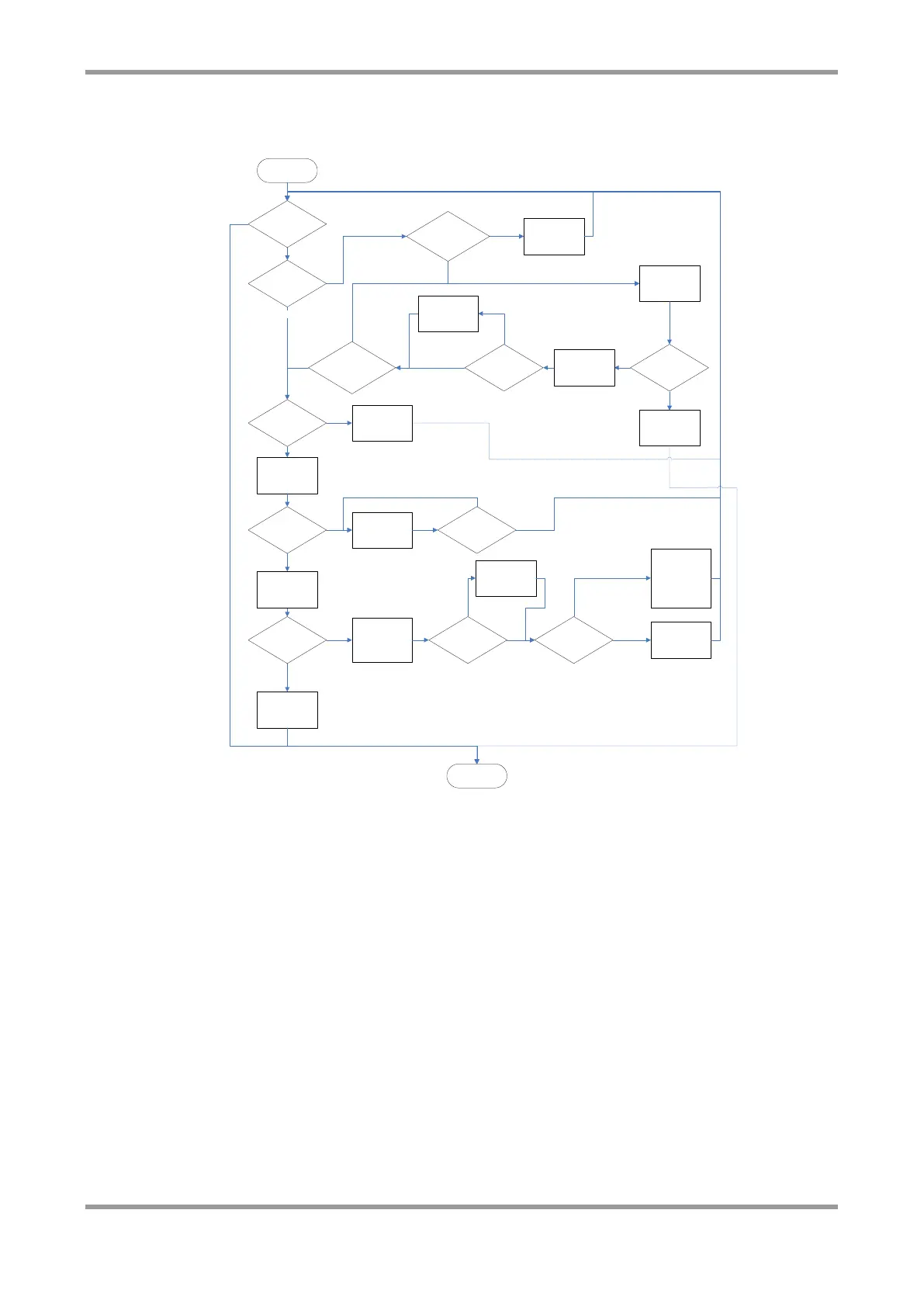
The above diagram shows how the MM-IM decides when to initiate a connection to the
DG, and the blacklist timers involved. There can be a maximum of ten IP dial out
addresses (e.g. primary and secondary DGs) and eight PSTN numbers.
Watchdog Diagnostics
The MMIM watchdog now creates a WD file which contains useful information regarding
the potential causes of an MMIM reset. The file is a temporary file and will be lost if the
MMIM is to lose power. It is possible to FTP the files from the MMIM in order to avoid
losing the information stored within.
These files are located in the /tmp directory on the MMIM.



 To Next Page