5-2 | Model 933 UV Analyzer
To perform a Span gas calibration:
1. From the Gas Calibration dialog box, perform an Auto-Zero on the
analyzer (click AutoZero) to automatically adjust the analyzer zero.
The zero gas solenoid is turned on and off automatically during the
sequence. The zero offset is adjusted based on the average reading
during the Cal Int Time duration at the end of the Auto-Zero duration
(A-Z Duration) countdown.
2. After the Auto-Zero process is complete, record the Zero gas pressure
setting and then turn off the Zero gas.
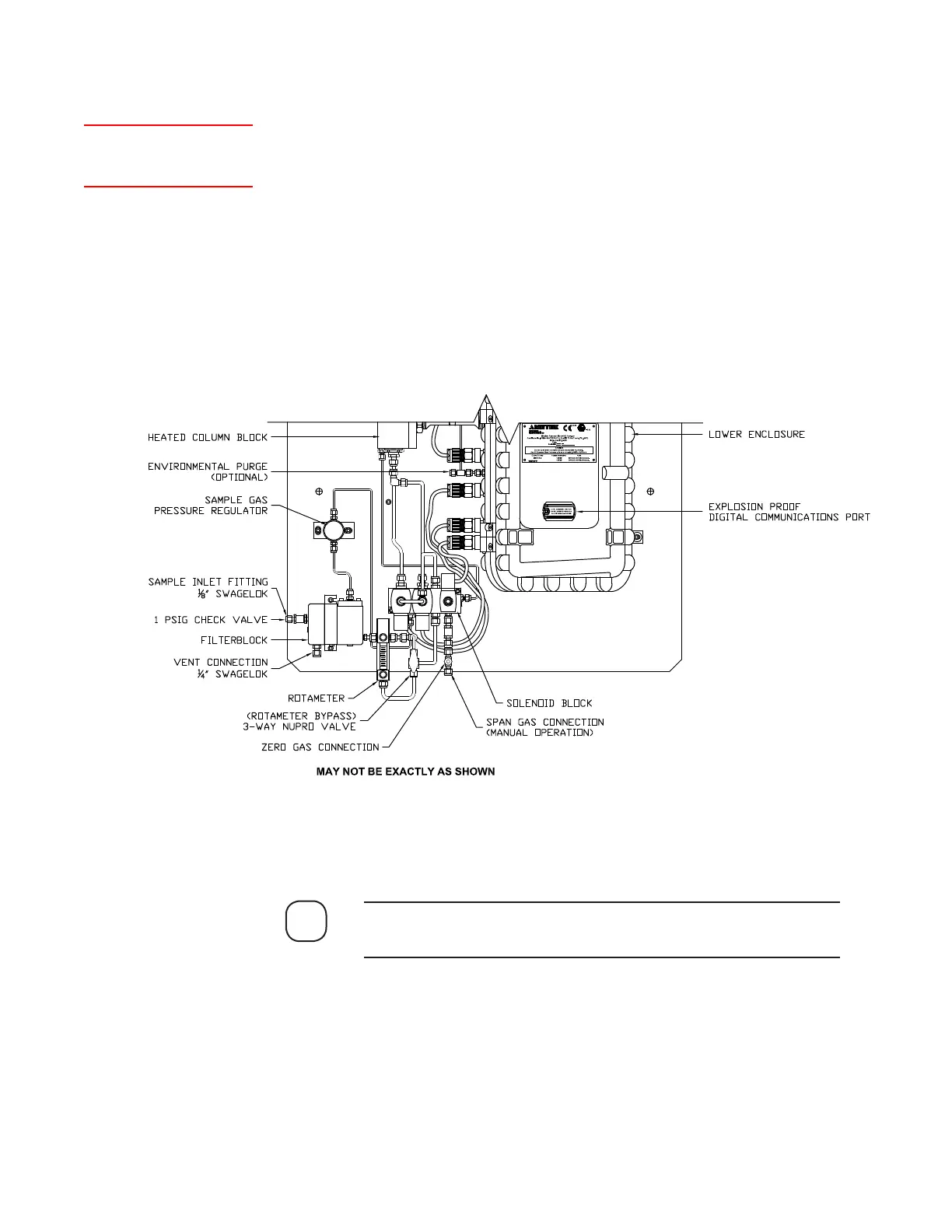
3. Remove the Swagelok cap from the Span Gas Connection (manual
operation) and connect the Span gas tubing to it (Figure 5-2).
See Appendix A for a North American style drawing (or Final “As-
Built” drawings in the analyzer Documentation Package).
4. Adjust the Span Gas regulator to between 80 and 90 PSIG (or as listed
on system drawings). The pressure must be less than the 1380 kPag
(200 psig) maximum Cell Pressure.
NOTE
Setup (tab)
Gas Calibration
Figure 5-2.
Span gas and Zero
gas inlet locations
(European).



 To Next Page