Controller / User Interface | 4-3
Reminder icon:
These reminders indicate related information about the topic,
certain actions that are necessary before continuing with the
current procedure, or information that is recommended by
AMETEK. See example at left.
Configurator Software navigation icon:
Indicates the menu structure to follow to view a menu, sub-menu,
or analyzer information while working from the software.
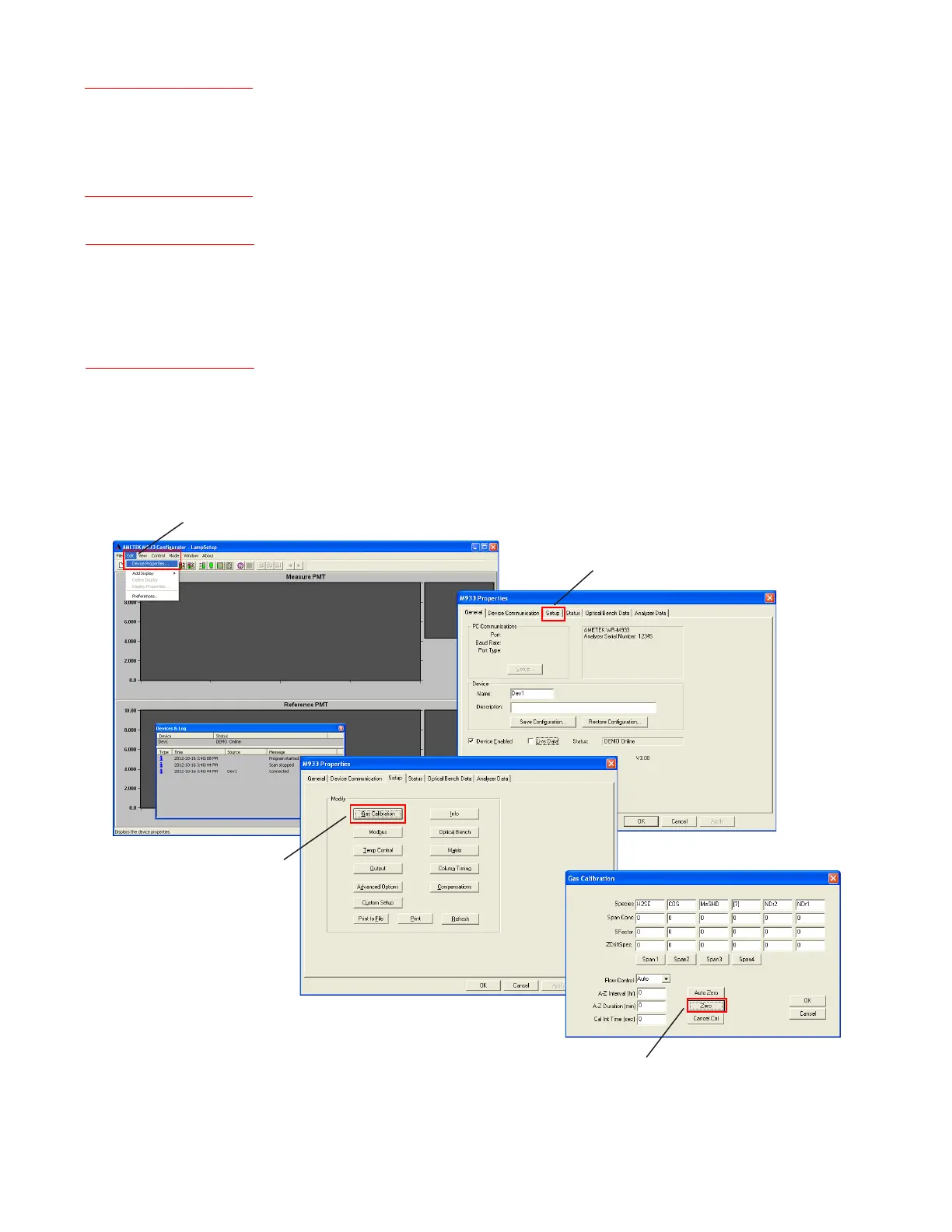
In the example at left (and illustrated below), after the
Configurator Software is first started, the M933 Configurator
main window will appear (Devices & Log window is active in this
window). To initiate a manual Zero, select Device Properties from
the Edit menu to view the M933 Properties dialog box. From here,
view the Setup tab and click the Gas Calibration button to view
the Gas Calibration dialog box. Finally, if all requirements have
been met to initiate the Zero, click the Zero button.
Example:
AMETEK recommends
installing the software and
program icons in the default
directory.
Example:
M933 Congurator (window)
Edit (menu)Device
PropertiesSetup (tab)
Gas Calibration (dialog
box)<<Zero (button)>>
Edit menu
(Device Properties selected, M933 Congurator window)
Gas Calibration button
(Setup tab)
Zero calibration button
(Gas Calibration dialog box)
Setup tab
(M933 Properties dialog box)



 To Next Page