Page 54
Outputs and Inputs
thermoMETER CTL
8.2.2 RS232 Interface
8.2.2.1 Installation
Mount the RS232 adapter, see 8.2.
i
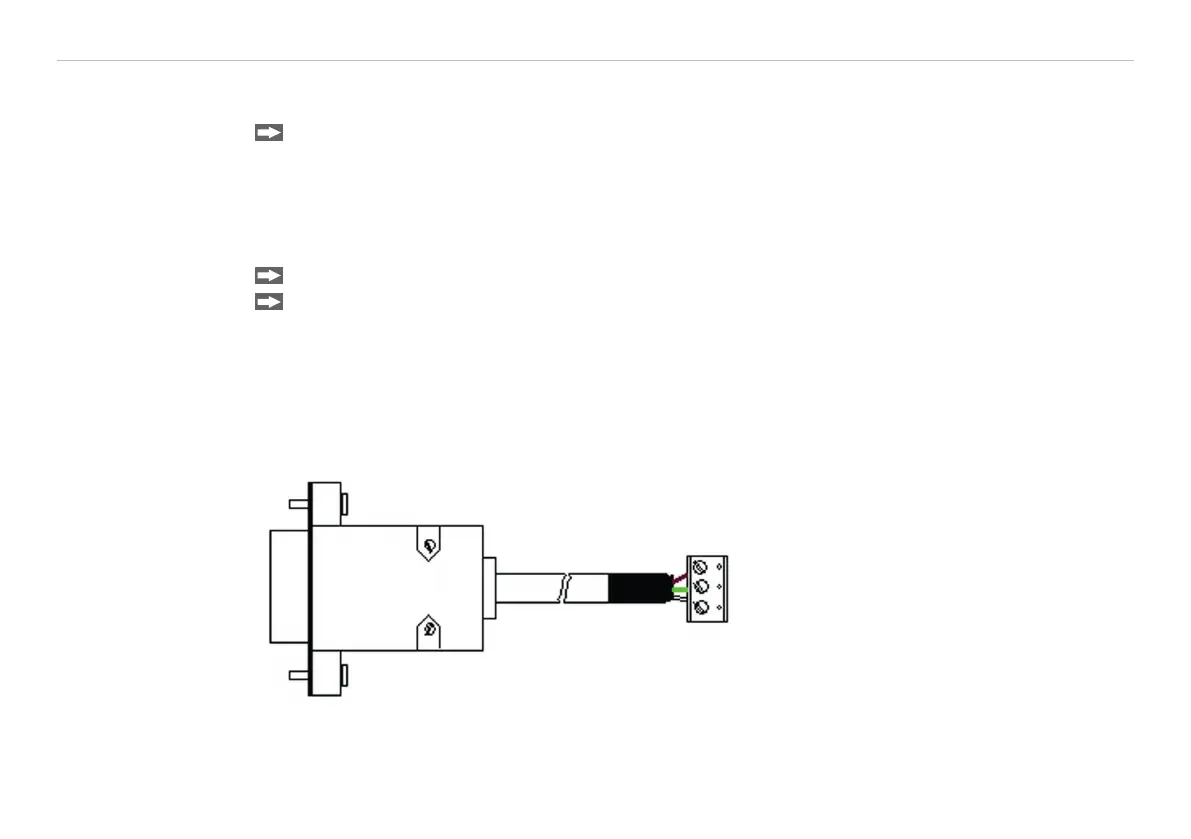
Make sure the wiring is correct according to the drawing and designation printed on the interface
board, see Fig. 17.
The CTL always needs an external power supply for operation.
8.2.2.2 Software Installation
Please install the CompactConnect software, see 11.
Follow the software instruction manual on the delivered CompactConnect software CD.
After you have connected the RS232 cable to your PC and started the CompactConnect software the com-
munication will be established.
The setting for baud rate in the CompactConnect software must be the same as on the thermoMETER CTL
unit (factory default: 9.6 kBaud).
i
Please make sure that the option Scan non-USB devices in menu Preferences/Options is acti-
vated in the CompactConnect software.
GND - brown
TXD - green
RXD - white
Fig. 17 Pin assignment RS232


 To Next Page