PDS-104G PoE Switch
Power Over Ethernet PowerView Pro User Guide
Copyright © 2016 Microsemi Page 45 of 48
Rev. 1.0 CPG – PoE BU
One Enterprise Aliso Viejo, CA 92656 USA
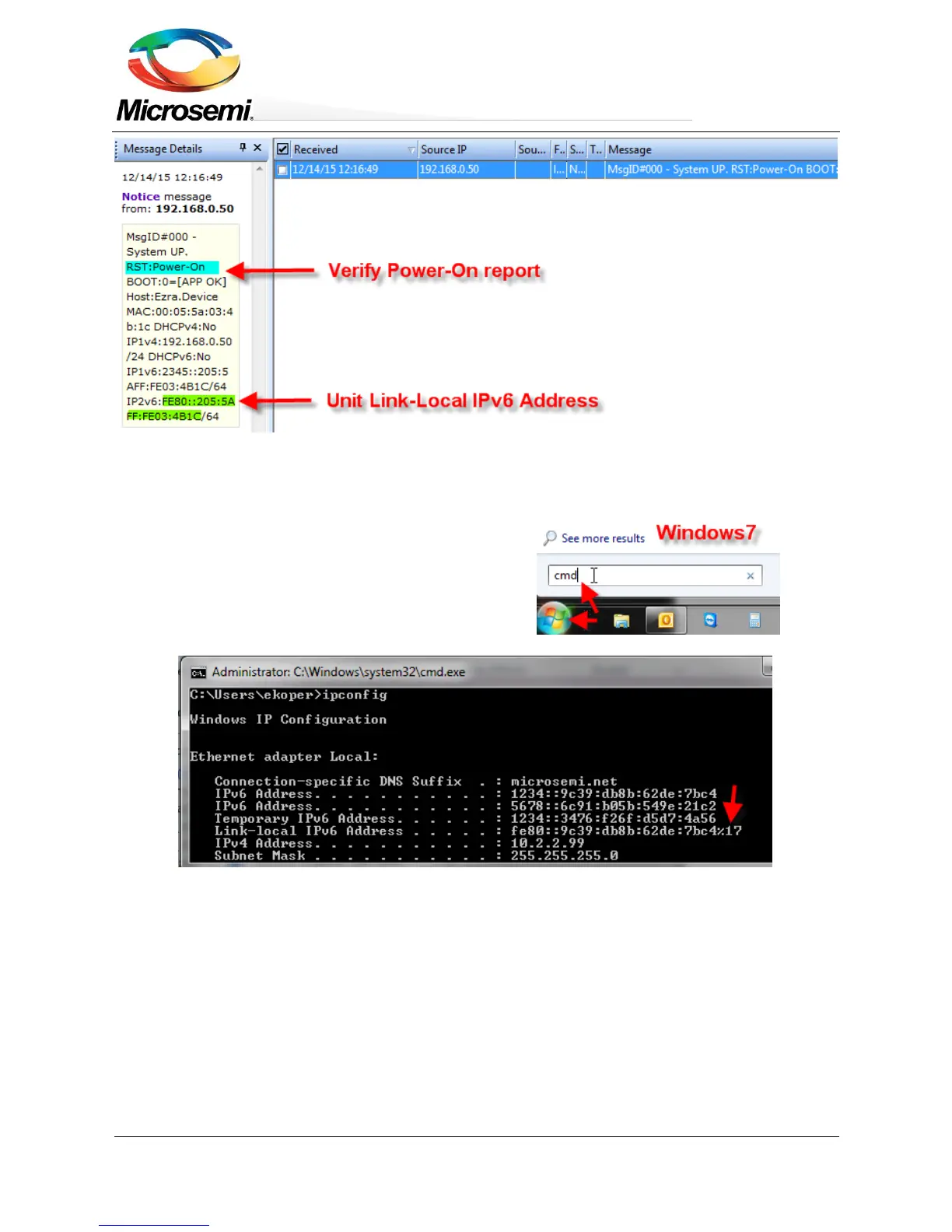
Figure 9-1: Find Unit IPv6 Link-Local address from Power-Up SysLog Report
4. Open a command window on your Windows7/Windows8 machine
For Windows 7 – Click Start and type cmd.
For Windows 8 – Press the Windows key + R key, and
type cmd.
5. Type ipconfig to identify the virtual interface index of your
IPv6 Link-Local address (%17) in the image below.
Figure 9-2: Find Unit IPv6 Link Local address from Power-Up SysLog Report
6. Prepare Telnet/SSH connection to be opened easily by typing:
Telnet <unit IPv6 Local-Link Address as reported by SysLog Server><%virtual interface number>
for example Telnet FE80::A8AB:ACFF:FE6E:57DD%17 2525 but don't press Enter.


 To Next Page