23
3.2 System Settings
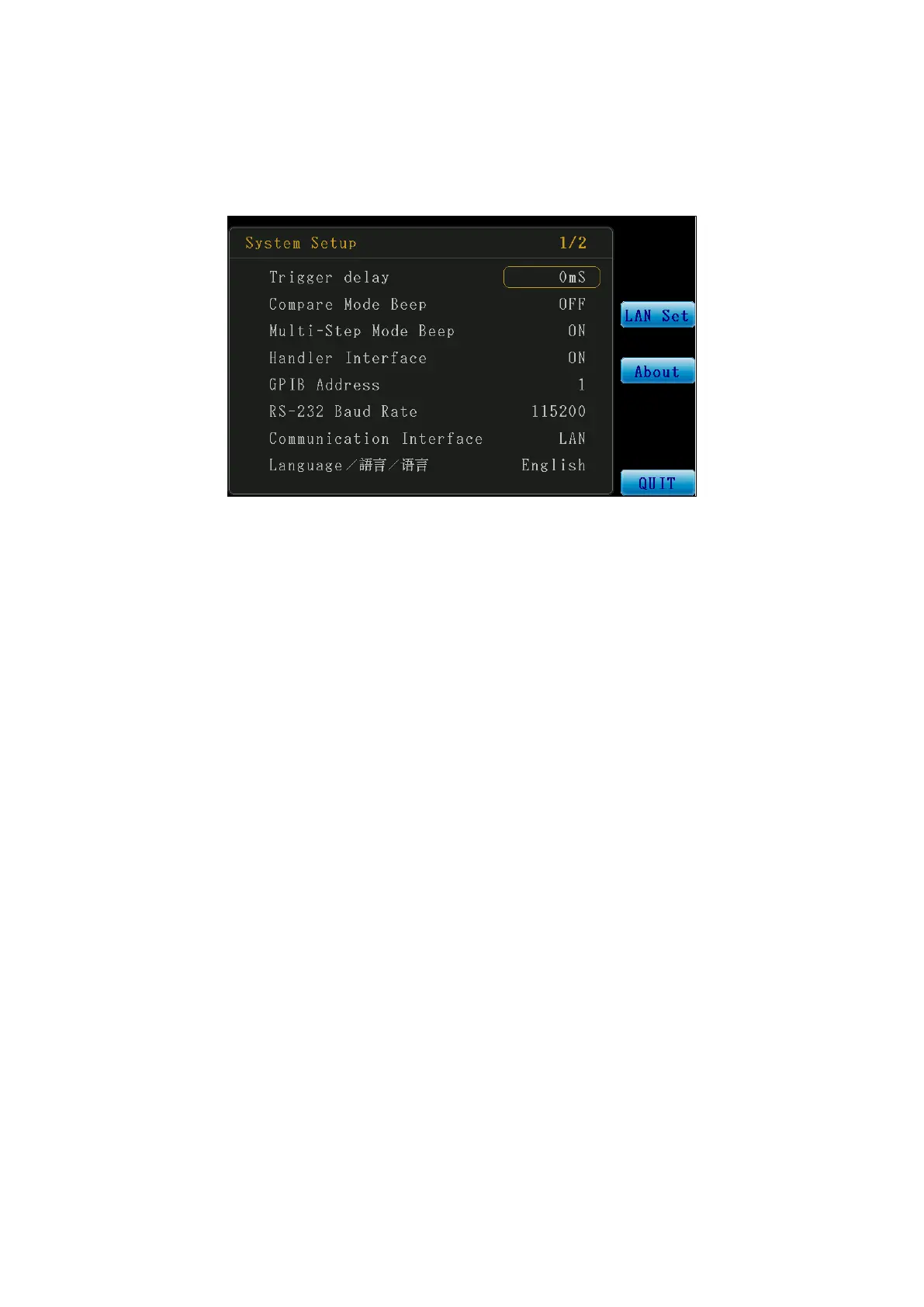
Press the Menu control key to enter the Main Menu screen, and then select SYSTEM to enter
the system setting screen.
Figure 3-2-1 System Setup Screen (1/2)
1. Trigger Delay (mS): Set the trigger delay time; the setting range is 0-5000 and the unit
is mS.
2. Compare Mode Beep: Set the time for the buzzer to prompt when the compare
function is enabled in Meter Mode. The Select function key can be used to make
selections.
a. OFF: Disable prompt.
b. NG: Prompt when any one item exceeds the setting range (FAIL).
c. OK: Prompt only when all items with compare enabled are within the setting
range (PASS).
3. Multi-Step Mode Beep: Test result prompt setting when in Multi-Step Test Mode; the
Select function key can be used to make selections.
a. ON: Enable prompt.
b. OFF: Disable prompt.
4. Handler Interface: Set Handler Interface function ON/OFF; the Select function key can
be used to make selections.
a. ON: Enable the Handler Interface function.
b. OFF: Disable the Handler Interface function.
5. GPIB Address: Set the GPIB communication address; setting range: 1-30.



 To Next Page