OM-269681 Page 8
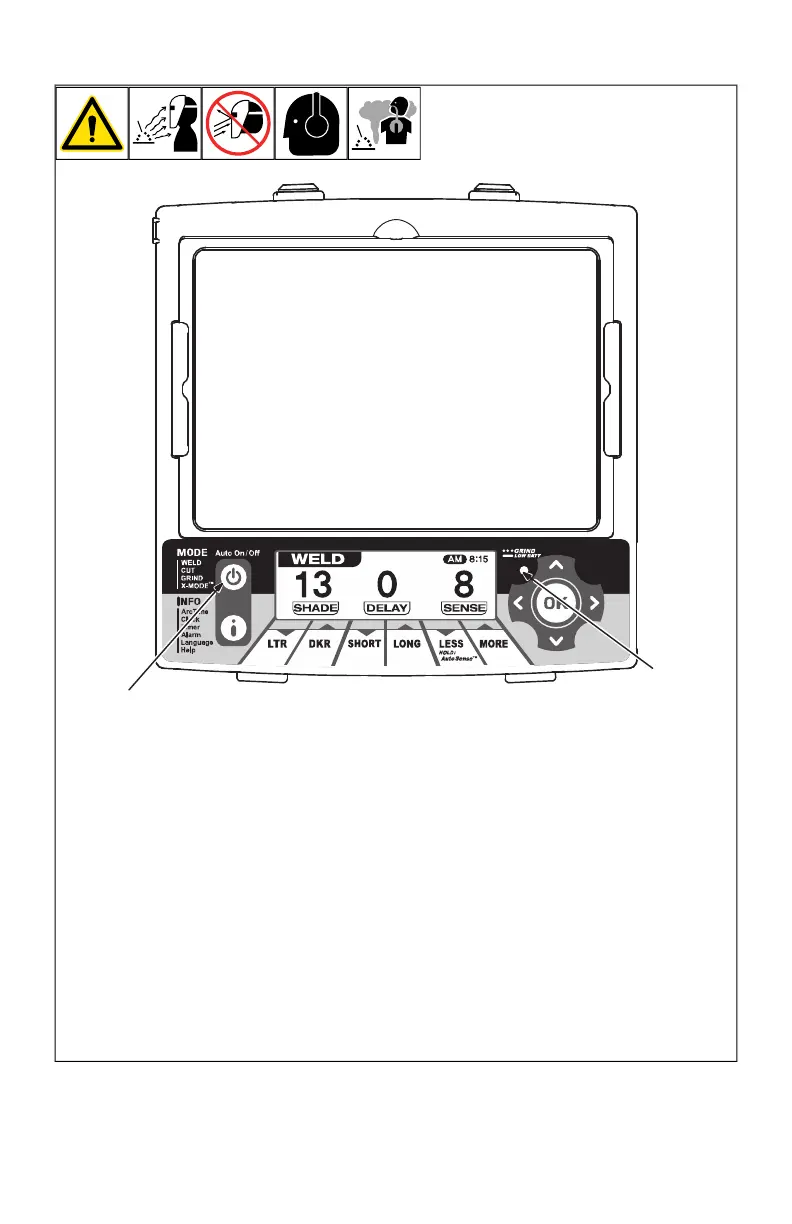
4-2. Auto On/Off (Mode) Button And Grind/Low Battery Light
OM-269681 Page 1
The auto-darkening lens
turns on (darkens) auto-
matically when welding
begins and turns off
when welding stops.
1 Auto On/Off Button
Press Auto On/Off button to
check if the lens is working
properly and to begin Mode
and Info adjustments.
When the Auto On/Off button
is pressed, the LCD control
panel will turn On.
Press and hold the Auto On/
Off button to turn the LCD
control panel Off. Lens is on
and will function properly.
After four minutes of in-
activity, the LCD control
panel will turn off auto-
matically to conserve
power. Press any button
to wake up the LCD con-
trol panel.
2 Grind/Low Battery Light
The Grind/Low Battery light
blinks when the lens is in the
Grind mode. Light stays on
when 2 3 days of battery life
remain.
If battery power is low, re-
place with CR2450 lithium
batteries (2 required Miller
Part No. 217043). See Sec-
tion NO TAG.
1
2
F
The auto-darkening lens turns on
(darkens) automatically when welding
begins and turns off when welding
stops.
1 Auto On/Off (Mode) Button
Press Auto On/Off (Mode) button to check if
the lens is working properly and to begin
Mode and Info adjustments.
When the Auto On/Off (Mode) button is
pressed, the LCD control panel will turn On.
Press and hold the Auto On/Off button to
turn the LCD control panel Off. Lens is on
and will function properly.
F
After four minutes of inactivity, the LCD
control panel will turn off automatically
to conserve power. Press any button
to wake up the LCD control panel.
2 Grind/Low Battery Light
The Grind/Low Battery light blinks when the
lens is in the Grind mode. Light stays on
when 2–3 days of battery life remain.
If battery power is low, replace with Pana-
sonic CR2450 lithium batteries (2 required,
Miller Part No. 217043). See Section 7-1.








 To Next Page