OM-269681 Page 9
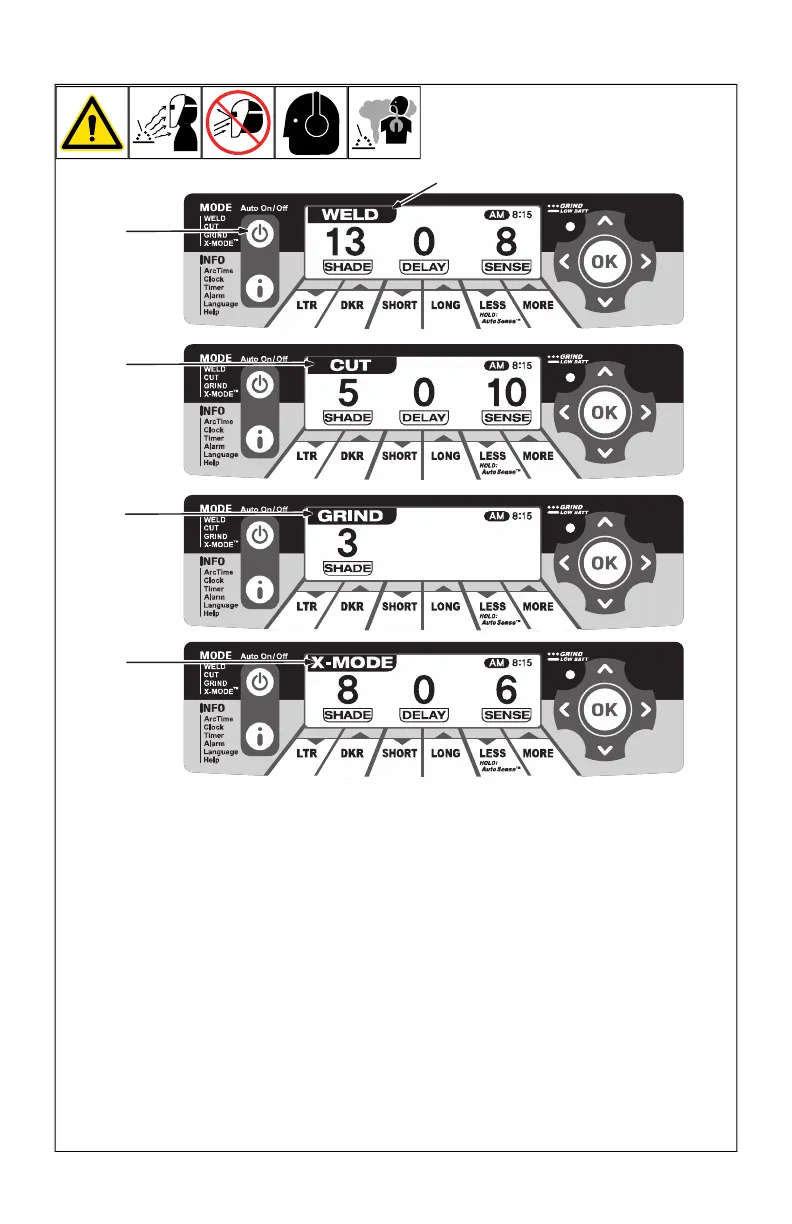
4-3. Mode Control
1 Auto On/Off (Mode) Control Button
Press Auto On/Off (Mode) button to select
the mode appropriate for the work activity.
2 Weld Mode
Used for most welding applications. In this
mode the lens turns on when it optically
senses a welding arc. Adjust shade, sensi-
tivity, and delay settings as needed.
3 Cut Mode
Used for cutting applications. In this mode
the lens turns on when it optically senses a
cutting arc. Adjust shade, sensitivity, and de-
lay settings as needed.
4 Grind Mode
Used for metal grinding applications. In this
mode the lens is fixed at shade No. 3. No
lens adjustments are possible.
5 X-Mode
Used for outdoor or low current welding ap-
plications. In this mode the lens turns on
when it senses a welding arc. Adjust shade,
sensitivity, and delay settings as needed.
F
Nearby welding may affect helmet op-
eration when lens is in X-Mode. Stay
at least 12 ft (3.7 m) away from other
welding activity.








 To Next Page