OM-269681 Page 19
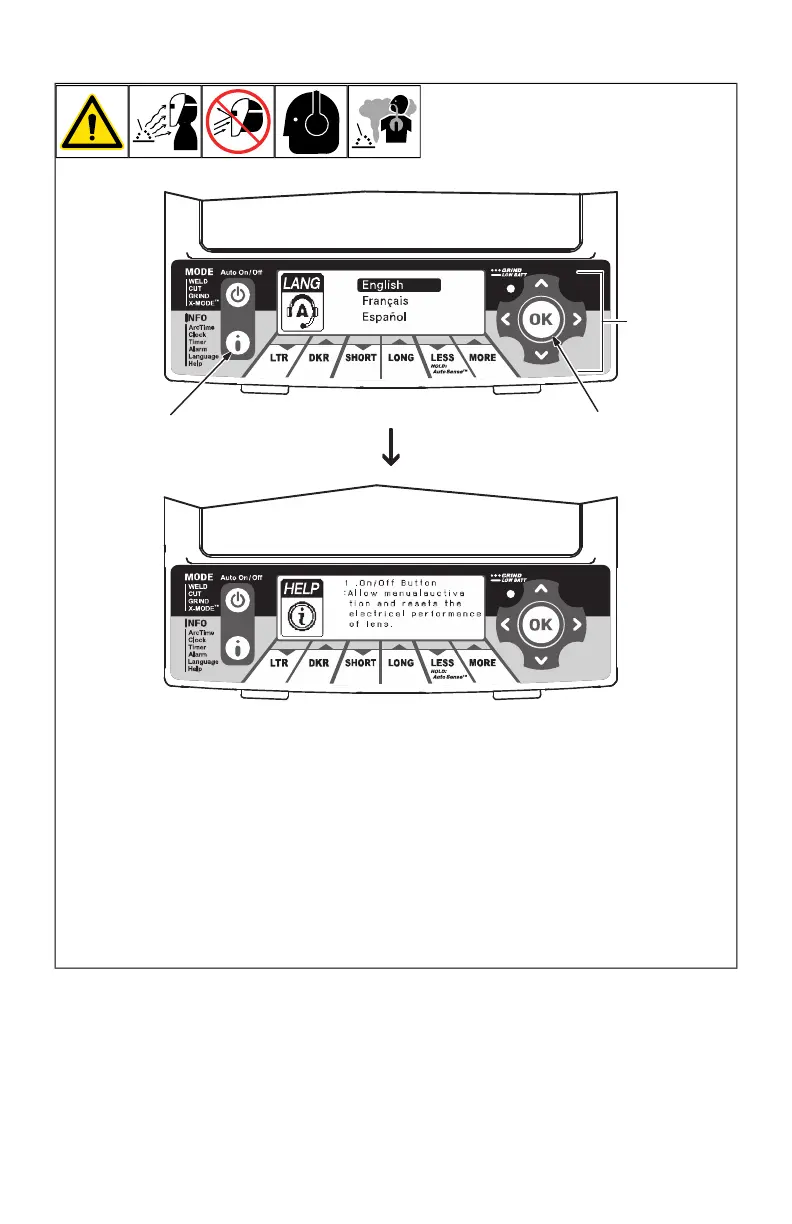
4-13. Setting Help Menu Language And Viewing Help Menu
OM-269681 Page 1
1 Info Control Button
2 Directional Buttons
3 OK Button
Press Auto On/Off but-
ton to turn helmet on.
Press Info button re-
peatedly until Language
is displayed on screen.
Use up/down arrows to
select desired lan-
guage. Press OK to
save.
Press the Info Control
button once. Help menu
will now be shown in the
desired language.
To navigate the Help
menu, use either the up/
down arrows or the left/
right arrows. To exit,
press the Auto On/Off
button.
Help menu displays ab-
breviated instructions,
modes, and notes on
proper usage. Help
menu should not be
used as a replacement
for the full manual.
1
2
3
1 Info Control Button
2 Directional Buttons
3 OK Button
l Press Auto On/Off (Mode) button to turn
helmet On.
l Use up/down buttons to select desired
language. Press OK to save.
l Press the Info button once. Help menu
will now be shown in the desired
language.
l To navigate the Help menu, use either
the up/down buttons or the left/right but-
tons. To exit, press the Auto On/Off
(Mode) button.
F
Help menu displays abbreviated in-
structions, modes, and notes on prop-
er usage. Help menu should not be
used as a replacement for the full
manual.








 To Next Page