OM-269681 Page 14
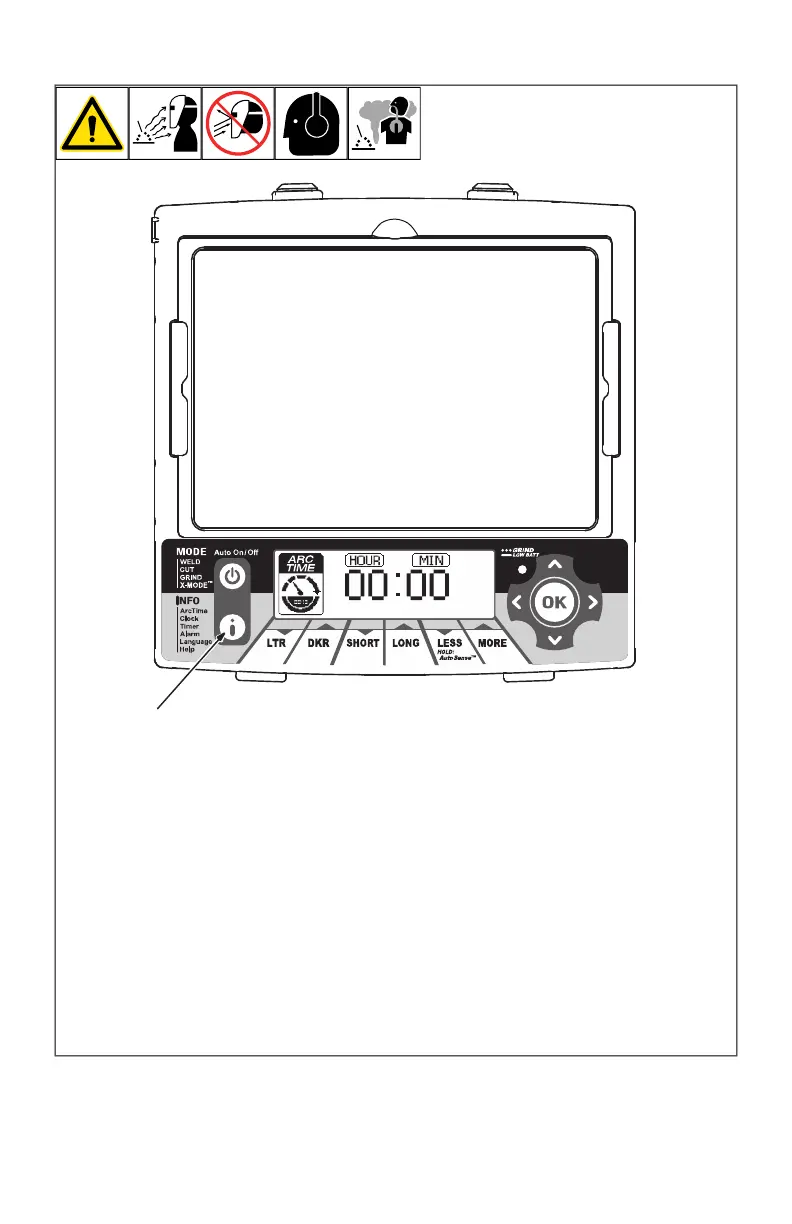
4-8. Info Control Button
OM-269681 Page 1
1 Info Control Button
Press Info Control button to
select from the following
functions:
Arc Time Records the
amount of time the lens as-
sembly is in the dark state
(exposed to arc). See Sec-
tion NO TAG to reset Arc
Time.
Clock Displays actual
time of day. See Section
NO TAG to set clock.
Timer Emits an audible
signal and flashes the
Grind mode light to alert the
operator after a specific
period of time has elapsed.
See Section NO TAG to set
timer.
Alarm Emits an audible
signal and flashes the
Grind mode light to alert the
operator at a specific time.
See Section NO TAG to set
alarm.
Language Sets lan-
guage for the Help menu.
See Section NO TAG to set
language.
Help Displays Help top-
ics. See Section NO TAG.
Lens automatically
exits the Info function
after one minute of in-
activity.
1
1 Info Control Button
Press Info Control button to select from the
following functions:
Arc Time - Records the amount of time the
lens assembly is in the dark state (exposed
to arc). See Section 4-9 to reset Arc Time.
Clock - Displays actual time of day. See
Section 4-10 to set clock.
Timer - Emits an audible signal and flashes
the Grind mode light to alert the operator
after a specific period of time has elapsed.
See Section 4-11 to set timer.
Alarm - Emits an audible signal and flashes
the Grind mode light to alert the operator at
a specific time. See Section 4-12 to set
alarm.
Language – Sets language for the Help
menu. See Section 4-13 to set language.
Help - Displays Help topics. See Section 4-
13.
F
Lens automatically exits the Info func-
tion after one minute of inactivity.








 To Next Page