OM-269681 Page 15
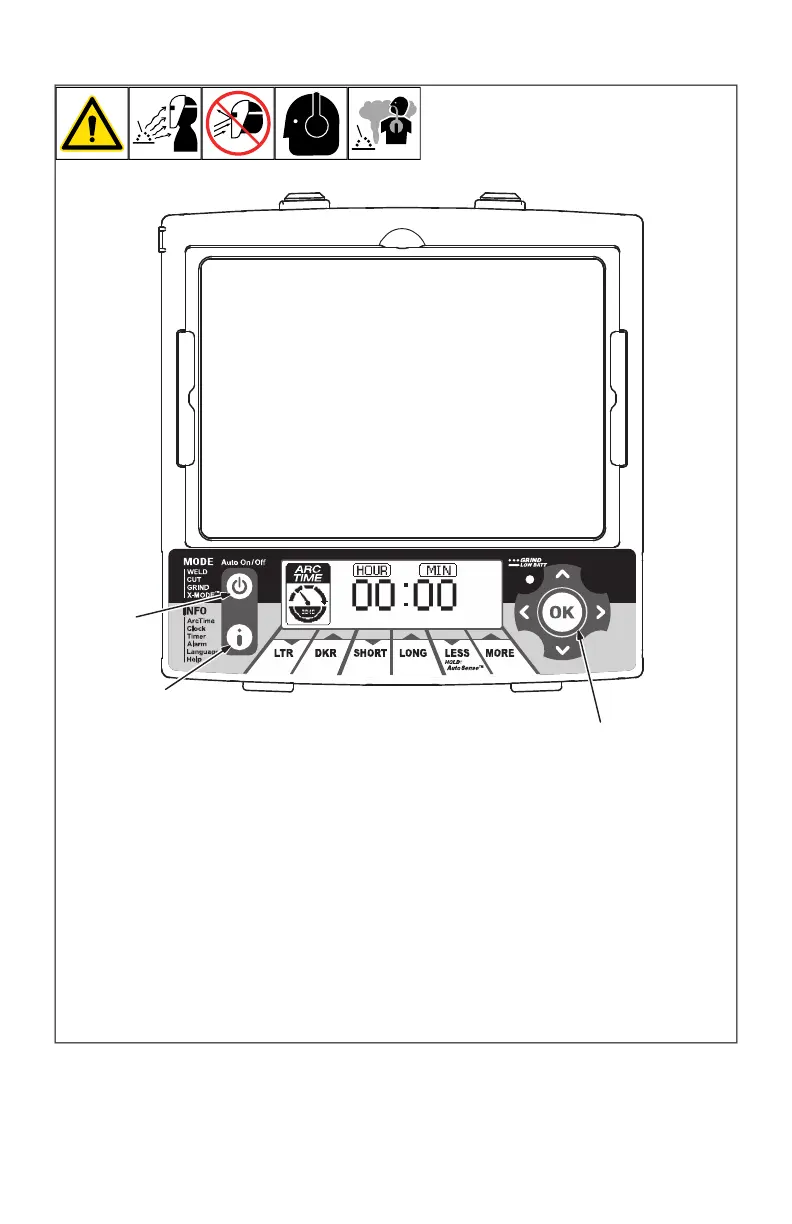
4-9. Arc Time Control
OM-269681 Page 1
The arc time function re-
cords the amount of time the
lens assembly is dark (ex-
posed to an arc).
1 Info Control Button
2 OK Button
3 Auto On/Off Button
Arc Time Procedure
Press Auto On/Off but-
ton to turn helmet On.
Press Info Control but-
ton repeatedly until Arc
Time is displayed on
screen.
Press OK button to
clear the arc time to
zero.
Press Auto On/Off but-
ton when finished.
Arc time is accumulat-
ed by the second, but
only hours and minutes
are displayed.
1
2
3
The arc time function records the amount of
time the lens assembly is dark (exposed to
an arc).
1 Info Control Button
2 OK Button
3 Auto-On/Off (Mode) Button
Arc Time Procedure
l Press Auto On/Off (Mode) button to turn
helmet On.
l Press Info button repeatedly until Arc
Time is displayed on screen.
l Press OK button to clear the arc time to
zero.
l Press Auto On/Off (Mode) button when
finished.
F
Arc time is accumulated by the second,
but only hours and minutes are
displayed.








 To Next Page