OM-269681 Page 23
SECTION 8 – INSTALLING OPTIONAL
MAGNIFYING LENS
8-1. Installing Optional Magnifying Lens
OM-269681 Page 1
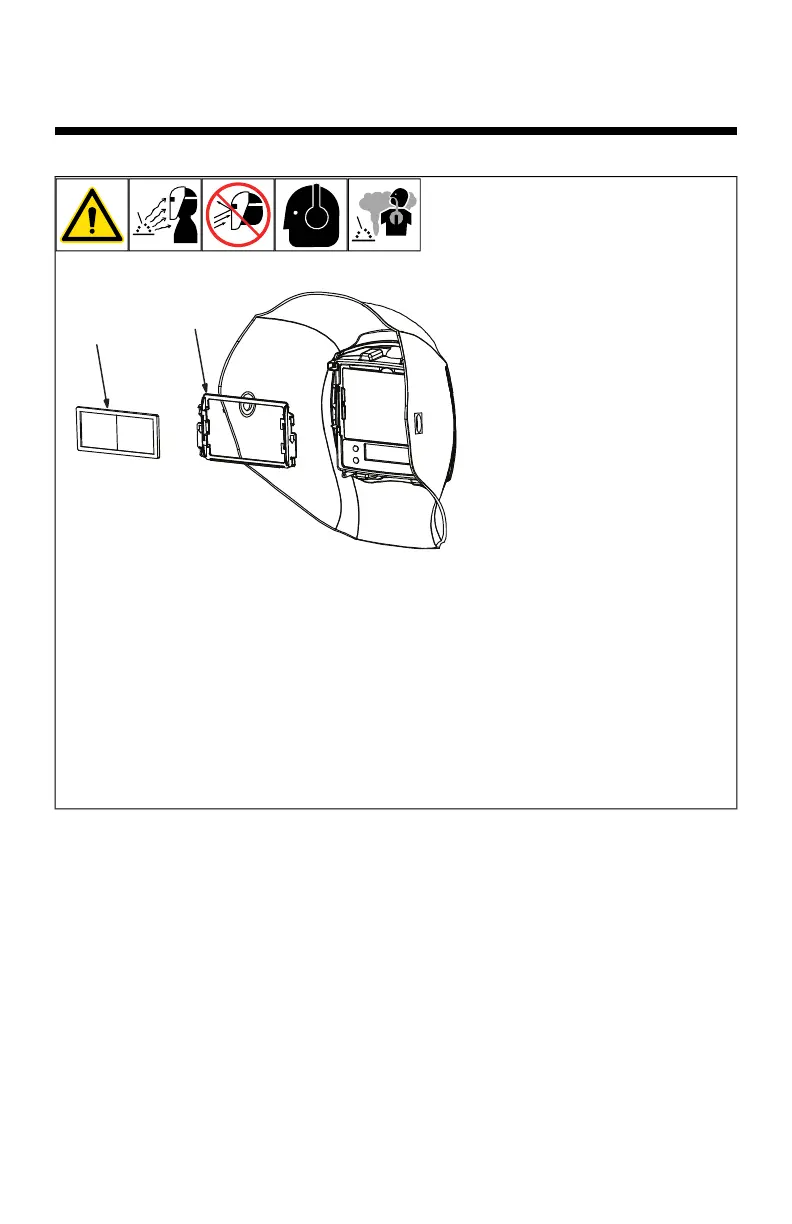
1 Optional Magnifying Lens
2 Magnifying Lens Adapter Frame
To install optional magnifying lens, a
magnifying
lens adapter frame is nec-
essary.
Install adapter by placing it to-
ward the top of the lens and
then sliding the adapter down
until it snaps into place.
Raised arrows and LOCK/UN-
LOCK text show proper direc-
tion.
Once the adapter is installed,
insert the magnifying lens in
the top and slide down to de-
sired position.
Reverse procedure to remove
magnifying lens. Lift adapter
frame out one edge at a time.
To prevent lens fogging, install flat
side of magnifying lens toward
auto-darkening lens.
804818
1
2
1 Optional Magnifying Lens
2 Magnifying Lens Adapter
Frame
To install optional magnifying
lens, a magnifying lens adapt-
er frame is necessary.
l Install adapter by placing
it toward the top of the
lens and then sliding the
adapter down until it
snaps into place.
l Raised arrows and Lock/
Unlock text show proper
direction.
l After the adapter is in-
stalled, insert the magni-
fying lens in the top and
slide down to desired
position.
l Reverse procedure to re-
move magnifying lens.
Lift adapter frame out one
edge at a time.
F
To prevent lens fogging,
install flat side of magni-
fying lens toward auto-
darkening lens.










 To Next Page