OM-269681 Page 16
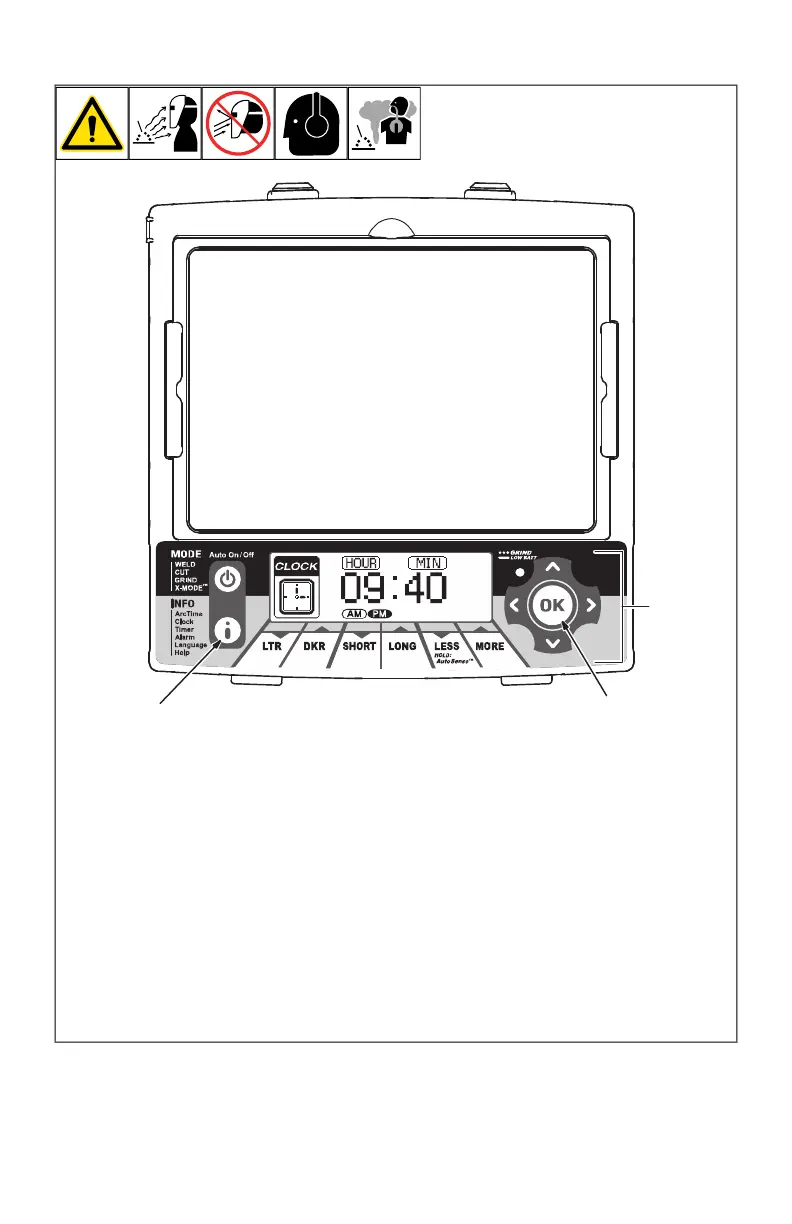
4-10. Clock Control
OM-269681 Page 1
1
The clock displays the actual
time of day.
1 Info Control Button
2 Directional Buttons
3 OK Button
Clock Procedure
Press Auto On/Off but-
ton to turn helmet On.
Press Info button re-
peatedly until Clock is
displayed on screen.
Use left/right arrows to
select hour or minute for
adjustment.
Adjust the hours to
change between a.m.
and p.m.
Use up/down arrows to
adjust to proper time.
Press OK to save.
Press Auto On/Off but-
ton when finished.
2
3
The clock displays the actual time of day.
1 Info Control Button
2 Navigational Buttons (Left, Right, Up,
Down)
3 OK Button
Clock Procedure
l Press Auto On/Off (Mode) button to turn
helmet On.
l Press Info button repeatedly until Clock
is displayed on screen.
l Use left/right buttons to select hour or
minute for adjustment.
F
Adjust the hours to change between
a.m. and p.m.
l Use up/down buttons to adjust to proper
time.
l Press OK to save.
l Press Auto On/Off (Mode) button when
finished.








 To Next Page