OM-269681 Page 22
SECTION 7 – REPLACING THE BATTERIES
7-1. Replacing The Batteries
OM-269681 Page 1
1
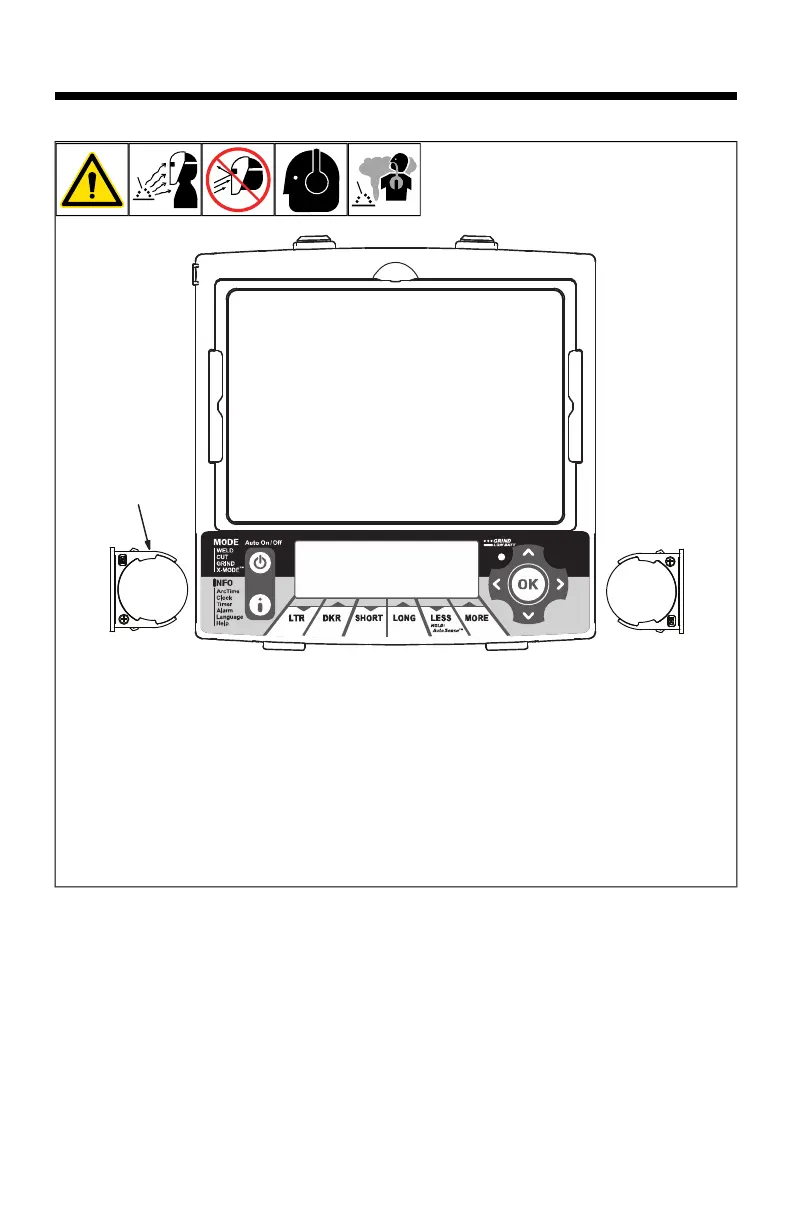
To replace the batteries, re-
move the auto-darkening lens
assembly (see Section
NO TAG).
1 Battery Tray
After removing the lens as-
sembly, slide the battery
holding trays out and re-
move the old batteries.
Replace with Panasonic
CR2450 lithium type batter-
ies (2 required) or equivalent
(Miller Part No. 217043).
Be sure Positive (+)
side of the battery faces
up (toward inside of
helmet).
Reinstall the battery trays.
To test battery, press the
Auto On/Off button. The dis-
play screen should turn On.
Reinstall the lens assembly.
+
+
To replace the batteries, remove the auto-
darkening lens assembly (see Section 6-1).
1 Battery Tray
After removing the lens assembly, slide the
battery holding trays out and remove the old
batteries.
Replace with Panasonic CR2450 lithium
batteries (2 required, Miller Part No.
217043).
F
Be sure Positive (+) side of the battery
faces up (toward inside of helmet).
Reinstall the battery trays. To test battery,
press the Auto On/Off button. The display
screen should turn On. Reinstall the lens
assembly.








 To Next Page