OM-269681 Page 17
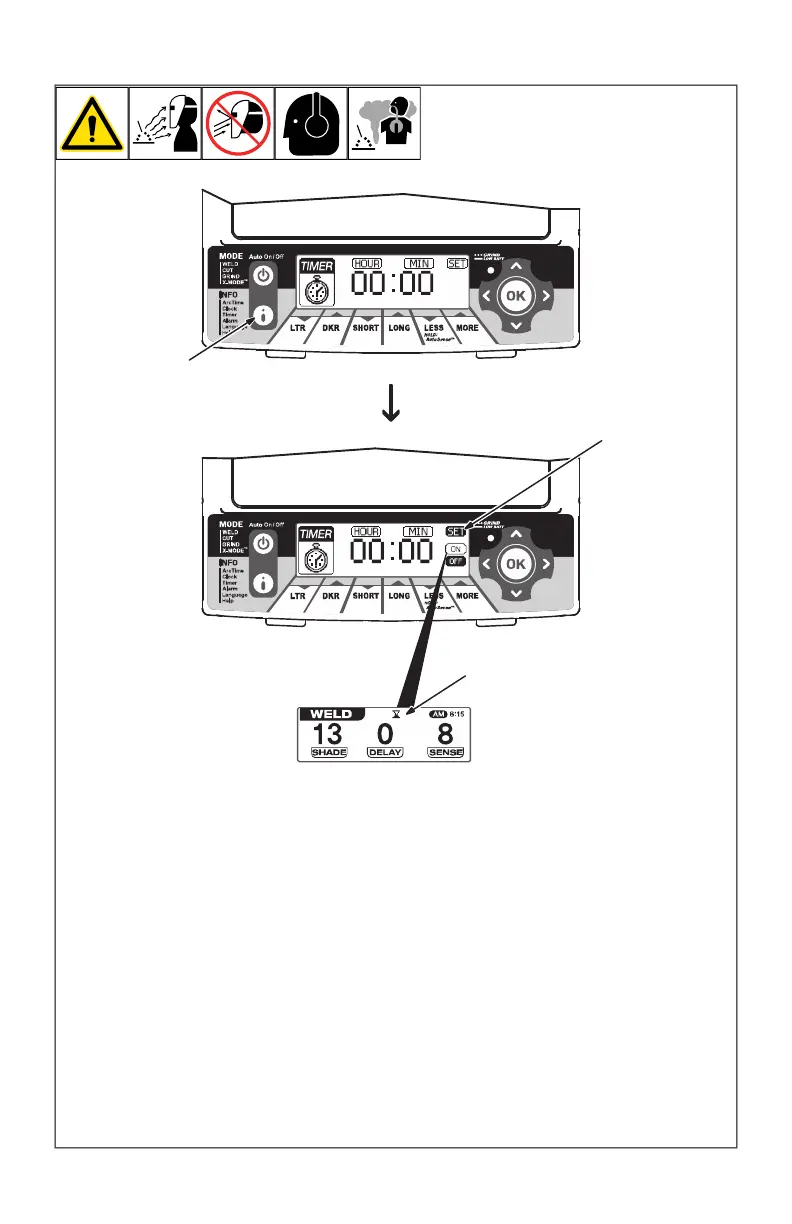
4-11. Timer Control
OM-269681 Page 1
The Timer emits an audible
signal and flashes the Grind
mode light to alert the operat-
or after a specific period of
time has elapsed.
1 Info Control Button
Timer Procedure
Press Auto On/Off but-
ton to turn helmet On.
Press Info Control but-
ton repeatedly until
Timer is displayed on
screen.
Use left/right arrows to
select hour or minute for
adjustment.
Use up/down arrows to
adjust to desired time.
2 Set Selection
3 Timer On Indicator
Use left/right arrows to
select Set. Use up/down
arrows to turn timer On/
Off.
Times can be saved for
future use, but the timer
must be turned on to be
active.
Press the OK button to
save, or press the Auto
On/Off button to exit.
Press any lens button to
turn off alarm.
1
2
3
The Timer emits an audible signal and
flashes the Grind mode light to alert the op-
erator after a specific period of time has
elapsed.
1 Info Control Button
Timer Procedure
l Press Auto On/Off (Mode) button to turn
helmet On.
l Press Info button repeatedly until Timer
is displayed on screen.
l Use left/right buttons to select hour or
minute for adjustment.
l Use up/down buttons to adjust to de-
sired time.
2 Set Selection
3 Timer On Indicator
l Use left/right buttons to select Set. Use
up/down buttons to turn timer On/Off.
F
Times can be saved for future use, but
the timer must be turned on to be
active.
l Press the OK button to save, or press
the Auto On/Off (Mode) button to exit
F
Press any lens button to turn off alarm.








 To Next Page